
KnowledgeMap
A bookmark management tool that combines mind map (jsmind) and richtext editor (lexical).
As of May 2026, KnowledgeMap has 36 users and a 5.00/5 rating from 2 reviews in the Productivity category.
Usersdown 2.7 percent−2.7%
36
36
Ratingno change0%
5.00
2 reviews
Reviewsno change0%
2
Version
1.1.6
Manifest V3
History
5 snapshotsTracking since Apr 1, 2026.
View as table
| Date | Users | Rating | Reviews | Version |
|---|---|---|---|---|
| Apr 1, 2026 | 37 | 5.00 | 2 | 1.1.6 |
| Apr 21, 2026 | 35 | 5.00 | 2 | 1.1.6 |
| May 6, 2026 | 36 | 5.00 | 2 | 1.1.6 |
| May 17, 2026 | 30 | 5.00 | 2 | 1.1.6 |
| May 31, 2026 | 33 | 5.00 | 2 | 1.1.6 |
| Now | 36 | 5.00 | 2 | 1.1.6 |
Permissions & access
- Permissions
- alarmscontextMenusdebuggertabsstorageunlimitedStoragebookmarks
- Host access
- None declared
Screenshots


About
## Overview
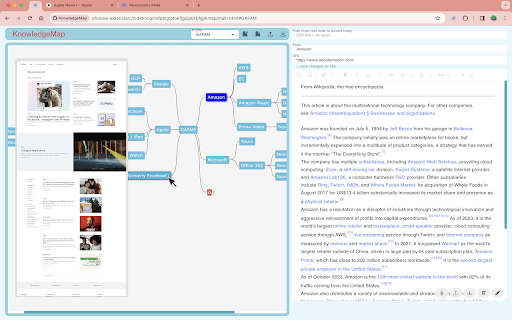
This app displays a hierarchy of bookmarks as a mind map and allows you to save notes at each node of the mind map.

## Features
* You can create multiple mind maps as profiles
* You can save notes in rich text format (images, tables, etc.) for each node of the mind map
* If you save a full screen capture from the context menu, the image will be displayed as a preview when you hover over the node of the mind map
* export/import each profile (Note: exclude preview images)
    * Import bookmarks from browser (supports Chrome / Microsoft Edge)
    * Import exported file

## Shortcut Keys
### Extension Launch
* Ctrl+K (Mac: Command+K): Open extension popup

### Mind Map Node Operations
* Enter: Add sibling node
* Ctrl+Enter (Insert): Add child node
* Shift+Ctrl+Enter: Bulk add nodes
* F2: Edit node topic
* Delete / Backspace: Delete node (move to trash)
* Ctrl+C / Alt+C: Copy node key
* Space: Expand/collapse node

### Node Selection & Movement
* Arrow keys (↑↓←→): Select nearest node in that direction
* Shift+Arrow keys: Move selected node in that direction
* Ctrl+R / Alt+R: Select root node

### Link & URL Operations
* Shift+Enter: Open node URL in browser
* Enter #{profile}-{nodekey} format in URL field to navigate to specified node in other profiles

### Profile Switching
* Ctrl+P / Alt+P: Switch to next profile
* Shift+Ctrl+P / Shift+Alt+P: Switch to previous profile

### Theme Change
* Ctrl+T / Alt+T: Change to next theme
* Shift+Ctrl+T / Shift+Alt+T: Change to previous theme

### Zoom Operations
* Ctrl+I / Alt+I: Zoom in
* Ctrl+O / Alt+O: Zoom out

## Usage
(Mind map operations)
* Drag and Drop: Move a node's position
* Double click: Edit a node topic
* If you delete the trash node, all the nodes under it will be completely deleted

(others)
* Press the edit button at the bottom right of the screen, edit a note, then press the save button to save the note
* After changing the URL field while the node is selected, the changed URL is saved when the focus is off
* Cross-profile navigation: Copy node key with Ctrl+C/Alt+C and paste it into another node's URL field to create links across profiles
* Click on the “Capture Full Page for Preview” context menu on the opened page to save the preview image
    * Since this app use Chrome debugger function, “KnowledgeMap started debugging this browser" is displayed. (automatically turns off after a few seconds)
Technical
- Version
- 1.1.6
- Manifest
- V3
- Size
- 4.23MiB
- Min Chrome
- 88
- Languages
- 2
- Featured
- No
Metadata
- ID
- lllooecllhclgioajjfakhgdchncgpjh
- Developer ID
- ub3522877a12086da03ebb6a8ef2b8aa9
- Developer Email
- [email protected]
- Created
- Feb 15, 2024
- Last Updated (Store)
- Jun 27, 2025
- Last Scraped
- May 31, 2026
- Website
- —
- Support URL
- —
- Privacy Policy
- —
Similar extensions
Alternatives to KnowledgeMap, ranked by description similarity.

Simple Mind Map
Open an editable minimal mind map from the toolbar icon or context menu.
28
★ 5.0

MindMap Clipper
Capture concepts and context from the web directly to Notion.
5
★ 5.0

Mind Map Maker
Create and share lightweight mind maps directly in your browser—offline, private, and exportable.
66

LazyBookmark
Live grep through bookmarks with LazySth like interface using leader key
2

tabMind - AI smart tree style tabs
Organize & visualize tabs, bookmarks in a smart AI-driven hierarchy. Organize tabs in tree based on its content not just who open it
288
★ 5.0

Bookmark +
A premium bookmark manager with nested folders, smart tags, instant search, and optional cloud sync.
1

Bookmark++
A local-first bookmark manager like Pocket, with optional cloud sync
9

MindPane
Turn any web page into a mind map with clean, distraction-free reading mode
10.0K
★ 4.6
Data sourced from the Chrome Web Store · last verified May 31, 2026.