
YouTube Agent - Transcript Fetch&Term Explain
Follow YouTube videos with transcript viewing, transcript downloads, and term explanations for technical or financial content.
As of June 2026, YouTube Agent - Transcript Fetch&Term Explain has 12 users and a 5.00/5 rating from 3 reviews in the Education category.
Usersup 500.0 percent+500.0%
12
12
Ratingno change0%
5.00
3 reviews
Reviewsno change0%
3
Version
1.2.1
Manifest V3
90-day change · In the last 90 days this extension 2 version updates, changed permissions.
History
7 snapshotsTracking since Apr 1, 2026.
View as table
| Date | Users | Rating | Reviews | Version |
|---|---|---|---|---|
| Apr 1, 2026 | 2 | — | — | 1.0.0 |
| Apr 17, 2026 | 2 | — | — | 1.0.0 |
| May 8, 2026 | 9 | 5.00 | 2 | 1.2.0 |
| May 12, 2026 | 14 | 5.00 | 2 | 1.2.0 |
| May 18, 2026 | 11 | 5.00 | 3 | 1.2.0 |
| May 31, 2026 | 12 | 5.00 | 3 | 1.2.1 |
| Jun 6, 2026 | 9 | 5.00 | 3 | 1.2.1 |
| Now | 12 | 5.00 | 3 | 1.2.1 |
Changelog
- May 18, 2026short_description
Follow YouTube videos with transcript viewing, transcript downloads, and short explanations for technical or financial terms.
Follow YouTube videos with transcript viewing, transcript downloads, and term explanations for technical or financial content.
- Apr 17, 2026description
YouTube Agent is a learning companion for YouTube. While you watch any video, it reads the transcript, finds the technical or financial terms being discussed, and shows short definitions in a floating panel — so you never have to pause, open a new tab, or lose your place to look something up.

HOW IT WORKS

When you open a YouTube video, the extension automatically fetches the transcript, scans it for recognised terms (such as CapEx, EBITDA, API, Kubernetes, Free Cash Flow), and displays definitions in a small side panel. Each definition includes clickable timestamps so you can jump directly to every moment in the video where that term is mentioned.

KEY FEATURES

• Automatic term detection — no manual highlighting needed; the panel updates as soon as the transcript loads.

• Clickable timestamps — click any time marker next to a term to jump straight to that moment in the video.

• Draggable floating panel — reposition the panel anywhere on screen; collapse it to a slim header bar when you want it out of the way.

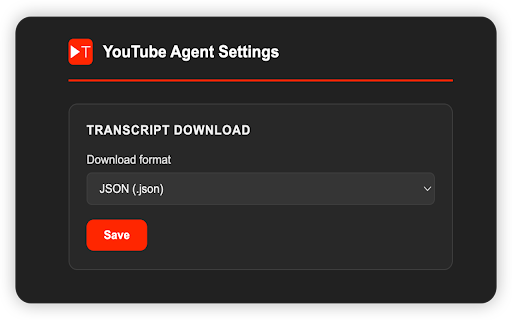
• Download the transcript — save the video transcript as SRT, VTT, plain text, or JSON with a single click. Perfect for note-taking, AI tools, accessibility, or video editing.

• Download format settings — choose your preferred transcript format once in the Settings page; your choice is remembered across sessions.

• Suggest missing terms — spotted a term that should have a definition? Submit it with one click straight from the panel.

• Refresh on demand — transcript or term list not loading? Hit the refresh button to re-fetch without reloading the page.

• Works without a backend — a bundled glossary covers common finance and tech terms out of the box, with no account required.

PERFECT FOR
• Students watching lectures or technical tutorials
• Investors and analysts watching earnings calls or financial commentary
• Developers watching conference talks or architecture walkthroughs
• Anyone learning a new field through YouTube

PRIVACY
YouTube Agent does not collect, transmit, or sell any personal data. The extension reads publicly available YouTube transcripts in your browser to perform local term matching. No browsing history, watch history, or personal information ever leaves your device. An optional remote glossary feature (disabled by default) sends the video transcript to a server you configure; it is never enabled without explicit setup.

PERMISSIONS USED
• Storage — to remember your collapsed/open panel state and your preferred download format.
• Access to youtube.com — to read transcripts from the YouTube page you are already on.
YouTube Agent is a learning companion for YouTube. While you watch any video, it reads the transcript, finds the technical or financial terms being discussed, and shows short definitions in a floating panel — so you never have to pause, open a new tab, or lose your place to look something up.

HOW IT WORKS

When you open a YouTube video, the extension automatically fetches the transcript, scans it for recognised terms (such as CapEx, EBITDA, API, Kubernetes, Free Cash Flow), and displays definitions in a small side panel. Each definition includes clickable timestamps so you can jump directly to every moment in the video where that term is mentioned.

KEY FEATURES

• Automatic term detection — no manual highlighting needed; the panel updates as soon as the transcript loads. (Note not every video has terms worth explaining, in this case, it would just display no glossary. This is normal).
• Clickable timestamps — click any time marker next to a term to jump straight to that moment in the video.
• Draggable floating panel — reposition the panel anywhere on screen; collapse it to a slim header bar when you want it out of the way.
• Download the transcript — save the video transcript as SRT, VTT, plain text, or JSON with a single click. Perfect for note-taking, AI tools, accessibility, or video editing.
• Download format settings — choose your preferred transcript format once in the Settings page; your choice is remembered across sessions.
• Suggest missing terms — spotted a term that should have a definition? Submit it with one click straight from the panel.
• Refresh on demand — transcript or term list not loading? Hit the refresh button to re-fetch without reloading the page.
• Works without a backend — a bundled glossary covers common finance and tech terms out of the box, with no account required.

PERFECT FOR
• Students watching lectures or technical tutorials
• Investors and analysts watching earnings calls or financial commentary
• Developers watching conference talks or architecture walkthroughs
• Anyone learning a new field through YouTube

PRIVACY
YouTube Agent does not collect, transmit, or sell any personal data. The extension reads publicly available YouTube transcripts in your browser to perform local term matching. No browsing history, watch history, or personal information ever leaves your device. An optional remote glossary feature (disabled by default) sends the video transcript to a server you configure; it is never enabled without explicit setup.

PERMISSIONS USED
• Storage — to remember your collapsed/open panel state and your preferred download format.
• Access to youtube.com — to read transcripts from the YouTube page you are already on.
- Apr 17, 2026short_description
YouTube Agent is a tool that helps you understand YouTube videos by providing short explanations of technical or financial terms.
Follow YouTube videos with transcript viewing, transcript downloads, and short explanations for technical or financial terms.
- Apr 17, 2026name
YouTube Agent
YouTube Agent - Transcript Fetch&Term Explain
- Apr 17, 2026host_permissions
https://www.youtube.com/*, https://*.googlevideo.com/*, https://www.pandarecord.com/*, http://127.0.0.1:8090/*
https://*.googlevideo.com/*, https://www.pandarecord.com/*, http://127.0.0.1:8090/*, http://localhost:8090/*
- Apr 17, 2026permissions
storage
storage, tabs, scripting
Permissions & access
- Permissions
- storagetabsscripting
- Host access
- https://*.googlevideo.com/*, https://www.pandarecord.com/*, http://127.0.0.1:8090/*, http://localhost:8090/*
Screenshots


About
YouTube Agent is a learning companion for YouTube. While you watch any video, it reads the transcript, finds the technical or financial terms being discussed, and shows short definitions in a floating panel — so you never have to pause, open a new tab, or lose your place to look something up.

HOW IT WORKS

When you open a YouTube video, the extension automatically fetches the transcript, scans it for recognised terms (such as CapEx, EBITDA, API, Kubernetes, Free Cash Flow), and displays definitions in a small side panel. Each definition includes clickable timestamps so you can jump directly to every moment in the video where that term is mentioned.

KEY FEATURES

• Automatic term detection — no manual highlighting needed; the panel updates as soon as the transcript loads. (Note not every video has terms worth explaining, in this case, it would just display no glossary. This is normal).
• Clickable timestamps — click any time marker next to a term to jump straight to that moment in the video.
• Draggable floating panel — reposition the panel anywhere on screen; collapse it to a slim header bar when you want it out of the way.
• Download the transcript — save the video transcript as SRT, VTT, plain text, or JSON with a single click. Perfect for note-taking, AI tools, accessibility, or video editing.
• Download format settings — choose your preferred transcript format once in the Settings page; your choice is remembered across sessions.
• Suggest missing terms — spotted a term that should have a definition? Submit it with one click straight from the panel.
• Refresh on demand — transcript or term list not loading? Hit the refresh button to re-fetch without reloading the page.
• Works without a backend — a bundled glossary covers common finance and tech terms out of the box, with no account required.

PERFECT FOR
• Students watching lectures or technical tutorials
• Investors and analysts watching earnings calls or financial commentary
• Developers watching conference talks or architecture walkthroughs
• Anyone learning a new field through YouTube

PRIVACY
YouTube Agent does not collect, transmit, or sell any personal data. The extension reads publicly available YouTube transcripts in your browser to perform local term matching. No browsing history, watch history, or personal information ever leaves your device. An optional remote glossary feature (disabled by default) sends the video transcript to a server you configure; it is never enabled without explicit setup.

PERMISSIONS USED
• Storage — to remember your collapsed/open panel state and your preferred download format.
• Access to youtube.com — to read transcripts from the YouTube page you are already on.
Technical
- Version
- 1.2.1
- Manifest
- V3
- Size
- 34.41KiB
- Min Chrome
- 88
- Languages
- 1
- Featured
- No
Metadata
- ID
- llidgfaegnckghcchhoknkaglkdklpck
- Developer ID
- ub16b769294e512f5055505767f723d22
- Developer Email
- [email protected]
- Created
- Mar 30, 2026
- Last Updated (Store)
- May 14, 2026
- Last Scraped
- Jun 6, 2026
- Website
- pandarecord.com
- Support URL
- https://www.pandarecord.com/
- Privacy Policy
- https://www.pandarecord.com/privacy
Data sourced from the Chrome Web Store · last verified Jun 6, 2026.