
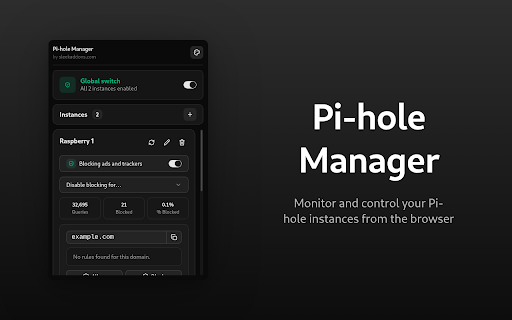
Pi-hole Manager
Monitor and control your Pi-hole instances from the browser
As of June 2026, Pi-hole Manager has 23 users in the Productivity category.
Usersdown 37.8 percent−37.8%
23
23
Ratingno change0%
—
— reviews
Reviewsno change0%
—
Version
1.0.9
Manifest V3
90-day change · In the last 90 days this extension 2 version updates.
History
11 snapshotsTracking since Apr 3, 2026.
View as table
| Date | Users | Rating | Reviews | Version |
|---|---|---|---|---|
| Apr 3, 2026 | 37 | — | — | 1.0.7 |
| Apr 17, 2026 | 41 | — | — | 1.0.7 |
| Apr 23, 2026 | 47 | — | — | 1.0.7 |
| Apr 27, 2026 | 40 | — | — | 1.0.7 |
| May 5, 2026 | 39 | — | — | 1.0.7 |
| May 10, 2026 | 27 | — | — | 1.0.7 |
| May 16, 2026 | 23 | — | — | 1.0.8 |
| May 22, 2026 | 25 | — | — | 1.0.9 |
| May 29, 2026 | 22 | — | — | 1.0.9 |
| Jun 5, 2026 | 23 | — | — | 1.0.9 |
| Jun 11, 2026 | 24 | — | — | 1.0.9 |
| Now | 23 | — | — | 1.0.9 |
Changelog
- May 10, 2026description
Monitor and control your Pi-hole 6+ instances directly from the browser. View stats, toggle blocking, and manage your allow and deny lists without opening the Pi-hole dashboard.

How it works

Add your Pi-hole servers by entering their URL and API password. The extension stores your credentials in local browser storage and connects to each instance. Open the popup to see stats and controls for all your servers at a glance.

Features

- Connect to one or more Pi-hole 6+ instances with URL and API password
- View total queries, blocked queries, block percentage, blocklist domains, and active clients
- Enable or disable blocking with a single toggle
- Temporarily disable blocking for 10 seconds, 30 seconds, 5 minutes, or indefinitely with a live countdown
- Check the current site against your allow list, deny list, or gravity blocklist
- Add or remove the current site from the allow or deny list with one click
- Each instance gets its own status card with independent stats and controls
- Auto refresh after a temporary disable timer expires

Who is this for

Pi-hole users who want quick access to their blocking controls without opening a separate dashboard. Useful when you need to temporarily disable blocking for a site or check if a domain is on your lists.

Why install it

Lightweight popup with no background processes. No data collection, everything stays on your device.
Monitor and control your Pi-hole 6+ instances directly from the browser. View stats, toggle blocking, and manage your allow and deny lists without opening the Pi-hole dashboard.

How it works

Add your Pi-hole servers by entering their URL and API password. The extension stores your credentials in local browser storage and connects to each instance. Open the popup to see stats and controls for all your servers at a glance.

Features

- Connect to one or more Pi-hole 6+ instances with URL and API password
- View total queries, blocked queries, block percentage, blocklist domains, and active clients
- Enable or disable blocking with a single toggle
- Temporarily disable blocking for 10 seconds, 30 seconds, 5 minutes, or indefinitely with a live countdown
- Check the current site against your allow list, deny list, or gravity blocklist
- Add or remove the current site from the allow or deny list with one click
- Each instance gets its own status card with independent stats and controls
- Auto refresh after a temporary disable timer expires

Who is this for

Pi-hole users who want quick access to their blocking controls without opening a separate dashboard. Useful when you need to temporarily disable blocking for a site or check if a domain is on your lists.

Why install it

Lightweight popup with no background processes. No data collection, everything stays on your device.

Open Source Software

This extension is fully open source. The complete source code is publicly available on GitHub, so you can review exactly how it works, verify that your data stays private, audit it for security, or build it yourself from source.

Source code: https://github.com/SleekAddons/browser-extensions

Contributions, bug reports, and feature requests are welcome!
Permissions & access
- Permissions
- activeTabstorage
- Host access
- https://*/*, http://*/*
Screenshots
About
Monitor and control your Pi-hole 6+ instances directly from the browser. View stats, toggle blocking, and manage your allow and deny lists without opening the Pi-hole dashboard.

How it works

Add your Pi-hole servers by entering their URL and API password. The extension stores your credentials in local browser storage and connects to each instance. Open the popup to see stats and controls for all your servers at a glance.

Features

- Connect to one or more Pi-hole 6+ instances with URL and API password
- View total queries, blocked queries, block percentage, blocklist domains, and active clients
- Enable or disable blocking with a single toggle
- Temporarily disable blocking for 10 seconds, 30 seconds, 5 minutes, or indefinitely with a live countdown
- Check the current site against your allow list, deny list, or gravity blocklist
- Add or remove the current site from the allow or deny list with one click
- Each instance gets its own status card with independent stats and controls
- Auto refresh after a temporary disable timer expires

Who is this for

Pi-hole users who want quick access to their blocking controls without opening a separate dashboard. Useful when you need to temporarily disable blocking for a site or check if a domain is on your lists.

Why install it

Lightweight popup with no background processes. No data collection, everything stays on your device.

Open Source Software

This extension is fully open source. The complete source code is publicly available on GitHub, so you can review exactly how it works, verify that your data stays private, audit it for security, or build it yourself from source.

Source code: https://github.com/SleekAddons/browser-extensions

Contributions, bug reports, and feature requests are welcome!
Technical
- Version
- 1.0.9
- Manifest
- V3
- Size
- 172KiB
- Min Chrome
- 88
- Languages
- 1
- Featured
- No
Metadata
- ID
- lknjhhcjbaahogmgnjfbkdpkenebfcjb
- Developer ID
- uf378cdc39026e310af78b6db34650aae
- Developer Email
- [email protected]
- Created
- Feb 25, 2026
- Last Updated (Store)
- May 11, 2026
- Last Scraped
- Jun 11, 2026
- Website
- sleekaddons.com
- Support URL
- —
- Privacy Policy
- https://sleekaddons.com/privacy
Similar extensions
Alternatives to Pi-hole Manager, ranked by description similarity.

Blocky Switch
Enable or disable blocking on a Blocky server
5

Popup Blocker (Lite)
A fast, easy and secure way to block all unwanted popups and pop-unders!
3.0K
★ 3.9

Smart Site Blocker
Block any websites you choose.
—

Site Blacklist
Block or unblock specific domains with a single click.
210
★ 3.0

Popup Tab Blocker
Instantly blocks new tabs and popups opened by selected sites
195
★ 5.0

ProAdBlock - Fast & Privacy-Friendly Ad Blocker
Block ads, trackers, and popups for a faster, cleaner, and safer browsing experience
56
★ 5.0

Pest Blocker
Blocks selected domains at network layer and prevents surprise popups/new tabs.
2

Popup Blocker - block pop up requests
Block annoying popup requests from any website and enjoy fast browsing!
10.0K
★ 3.7
Data sourced from the Chrome Web Store · last verified Jun 11, 2026.