
Sales.Rocks
Find company and contact data while browsing the Internet.
As of May 2026, Sales.Rocks has 856 users and a 5.00/5 rating from 8 reviews in the Productivity category.
Usersdown 3.5 percent−3.5%
856
856
Ratingno change0%
5.00
8 reviews
Reviewsdown 11.1 percent−11.1%
8
Version
1.0.9
Manifest V3
History
2 snapshotsTracking since Apr 24, 2026.
View as table
| Date | Users | Rating | Reviews | Version |
|---|---|---|---|---|
| Apr 24, 2026 | 887 | 5.00 | 9 | 1.0.9 |
| May 19, 2026 | 878 | 5.00 | 8 | 1.0.9 |
| Now | 856 | 5.00 | 8 | 1.0.9 |
Permissions & access
- Permissions
- cookiesstoragetabs
- Host access
- *://*.linkedin.com/, *://api.sales.rocks/*, <all_urls>
Screenshots


About
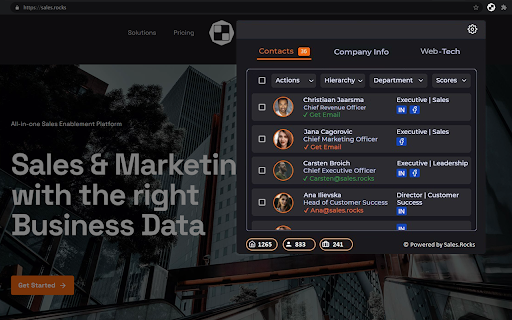
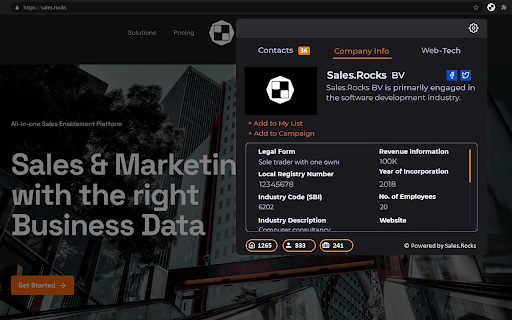
With Sales.Rocks Chrome Extension you can easily find all contact information when visiting a company website with a single click. Find all Contacts by hierarchy and find their direct email addresses and social media links. Expand your search with Company information, from address, local registry number, revenue and size to detailed information like email address, phone number and social media profiles, and check the web-technologies used by the company. Create custom Lead Lists and start your direct prospecting via the Sales.Rocks Platform.

🏢 Company Search

The Company Search will retrieve data from our regularly updated and enriched B2B Database searched by the company domain. It will list 15 different data points about the company among which local address, local registry number, company size, industry and industry code (NACE), revenue and company size, year of incorporation together with contact details about the company like the email address, phone number and social media profiles.

👔 Contact Search

The Contact Search works also based on a search by company domain. It will retrieve all the Contacts working within the company sorted by hierarchy and department, revealing their job title, direct email address and social media links.

⚙️Web-Technologies

The Web-Tech tab unlocks the company technology stack. You can check the current web-technologies used by the company and the version of the used software.

✉️ Lead Lists

Once found, the Contacts can be added to a Lead List in your Sales.Rocks account. The same can be done with the whole company data. You can choose to either create a new Lead List or add the information to an existing Lead List. With a single click on the + Add to My List button you can prepare your next outreach list.

🚀 Getting Started

To join our 3000+ Users you would need to register for a Sales.Rocks account. This can be easily done on the Register button upon the installation of the Sales.Rocks Chrome Extension in your Browser. If you already have your Sales.Rocks account, you can connect it to the Chrome Extension with a simple Login.

With the installation of the Sales.Rocks Chrome Plugin you agree with our terms and conditions (https://sales.rocks/privacy-terms-conditions/)

Have some questions? Drop us an email at [email protected]
Made with 🧡 from the Sales.Rocks Team
Technical
- Version
- 1.0.9
- Manifest
- V3
- Size
- 5.81MiB
- Min Chrome
- 88
- Languages
- 1
- Featured
- No
Metadata
- ID
- lkjjmginpielfdegmklfjfddmiebdddj
- Developer ID
- u06e16f9ec68dd3fa240683d0911abdf9
- Developer Email
- [email protected]
- Created
- Jul 1, 2021
- Last Updated (Store)
- Jan 18, 2024
- Last Scraped
- May 19, 2026
- Website
- —
- Support URL
- https://help.sales.rocks
- Privacy Policy
- https://sales.rocks/privacy-terms-conditions/
Similar extensions
Alternatives to Sales.Rocks, ranked by description similarity.

Leadsrush
Improve your business connections with easy email finding, checking, and more information, all by pressing a button.
Get all the…
1

Success.ai - Email Finder
Discover emails, phone numbers, and profiles for anyone working at a company from any webpage you visit
1.0K
★ 5.0

Prospeo Contact Finder – Email & Phone Number Finder
Find verified business email addresses and mobile numbers wherever you work on the web.
30.0K
★ 4.8

TheGrid
This tool provides business contact information while you're browsing the web.
For Sales Professionals
🚀 Effortless Data…
247
★ 5.0

Company Information Extractor
Extracts sales intelligence data like contacts, tech, SEO strategy, and buying signals.
23
★ 5.0

AirLeads
The AirLeads Chrome Extension scans pages you visit on LinkedIn to provide supplementary contact info from the AirLeads database.
2

Email Finder by ContactOut – Email Lookup Tool
Find emails for 75% of Linkedin or ANY website. Save profiles to CRM. Chatgpt comments & email writer. Trusted by 76% of Fortune500.
600.0K
★ 4.4

Get Email and Phone Number From Any LinkedIn Profile — SupportFinity
Unlock Contacts. Summarize Profiles. Hire Smarter.
99
★ 5.0
Data sourced from the Chrome Web Store · last verified May 19, 2026.