
ImageTrans
Translate images on websites
As of June 2026, ImageTrans has 10,000 users and a 1.66/5 rating from 44 reviews in the Productivity category.
Usersup 66.7 percent+66.7%
10.0K
10,000
Ratingno change0%
1.66
44 reviews
Reviewsno change0%
44
Version
5.11
Manifest V3
90-day change · In the last 90 days this extension gained 4.0K users, 5 version updates.
History
9 snapshotsTracking since Apr 18, 2026.
View as table
| Date | Users | Rating | Reviews | Version |
|---|---|---|---|---|
| Apr 18, 2026 | 6.0K | 1.66 | 44 | 3.0 |
| Apr 28, 2026 | 6.0K | 1.66 | 44 | 3.0 |
| May 7, 2026 | 6.0K | 1.66 | 44 | 3.0 |
| May 11, 2026 | 6.0K | 1.66 | 44 | 4.3 |
| May 15, 2026 | 6.0K | 1.66 | 44 | 5.0 |
| May 23, 2026 | 6.0K | 1.66 | 44 | 5.2 |
| May 28, 2026 | 8.0K | 1.66 | 44 | 5.2 |
| Jun 11, 2026 | 10.0K | 1.66 | 44 | 5.2 |
| Jun 24, 2026 | 10.0K | 1.66 | 44 | 5.7 |
| Now | 10.0K | 1.66 | 44 | 5.11 |
Changelog
- Jun 24, 2026description
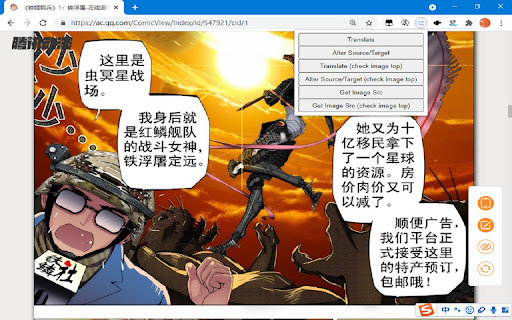
An image translator. It uses ImageTrans to translate images on websites whether they are posters, brochures, comics, manga, manhua or webtoon. State-of-art OCR and AI translation services are used to guarantee the translation quality.

Usage:
1. Install the extension and ImageTrans.
2. Right click on the image to translate it, which will replace the image with a translated version.
3. If the context menu is disabled, use the shortcut (CTRL+SHIFT+F) to call the popup, use Tab to switch operations and press Enter to perform the operation.

It supports automatic image translation and screen capture translation, where it is possible to copy text in images.

Detailed guide: https://github.com/xulihang/ImageTrans_chrome_extension

It needs ImageTrans by default. You can use PaddleOCR without using ImageTrans but the functions are limited in terms of accuracy, speed, options and language support.

You can set up OpenAI API to use ChatGPT, Gemini, etc, for better translation.
An image translator. It uses ImageTrans to translate images on websites whether they are posters, brochures, comics, manga, manhua or webtoon. State-of-art OCR and AI translation services are used to guarantee the translation quality.

Usage:
1. Install the extension and ImageTrans.
2. Right click on the image to translate it, which will replace the image with a translated version.
3. If the context menu is disabled, use the shortcut (CTRL+SHIFT+F) to call the popup, use Tab to switch operations and press Enter to perform the operation.

It supports automatic image translation and screen capture translation, where it is possible to copy text in images.

Detailed guide: https://github.com/xulihang/ImageTrans_chrome_extension

It needs ImageTrans by default. You can use PaddleOCR without using ImageTrans but the functions are limited in terms of accuracy, speed, options and language support.

You can set up OpenAI API to use ChatGPT, Gemini, etc, for better translation.

Japanese furigana and Chinese pinyin annotation is also supported for language learning.
- May 11, 2026description
An image translator. It uses ImageTrans to translate images on websites whether they are posters, brochures, comics, manga, manhua or webtoon. State-of-art OCR and machine translation services are used to guarantee the translation quality.

Usage:
1. Install the extension and ImageTrans.
2. Right click on the image to translate it.
3. If the context menu is disabled, use the shortcut (CTRL+SHIFT+F) to call the popup, use Tab to switch operations and press Enter to perform the operation.

Detailed guide: https://github.com/xulihang/ImageTrans_chrome_extension

It needs ImageTrans by default and you can setup OpenAI API to use ChatGPT, Gemini, etc. You can also use PaddleOCR without using ImageTrans but its functions are limited.
An image translator. It uses ImageTrans to translate images on websites whether they are posters, brochures, comics, manga, manhua or webtoon. State-of-art OCR and AI translation services are used to guarantee the translation quality.

Usage:
1. Install the extension and ImageTrans.
2. Right click on the image to translate it, which will replace the image with a translated version.
3. If the context menu is disabled, use the shortcut (CTRL+SHIFT+F) to call the popup, use Tab to switch operations and press Enter to perform the operation.

It supports automatic image translation and screen capture translation, where it is possible to copy text in images.

Detailed guide: https://github.com/xulihang/ImageTrans_chrome_extension

It needs ImageTrans by default. You can use PaddleOCR without using ImageTrans but the functions are limited in terms of accuracy, speed, options and language support.

You can set up OpenAI API to use ChatGPT, Gemini, etc, for better translation.
- May 7, 2026description
An image translator. It uses ImageTrans to translate images on websites whether they are posters, brochures, comics, manga, manhua or webtoon. State-of-art OCR and machine translation services are used to guarantee the translation quality.

** Please note that although an online ImageTrans instance (mainly for manga) is available for testing, you'd better start your own ImageTrans instance for translating.**

Usage:
1. Install the extension and ImageTrans.
2. Right click on the image to translate it.
3. If the context menu is disabled, use the shortcut (CTRL+SHIFT+F) to call the popup, use Tab to switch operations and press Enter to perform the operation.

Detailed guide: https://github.com/xulihang/ImageTrans_chrome_extension
An image translator. It uses ImageTrans to translate images on websites whether they are posters, brochures, comics, manga, manhua or webtoon. State-of-art OCR and machine translation services are used to guarantee the translation quality.

Usage:
1. Install the extension and ImageTrans.
2. Right click on the image to translate it.
3. If the context menu is disabled, use the shortcut (CTRL+SHIFT+F) to call the popup, use Tab to switch operations and press Enter to perform the operation.

Detailed guide: https://github.com/xulihang/ImageTrans_chrome_extension

It needs ImageTrans by default and you can setup OpenAI API to use ChatGPT, Gemini, etc. You can also use PaddleOCR without using ImageTrans but its functions are limited.
Permissions & access
- Permissions
- storageactiveTabcontextMenusclipboardWritedeclarativeNetRequest
- Host access
- <all_urls>
Screenshots
About
An image translator. It uses ImageTrans to translate images on websites whether they are posters, brochures, comics, manga, manhua or webtoon. State-of-art OCR and AI translation services are used to guarantee the translation quality.

Usage:
1. Install the extension and ImageTrans.
2. Right click on the image to translate it, which will replace the image with a translated version.
3. If the context menu is disabled, use the shortcut (CTRL+SHIFT+F) to call the popup, use Tab to switch operations and press Enter to perform the operation.

It supports automatic image translation and screen capture translation, where it is possible to copy text in images.

Detailed guide: https://github.com/xulihang/ImageTrans_chrome_extension

It needs ImageTrans by default. You can use PaddleOCR without using ImageTrans but the functions are limited in terms of accuracy, speed, options and language support.

You can set up OpenAI API to use ChatGPT, Gemini, etc, for better translation.

Japanese furigana and Chinese pinyin annotation is also supported for language learning.
Technical
- Version
- 5.11
- Manifest
- V3
- Size
- 55.95MiB
- Min Chrome
- 88
- Languages
- 2
- Featured
- No
Metadata
- ID
- lkijcgjookpddgfacoankphnpbinmhia
- Developer ID
- u4a2f81641b3765bfdc4dfe25d6894e2a
- Developer Email
- [email protected]
- Created
- Mar 31, 2021
- Last Updated (Store)
- Jun 22, 2026
- Last Scraped
- Jun 24, 2026
- Website
- —
- Support URL
- https://www.basiccat.org/imagetrans
- Privacy Policy
- —
Similar extensions
Alternatives to ImageTrans, ranked by description similarity.

Inplace Image Translator
Instantly translate text in images with one click
807
★ 3.1

Image Translate
Translate images from web pages with 1bit.ai
42

Manga Translator
Compatible with major manga websites and translates raw manga into multiple languages with one click.
45
★ 1.0

NekoTranslate
Translate any manga or comic in place and in real time.
226
Graphic Novel Screen Translator
An easy to use extension for translating any text on the webpage to English
2.0K
★ 3.3

TranslateImage
AI-powered image translation. Right-click images on web pages to translate text.
42

Google Translate & Image Translator by Tranzly – Popup View
Quickly translate texts and images with Google Translate without any copy‑pasting.
2.0K
★ 4.3

Torii Image Translator — AI Manga Translator, Manhwa Translator ...
Best manga translator, manhwa translator, image translator in general, using AI, translate any image on any website!
10.0K
★ 4.3
Data sourced from the Chrome Web Store · last verified Jun 24, 2026.