
Web to AI — UI swipe file for Claude Code & Cursor
Capture web UI. Build a library Claude Code & Cursor query via MCP. Free for 50 captures, no credit card.
As of June 2026, Web to AI — UI swipe file for Claude Code & Cursor has 44 users in the Productivity category.
Usersdown 12.0 percent−12.0%
44
44
Ratingno change0%
—
— reviews
Reviewsno change0%
—
Version
1.1.0
Manifest V3
90-day change · In the last 90 days this extension 1 version update.
History
6 snapshotsTracking since Apr 18, 2026.
View as table
| Date | Users | Rating | Reviews | Version |
|---|---|---|---|---|
| Apr 18, 2026 | 50 | — | — | 1.0.1 |
| Apr 28, 2026 | 46 | — | — | 1.0.1 |
| May 9, 2026 | 43 | — | — | 1.0.1 |
| May 14, 2026 | 41 | — | — | 1.1.0 |
| May 27, 2026 | 47 | — | — | 1.1.0 |
| Jun 9, 2026 | 49 | — | — | 1.1.0 |
| Now | 44 | — | — | 1.1.0 |
Changelog
- May 9, 2026description
Analyze and import any website’s components or design elements directly into Cursor, Claude Code, ChatGPT, or Gemini — all in under 10 seconds. Perfect for developers and designers who want instant AI-powered insights from any webpage.
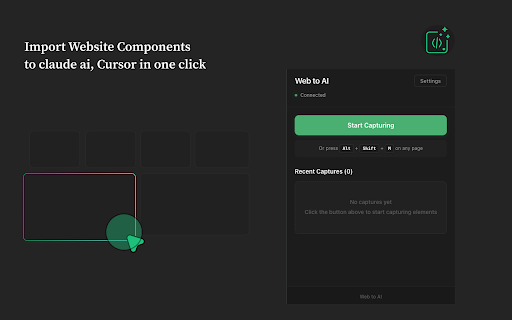
Web to AI is the fastest way to bridge the web and your AI coding assistant. Right-click any element on any website to capture it — HTML, computed CSS, JavaScript, and viewport metadata. Captures land in a personal cloud library your AI assistant can search, filter, and turn into production React on demand. Works with Claude Code, Cursor, Claude Desktop, ChatGPT, and Gemini. — THE PROBLEM — Building UI from scratch in 2026 is a waste of your time. Designs you admire already exist on the web. But pasting DevTools dumps into Claude or Cursor is slow, lossy, and forgets context the moment you close the chat. AI coding assistants need a richer source — and a library that grows with you. — WHAT WEB TO AI DOES — 1) Press Alt + Shift + M on any webpage. Hover an element. Click to capture. 2) The capture is sent to your private cloud and exposed via the Model Context Protocol (MCP) — the open standard Anthropic, Vercel, Microsoft, and Google support for connecting AI to live data. 3) From inside Cursor or Claude Code, your AI uses tools like search_captures, extract_components, and generate_react_component to query your library and ship React/Tailwind code that matches the inspiration you saved. This isn't a one-shot clipboard — it's a persistent, searchable swipe file your AI can reason over. Capture a hero from Linear, a pricing card from Stripe, a button from Vercel, then say "build me a hero like the ones I saved from Linear and Stripe" — your AI handles the rest. — FREE TIER — Sign up with your email inside the extension. You get 50 captures, full MCP access, all 8 tools, and integration with every supported IDE. No credit card. No trial timer. Upgrade to Pro only when you outgrow it. — FEATURES — • Visual element picker — hover to highlight, click to capture • Captures HTML, computed CSS (40+ properties), inline styles, JS handlers • Cloud sync via MCP — your library is available in any MCP-aware tool • 8 MCP tools out of the box: - list_captures - get_capture_metadata - analyze_capture (paginated for large pages) - search_captures (full-text across your library) - filter_captures_by_domain - extract_components (buttons, navs, forms, links, inputs) - generate_react_component (inline styles, CSS modules, or styled-components) - get_capture_stats • Works with Claude Code, Cursor, Claude Desktop, VSCode (Claude Code ext), ChatGPT, Gemini, and any MCP client • Keyboard shortcut (Alt + Shift + M) for instant capture • Local fallback — captures save to your machine if the cloud is unreachable • Optional fully local MCP server for privacy-focused workflows — PRICING — • Free: 50 captures, all features, no card required • Pro: $24/year, unlimited captures, priority support, 30-day refund — WHO IT'S FOR — • Developers using Cursor or Claude Code who want production UI faster • Freelancers and agencies building client sites against design references • Founders prototyping ideas without a designer • Engineers learning by reverse-engineering production patterns — SETUP (60 SECONDS) — 1. Install this extension 2. Click the icon, enter your email, get a free Account ID 3. Add the MCP server to your IDE: Claude CLI: claude mcp add --transport sse web_capture https://web-to-ai.com/mcp/YOUR_ID Cursor: add to ~/.cursor/mcp.json (config in extension popup) Claude Desktop: edit claude_desktop_config.json 4. Capture and start asking your AI to use search_captures — PRIVACY — • Captures only happen on the page you're actively viewing, only when you trigger them. Nothing is captured passively. • Your library is private to your Account ID. We never share data with third parties. • Optional local-only mode runs the MCP server on your own machine — captures never leave your computer. • Read the full privacy policy at https://web-to-ai.com/privacy — OPEN STANDARD — Web to AI is built on the Model Context Protocol (MCP), the open spec from Anthropic. That means your library isn't locked into one IDE — it works with every current and future MCP client. Learn more at modelcontextprotocol.io. — SUPPORT — Questions, feature requests, or bugs: [email protected] Docs: https://web-to-ai.com - May 9, 2026short_description
Analyse design and import website components and import to Cursor, Claude Code, ChatGPT or Gemini under 10 sec
Capture web UI. Build a library Claude Code & Cursor query via MCP. Free for 50 captures, no credit card.
- May 9, 2026name
Web to AI - Analyze, import any website components to Cursor or Claude Code
Web to AI — UI swipe file for Claude Code & Cursor
Permissions & access
- Permissions
- activeTabscriptingstoragenotifications
- Host access
- None declared
Screenshots
About
Web to AI is the fastest way to bridge the web and your AI coding assistant.
  Right-click any element on any website to capture it — HTML, computed CSS,
  JavaScript, and viewport metadata. Captures land in a personal cloud library
  your AI assistant can search, filter, and turn into production React on demand.

  Works with Claude Code, Cursor, Claude Desktop, ChatGPT, and Gemini.

  — THE PROBLEM —
  Building UI from scratch in 2026 is a waste of your time. Designs you admire
  already exist on the web. But pasting DevTools dumps into Claude or Cursor is
  slow, lossy, and forgets context the moment you close the chat. AI coding
  assistants need a richer source — and a library that grows with you.

  — WHAT WEB TO AI DOES —
  1) Press Alt + Shift + M on any webpage. Hover an element. Click to capture.
  2) The capture is sent to your private cloud and exposed via the Model Context
     Protocol (MCP) — the open standard Anthropic, Vercel, Microsoft, and Google
     support for connecting AI to live data.
  3) From inside Cursor or Claude Code, your AI uses tools like search_captures,
     extract_components, and generate_react_component to query your library and
     ship React/Tailwind code that matches the inspiration you saved.

  This isn't a one-shot clipboard — it's a persistent, searchable swipe file your
  AI can reason over. Capture a hero from Linear, a pricing card from Stripe, a
  button from Vercel, then say "build me a hero like the ones I saved from
  Linear and Stripe" — your AI handles the rest.

  — FREE TIER —
  Sign up with your email inside the extension. You get 50 captures, full MCP
  access, all 8 tools, and integration with every supported IDE. No credit card.
  No trial timer. Upgrade to Pro only when you outgrow it.

  — FEATURES —
  • Visual element picker — hover to highlight, click to capture
  • Captures HTML, computed CSS (40+ properties), inline styles, JS handlers
  • Cloud sync via MCP — your library is available in any MCP-aware tool
  • 8 MCP tools out of the box:
    - list_captures
    - get_capture_metadata
    - analyze_capture (paginated for large pages)
    - search_captures (full-text across your library)
    - filter_captures_by_domain
    - extract_components (buttons, navs, forms, links, inputs)
    - generate_react_component (inline styles, CSS modules, or styled-components)
    - get_capture_stats
  • Works with Claude Code, Cursor, Claude Desktop, VSCode (Claude Code ext),
    ChatGPT, Gemini, and any MCP client
  • Keyboard shortcut (Alt + Shift + M) for instant capture
  • Local fallback — captures save to your machine if the cloud is unreachable
  • Optional fully local MCP server for privacy-focused workflows

  — PRICING —
  • Free: 50 captures, all features, no card required
  • Pro: $24/year, unlimited captures, priority support, 30-day refund

  — WHO IT'S FOR —
  • Developers using Cursor or Claude Code who want production UI faster
  • Freelancers and agencies building client sites against design references
  • Founders prototyping ideas without a designer
  • Engineers learning by reverse-engineering production patterns

  — SETUP (60 SECONDS) —
  1. Install this extension
  2. Click the icon, enter your email, get a free Account ID
  3. Add the MCP server to your IDE:
       Claude CLI:  claude mcp add --transport sse web_capture https://web-to-ai.com/mcp/YOUR_ID
       Cursor:      add to ~/.cursor/mcp.json (config in extension popup)
       Claude Desktop: edit claude_desktop_config.json
  4. Capture and start asking your AI to use search_captures

  — PRIVACY —
  • Captures only happen on the page you're actively viewing, only when you
    trigger them. Nothing is captured passively.
  • Your library is private to your Account ID. We never share data with third
    parties.
  • Optional local-only mode runs the MCP server on your own machine — captures
    never leave your computer.
  • Read the full privacy policy at https://web-to-ai.com/privacy

  — OPEN STANDARD —
  Web to AI is built on the Model Context Protocol (MCP), the open spec from
  Anthropic. That means your library isn't locked into one IDE — it works with
  every current and future MCP client. Learn more at modelcontextprotocol.io.

  — SUPPORT —
  Questions, feature requests, or bugs: [email protected]
  Docs: https://web-to-ai.com
Technical
- Version
- 1.1.0
- Manifest
- V3
- Size
- 82.98KiB
- Min Chrome
- 88
- Languages
- 1
- Featured
- No
Metadata
- ID
- lkciijjmejgphjnbgdfpllfkalknokdb
- Developer ID
- u30acb905f5aa3d449368fff4bb1bdf41
- Developer Email
- [email protected]
- Created
- Oct 14, 2025
- Last Updated (Store)
- Apr 29, 2026
- Last Scraped
- Jun 9, 2026
- Website
- —
- Support URL
- —
- Privacy Policy
- https://weabers.com/privacy-policy
Similar extensions
Alternatives to Web to AI — UI swipe file for Claude Code & Cursor, ranked by description similarity.

ProjectX
Capture any UI element from the web, extract its code, and generate AI-ready prompts
3

Chat GPT Dialog
Boost your productivity. Seamlessly send selected web text directly to ChatGPT, Google Gemini, or Anthropic Claude using the…
4

Crit Design
Crit Design, a designer co-pilot. Enhancing design process powered by AI
77
★ 3.7

Chat Glider
Navigate through questions in ChatGPT and Gemini chats.
21
★ 5.0

AI Prompts Navigator
Navigate AI chat conversations with ease. Instantly Jump between questions in ChatGPT, Claude, Gemini & more using this side panel.
26
★ 5.0

1-Prompt
Capture & Compile your prompts from AI conversations in One Click
10

PlayPage
AI (Gemini) を使用して、Webページのコンテンツを即席アプリ化するChrome拡張機能です。
16

AI Prompt Manager
Save, organize, and quickly access your frequently used AI prompts
1
Data sourced from the Chrome Web Store · last verified Jun 9, 2026.