
Underline
AI-powered language learning assistant with contextual lookups.
As of June 2026, Underline has 1 users in the Education category.
Usersno change0%
1
1
Ratingno change0%
—
— reviews
Reviewsno change0%
—
Version
1.0.0
Manifest V3
History
2 snapshotsTracking since Jun 6, 2026.
Not enough history yet for this metric — the chart fills in as we collect more snapshots.
View as table
| Date | Users | Rating | Reviews | Version |
|---|---|---|---|---|
| Jun 6, 2026 | — | — | — | 1.0.0 |
| Jun 15, 2026 | — | — | — | 1.0.0 |
| Now | 1 | — | — | 1.0.0 |
Permissions & access
- Permissions
- activeTabstoragescriptingcontextMenus
- Host access
- None declared
Screenshots


About
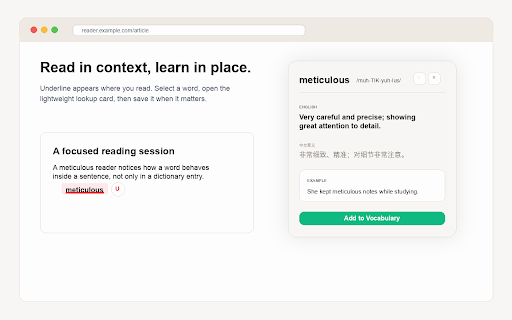
Underline is your intelligent language learning companion powered by advanced AI. Whether you're reading articles, studying documents, or browsing the web, Underline helps you understand and learn new vocabulary effortlessly.

Key features:

AI-powered word lookup
Get Chinese definitions, English explanations, phonetic transcriptions, and contextual analysis for selected words.

Contextual example sentences
See bilingual example sentences that show how a word is used in real reading contexts.

Smart vocabulary management
Save useful words to your personal vocabulary list and review them later from the extension popup.

Flexible configuration
Use your own OpenAI-compatible API key, choose a model, and optionally configure a custom Base URL.

How it works:
1. Install the extension and enter your API key in Settings.
2. Select any word or phrase on a webpage.
3. Open the Underline lookup panel.
4. Review the AI-powered definition and examples.
5. Save useful words to your vocabulary list.

Underline is designed for English learners, students, professionals, and anyone who wants to build vocabulary while reading on the web.

Privacy note:
Your vocabulary, settings, and API key are stored locally in Chrome extension storage. Selected text is sent only to the AI API endpoint you configure when you request a lookup.
Technical
- Version
- 1.0.0
- Manifest
- V3
- Size
- 207KiB
- Min Chrome
- 88
- Languages
- 1
- Featured
- No
Metadata
- ID
- lkcgdmkffamkdefcgohfjicefiiabooh
- Developer ID
- ua42f14b8ded83d367cce32f2b0276df9
- Developer Email
- [email protected]
- Created
- Jun 5, 2026
- Last Updated (Store)
- Jun 5, 2026
- Last Scraped
- Jun 15, 2026
- Website
- —
- Support URL
- https://github.com/GasonW/Underline/issues
Data sourced from the Chrome Web Store · last verified Jun 15, 2026.