
CodeSignal
CodeSignal Chrome Extension: Generate CodeSignal interview links and easily add them to your ATS.
As of June 2026, CodeSignal has 759 users and a 5.00/5 rating from 3 reviews in the Workflow & Planning category.
Usersup 0.3 percent+0.3%
759
759
Ratingno change0%
5.00
3 reviews
Reviewsno change0%
3
Version
0.7.1
Manifest V3
History
4 snapshotsTracking since Apr 1, 2026.
View as table
| Date | Users | Rating | Reviews | Version |
|---|---|---|---|---|
| Apr 1, 2026 | 757 | 5.00 | 3 | 0.7.1 |
| Apr 21, 2026 | 768 | 5.00 | 3 | 0.7.1 |
| May 6, 2026 | 764 | 5.00 | 3 | 0.7.1 |
| Jun 4, 2026 | 752 | 5.00 | 3 | 0.7.1 |
| Now | 759 | 5.00 | 3 | 0.7.1 |
Permissions & access
- Permissions
- tabs
- Host access
- https://*.codesignal.com/*, http://localhost:3000/*, https://*.greenhouse.io/*, https://*.lever.co/candidates/*
Screenshots



About
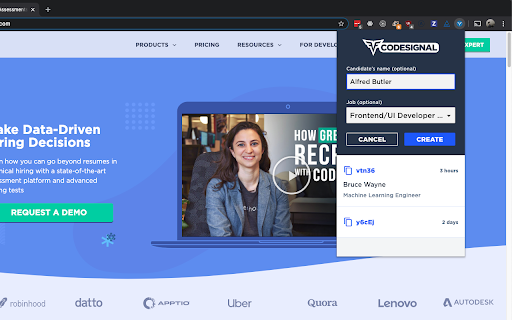
With the CodeSignal extension, technical recruiters don’t have to switch between their Applicant Tracking System and CodeSignal while scheduling interviews — instead, they can conveniently generate interview links directly from the extension while staying within the ATS.


Recruiters can also view previous links that they have generated through the extension, to allow for copying it easily to multiple places, such as both the ATS and a calendar invitation, for example.

For Greenhouse and Lever users, the integration is even more powerful. The CodeSignal extension will generate a “Create Interview Link” option directly within the Greenhouse or Lever ATS, which you can click to automatically generate an interview link that will be auto-filled into your ATS (for Greenhouse) or can be easily copied (for Lever).

To get started, simply download the extension and log in to your CodeSignal company account. If you’re not using Greenhouse or Lever, click on the CodeSignal extension icon to get started! If you are using Greenhouse or Lever, then open a candidate's profile in your ATS, and autogenerate a CodeSignal interview link with the click of a button!
Technical
- Version
- 0.7.1
- Manifest
- V3
- Size
- 24.48KiB
- Min Chrome
- 88
- Languages
- 1
- Featured
- No
Metadata
- ID
- ljpmmkjcophmdnndejefcilnkmhpjlfh
- Developer ID
- u2e68377686319cbd2170eaa1bfc56ff7
- Developer Email
- [email protected]
- Created
- Nov 15, 2017
- Last Updated (Store)
- May 2, 2025
- Last Scraped
- Jun 4, 2026
- Website
- —
- Privacy Policy
- https://codesignal.com/privacy/
Similar extensions
Alternatives to CodeSignal, ranked by description similarity.

HackerEarth
HackerEarth FaceCode Interview Extension
20
★ 5.0

Spark Hire Recruit Sourcing for Chrome
Source candidates from LinkedIn with just the click of a button!
1.0K
★ 4.0

WedgeHR Extension
Extension for using WedgeHR with an ATS Integration
1.0K

Greenhouse Recruiting Chrome extension
Add prospects to Greenhouse from anywhere
9.0K
★ 2.4

Extension Recruteur
Extension Recruteur: a Simple and comprehensive recruitment software
147

CareerGenie Talent Outreach Manager
Detect LinkedIn profiles, check pipeline, add to roles, and suggest outreach messages.
5

Perusal Candidate Sourcer
Source candidates from job portals and add to the job pool
3
★ 5.0

Kini Talent Sourcing Assistant
Simplify talent acquistion. Send candidates directly from a LinkedIn profile to over 50 ATS platforms in just a few seconds.
13
★ 5.0
Data sourced from the Chrome Web Store · last verified Jun 4, 2026.