
VimDF
Navigate PDFs with Vim keybindings
As of June 2026, VimDF has 19 users and a 4.00/5 rating from 1 reviews in the Productivity category.
Usersno change0%
19
19
Ratingno change0%
4.00
1 reviews
Reviewsno change0%
1
Version
0.4.3
Manifest V3
90-day change · In the last 90 days this extension 2 version updates, changed permissions.
History
8 snapshotsTracking since Apr 21, 2026.
View as table
| Date | Users | Rating | Reviews | Version |
|---|---|---|---|---|
| Apr 21, 2026 | — | — | — | 0.2.0 |
| Apr 26, 2026 | — | — | — | 0.2.0 |
| May 9, 2026 | 4 | — | — | 0.2.0 |
| May 14, 2026 | 7 | 4.00 | 1 | 0.2.0 |
| May 20, 2026 | 11 | 4.00 | 1 | 0.2.0 |
| May 26, 2026 | 14 | 4.00 | 1 | 0.2.0 |
| Jun 2, 2026 | 15 | 4.00 | 1 | 0.4.2 |
| Jun 8, 2026 | 19 | 4.00 | 1 | 0.4.2 |
| Now | 19 | 4.00 | 1 | 0.4.3 |
Changelog
- May 26, 2026permissions
declarativeNetRequest, storage, downloads
declarativeNetRequest, storage, downloads, tabs
Permissions & access
- Permissions
- declarativeNetRequeststoragedownloadstabs
- Host access
- <all_urls>
Screenshots
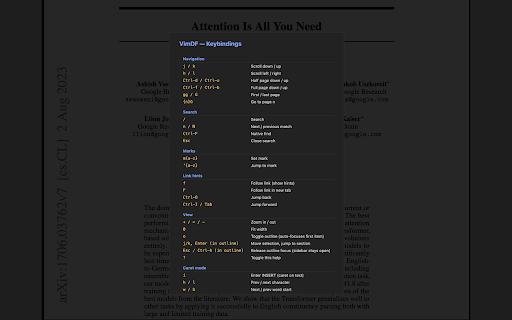
About
VimDF replaces Chrome's built-in PDF viewer with a modal, keyboard-driven one. Read papers, specs, and books without ever
touching the mouse.

— FEATURES —

• Vim-style navigation — j/k/h/l, gg/G/{n}G, Ctrl-d/Ctrl-u/Ctrl-f/Ctrl-b
• Search — / to query, n/N to cycle matches; Ctrl-F for native find
• Marks — m{a-z} to set, '{a-z} to jump back
• Link hints — f to show yellow hint labels on every link, F to open in new tab
• Jump list — Ctrl-O / Ctrl-I / Tab to traverse your navigation history
• Outline sidebar — o toggles the table of contents, auto-focuses the section you're currently in; j/k to move, Enter to jump
• Caret mode — i enters a Vim-modal caret over the text:
  · h/l/w/b/e for char/word motion
  · j/k column-aware line motion
  · v / V / Ctrl-V for char / line / block VISUAL selection
  · y to yank to clipboard, H to save a persistent highlight
• Remembers last page per document
• Auto / Dark / Light themes; customizable hint and status-bar colors
• Custom keymap aliases for page-scroll commands

Press ? inside the viewer for the full keybinding reference.

Works on any .pdf URL — http(s), extension pages, and local file:// PDFs (requires enabling "Allow access to file URLs" in
chrome://extensions).

Open-source (MIT). Built on Mozilla's PDF.js.
Technical
- Version
- 0.4.3
- Manifest
- V3
- Size
- 1.63MiB
- Min Chrome
- 88
- Languages
- 1
- Featured
- No
Metadata
- ID
- ljjchallgifapclnhgoilmlijmncbahn
- Developer ID
- u79301c6c0067524f119ccd58d203e363
- Developer Email
- [email protected]
- Created
- Apr 20, 2026
- Last Updated (Store)
- Jun 5, 2026
- Last Scraped
- Jun 8, 2026
- Website
- —
- Support URL
- https://github.com/tatsukamijo/vimdf
- Privacy Policy
- —
Data sourced from the Chrome Web Store · last verified Jun 8, 2026.