
CSV to PDF
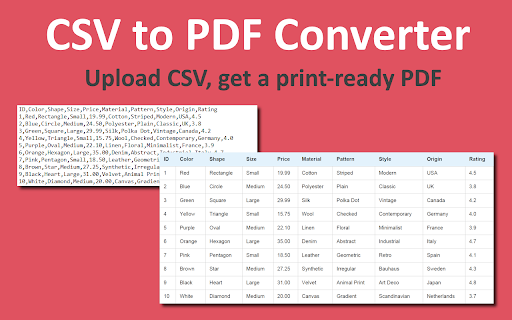
Convert CSV to PDF instantly! This CSV to PDF Converter changes the CSV format to a PDF file online in your browser.
As of June 2026, CSV to PDF has 86 users and a 5.00/5 rating from 7 reviews in the Productivity category.
Usersup 11.7 percent+11.7%
86
86
Ratingno change0%
5.00
7 reviews
Reviewsno change0%
7
Version
1.1
Manifest V3
History
4 snapshotsTracking since Apr 1, 2026.
View as table
| Date | Users | Rating | Reviews | Version |
|---|---|---|---|---|
| Apr 1, 2026 | 77 | 5.00 | 7 | 1.1 |
| Apr 21, 2026 | 83 | 5.00 | 7 | 1.1 |
| May 11, 2026 | 79 | 5.00 | 7 | 1.1 |
| Jun 6, 2026 | 82 | 5.00 | 7 | 1.1 |
| Now | 86 | 5.00 | 7 | 1.1 |
Permissions & access
- Permissions
- activeTabcontextMenusstorage
- Host access
- None declared
Screenshots
About
Need to convert .csv to pdf quickly and effortlessly? Our converter is the perfect solution! With just one click, you can transform csv format to pdf without installing additional software. Whether you need to convert CSV file to PDF for work, school, or personal use, this Chrome extension makes the process fast and hassle-free.

💎 Features of Conversion Tool:
🔸 Easily convert CSV to PDF without complex settings.
🔸 Convert Excel CVS to PDF without formatting issues.
🔸 High-quality formatting to keep your data intact.
🔸 Works in any Chromium-based browser without installation.

❓ How to Convert a File?
1️⃣ Click on the extension icon in Chrome
2️⃣ Upload your .csv-file to converter tool
3️⃣ Hit "Convert" and get your pdf in seconds
4️⃣ Download and save your pdf-file

❓ Why Choose Our Converter?
➡️ Incredibly Easy to Use – Our converter’s intuitive design allows you to prepare your file within seconds, making the entire process extremely user-friendly and efficient.
➡️ Secure & Private – Your valuable files are processed entirely on your device, ensuring that your data remains safe, confidential, and completely under your control.
➡️ High-Quality Output – We deliver exceptional, high-quality conversion results with perfectly maintained formatting, ensuring every detail of your original file is accurately preserved.
➡️ Batch Conversion – Save valuable time by effortlessly converting multiple CSV in PDF simultaneously, streamlining your workflow with a single, efficient process.
➡️ No Watermarks – Enjoy a professional and uncluttered final document, free from any watermarks or unwanted markings, so your work always looks clean and polished.
➡️ No Sign-Up Required – Begin converting your files instantly without any registration or account creation, simplifying access and saving you valuable time from the start.
➡️ Fast and Reliable – Experience rapid and dependable high-quality file conversions with just one click, ensuring a seamless transition from CSV a PDF every time.

📌 Common Use Cases
You may need to convert your file for various reasons:
1. Creating professional reports from csv-data
2. Sending structured csv-data in a more readable format
3. Printing or archiving
4. Sharing csv-files while preserving the layout

❓ Why I Need to Export CSV Format to PDF?
✔️ PDFs are universally readable
✔️ Maintain structured data
✔️ Easy to print and share
✔️ No formatting issues when transferring data

❓ How to Get a PDF-File Without Software?
Many users ask how to convert csv to pdf without installing software. The solution is simple - use our converter directly from your browser.
- Works on Windows, Mac, and Linux
- No file size restrictions
- Fast and free conversion
- No installations required
- Works directly in your Chrome browser
- Converts files instantly

🔄 Works on Any Device
Need to convert from csv to pdf from a different device? Our online converter works on:
🔹 Windows PCs and laptops
🔹 MacBooks and iMacs
🔹 Chromebooks
🔹 Linux systems

💬 FAQ – Everything You Need to Know Conversion
Q: How to csv convert to pdf quickly?
A: Use our converter for instant results. Just upload your file and hit Convert!
Q: Can I batch convert .csv to pdf?
A: Yes! Our tool supports batch conversion, so you can process multiple files at once.
Q: Does it work with Excel?
A: Absolutely! You can use the csv file to pdf converter effortlessly.

❓ Who Can Benefit from the Conversion?
✅ Business Professionals – Streamline reports and presentations by converting data into a professional, visually appealing format.
✅ Students & Researchers – Convert raw CSV data into easy-to-read formats like PDFs for academic and research projects.
✅ Accountants & Analysts – Organize and process financial records and data analysis efficiently with consistent formatting.
✅ Developers & IT Professionals – Generate structured files from logs and error reports to simplify debugging and archiving.
✅ Anyone Working with Data – Maintain CSV records in a universally accepted format to ensure data portability and organization.

🚀 Start Converting Today!
Why struggle with manual csv to pdf conversion when you can use this converter for instant results? Whether you need to convert a file for work, school, or personal use, this extension provides the fastest and most reliable solution. Click Add to Chrome now and get the result in just seconds!
Technical
- Version
- 1.1
- Manifest
- V3
- Size
- 352KiB
- Min Chrome
- 88
- Languages
- 52
- Featured
- No
Metadata
- ID
- ljckalapleakcbhehpfoefopbdpjcmgd
- Developer ID
- u1d15478328de46ed155a1c58d7342a6e
- Developer Email
- [email protected]
- Created
- Mar 31, 2025
- Last Updated (Store)
- Apr 8, 2025
- Last Scraped
- Jun 6, 2026
- Website
- —
- Support URL
- —
Similar extensions
Alternatives to CSV to PDF, ranked by description similarity.

Convert TXT to CSV
Convert TXT to CSV effortlessly! Quickly convert txt file to csv format with accurate results. Simple, fast, and reliable tool!
170

Excel to pdf
Use the excel to pdf extension to convert excel to pdf swiftly. Now, convert xls to pdf easier than ever, right in your browser!
958
★ 5.0

CSV to XLSX
Convert CSV files to Excel XLSX format with automatic encoding detection
105
Convert CSV to JSON
Convert CSV & text files to JSON easily with our Chrome Extension.
597
★ 5.0

Convert XML to CSV
Use Convert XML to CSV to translate xml to csv file
968
★ 2.0

TXT to PDF
Easily convert TXT to PDF with the this Chrome Extension. Fast and simple way to convert TXT files to PDF in just a few clicks!
210
★ 5.0

CSV to Excel
Convert CSV to Excel: Upload unlimited CSV files and download individually or as a ZIP archive. Fast CSV file to Excel!
397
★ 5.0

Convert JSON to CSV
Easily transform json to csv with Convert JSON to CSV tool. Ideal for quick json converter needs, making json format to csv smooth.
1.0K
★ 3.7
Data sourced from the Chrome Web Store · last verified Jun 6, 2026.