
Tag Bookmarks
Rebuild your bookmarks with tags
As of June 2026, Tag Bookmarks has 933 users and a 4.92/5 rating from 12 reviews in the Productivity category.
Usersup 15.8 percent+15.8%
933
933
Ratingup 0.4 percent+0.4%
4.92
12 reviews
Reviewsup 20.0 percent+20.0%
12
Version
3.5.0
Manifest V3
History
10 snapshotsTracking since Apr 3, 2026.
View as table
| Date | Users | Rating | Reviews | Version |
|---|---|---|---|---|
| Apr 3, 2026 | 806 | 4.90 | 10 | 3.5.0 |
| Apr 17, 2026 | 812 | 4.90 | 10 | 3.5.0 |
| Apr 23, 2026 | 936 | 4.90 | 10 | 3.5.0 |
| Apr 27, 2026 | 957 | 4.90 | 10 | 3.5.0 |
| May 5, 2026 | 835 | 4.90 | 10 | 3.5.0 |
| May 10, 2026 | 1.0K | 4.90 | 10 | 3.5.0 |
| May 16, 2026 | 908 | 4.90 | 10 | 3.5.0 |
| May 22, 2026 | 928 | 4.90 | 10 | 3.5.0 |
| May 29, 2026 | 929 | 4.90 | 10 | 3.5.0 |
| Jun 6, 2026 | 955 | 4.92 | 12 | 3.5.0 |
| Now | 933 | 4.92 | 12 | 3.5.0 |
Permissions & access
- Permissions
- sidePaneltabsstoragebookmarkscommands
- Host access
- None declared
Screenshots


About
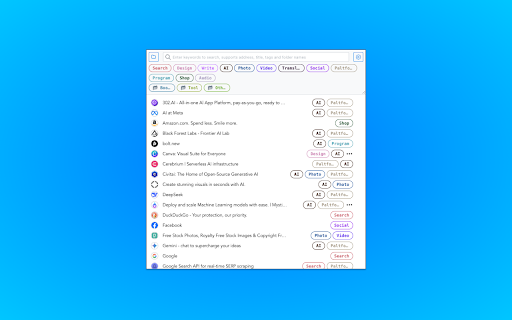
Add tags 🏷️ to your bookmarks 🔖 for easy filtering and management, perfect for heavy bookmark users to alleviate bookmark anxiety.

* Click the edit button on a bookmark to edit it (select tags, add tags, modify title, delete, etc.)
* Click the configuration button in the top-right corner for quick settings (language, theme, bookmark sorting, display options, etc.)
* Use the top search bar for keyword filtering (name, URL, tags, and folder, including all parent folders)
* Click tags at the top or behind a bookmark to filter
* Click the folder in the top-left corner to filter by folder
* After filtering, click the [Add Tags to Filtered Bookmarks] button at the bottom to batch-add selected tags to bookmarks
* Right-click the extension to open the sidebar mode
* Right-click the extension or click the text link in the edit menu to open the options panel for detailed configuration (tag display, storage mode, etc.) and tag management (adding tags, editing colors, deleting, etc.)
* Use shortcuts cmd|ctrl+shift+O to quickly open the extension and cmd|ctrl+shift+K to quickly add or edit bookmarks
* Trigger OmniBox search with the `tb` keyword in the search bar for quick bookmark search (supports name, URL, tags, and folder)

This extension does not store any user information. Tag data is saved in the original bookmarks in a specific format and can be searched directly in the search bar. If there are data sync issues, it’s likely Chrome’s problem—consider backing up when organizing a large number of bookmarks.

More features are being developed and updated regularly.
Technical
- Version
- 3.5.0
- Manifest
- V3
- Size
- 256KiB
- Min Chrome
- 88
- Languages
- 10
- Featured
- No
Metadata
- ID
- liofmdplmickalghfcokjdeohefnnofc
- Developer ID
- uf9211aa942f1c29c294fa006633d07be
- Developer Email
- [email protected]
- Created
- Jul 10, 2022
- Last Updated (Store)
- Feb 23, 2026
- Last Scraped
- Jun 6, 2026
- Website
- heyfe.org
- Privacy Policy
- —
Similar extensions
Alternatives to Tag Bookmarks, ranked by description similarity.

Tag Bookmark Manager
Tag and organize bookmarks using native Chrome storage — no cloud, no account. Combine folders + tags for powerful search.
30

TagTabs
Bookmark open tabs with tags and filter them easily
34
★ 5.0

Bookmark +
A premium bookmark manager with nested folders, smart tags, instant search, and optional cloud sync.
1

Bookmark tags
Adds tags to bookmarks. Improves search and more.
2.0K
★ 4.7
ChromTag - tag your bookmarks
Tag your bookmarks with #hashtag!
406
★ 3.3

TagIt for Bookmarks
Displays tagged (in brackets) bookmarks on the new tab page.
—

BookmarkGenius
A basic Chrome extension that functions as a bookmark bar with tags.
1

Tag mark
Seamlessly organize bookmarks with nested tags and custom hotkeys. Experience a smarter way to manage your digital favorites.
32
★ 5.0
Data sourced from the Chrome Web Store · last verified Jun 6, 2026.