
AI Video Generator | Text & Image to Video with Sora 2
Create cinematic AI videos from text or images with Sora 2. Realistic physics, synced audio, scene control. No filming required.
As of June 2026, AI Video Generator | Text & Image to Video with Sora 2 has 578 users and a 5.00/5 rating from 4 reviews in the Social & Communication category.
Usersdown 1.4 percent−1.4%
578
578
Ratingno change0%
5.00
4 reviews
Reviewsno change0%
4
Version
1.3.1
Manifest V3
History
10 snapshotsTracking since Apr 3, 2026.
View as table
| Date | Users | Rating | Reviews | Version |
|---|---|---|---|---|
| Apr 3, 2026 | 586 | 5.00 | 4 | 1.3.1 |
| Apr 17, 2026 | 613 | 5.00 | 4 | 1.3.1 |
| Apr 24, 2026 | 603 | 5.00 | 4 | 1.3.1 |
| May 2, 2026 | 621 | 5.00 | 4 | 1.3.1 |
| May 8, 2026 | 613 | 5.00 | 4 | 1.3.1 |
| May 13, 2026 | 586 | 5.00 | 4 | 1.3.1 |
| May 19, 2026 | 583 | 5.00 | 4 | 1.3.1 |
| May 25, 2026 | 574 | 5.00 | 4 | 1.3.1 |
| Jun 1, 2026 | 588 | 5.00 | 4 | 1.3.1 |
| Jun 7, 2026 | 587 | 5.00 | 4 | 1.3.1 |
| Now | 578 | 5.00 | 4 | 1.3.1 |
Permissions & access
- Permissions
- storagetabscookiesdownloads
- Host access
- https://sora2ai.co/*
Screenshots


About
Transform your ideas into captivating, high-quality videos in minutes. Whether you start with text descriptions or static images, Sora 2 brings your vision to life with synchronized audio, lifelike physics, and cinematic quality-no filming, no editing skills, no production crew required.

Use the intuitive Storyboard tool to plan multi-scene narratives, refine AI-generated drafts, and specify camera angles, pacing, and transitions through detailed prompts.

🎯 Key Features
• 🔊 Synchronized Audio & Video
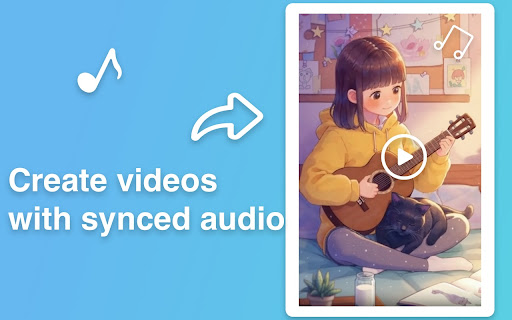
Automatically generates dialogue, sound effects, and ambient music perfectly aligned with on-screen action for immersive viewing experiences.

• ⚙️ Advanced Physics Engine
Objects move naturally with realistic momentum, turning dynamics, bouncing, and lifelike motion that mirrors the real world.

• 🎬 Multi-Shot Sequences & Scene Control
Handle complex, multi-scene prompts while maintaining consistent world state, characters, and continuity. Control camera movements, pacing, and smooth transitions between shots.

• 🎨 Multiple Visual Styles
Choose from realistic, cinematic, or anime aesthetics-all rendered in stunning quality to match your creative vision.

• 📝 Text-to-Video & 🖼️ Image-to-Video
Describe any scene in words or upload a single image to generate dynamic, related motion and bring static content to life.

• 🎵 Intelligent Music Generation
Automatically adds background music that fits the mood, pacing, and atmosphere of your scene-no manual audio editing needed.

• 📐 Storyboard-Based Creative Control
Fine-tune camera angles, scene pacing, lighting, and aspect ratios through the Storyboard editor. Combine multiple clips into unified sequences with narrative flow and seamless scene transitions.

• 🏆 Commercial-Ready Quality
Professional-grade output suitable for marketing campaigns, product showcases, advertisements, presentations, and client deliverables.

👥 Who It's For
• Content Creators & Social Media Teams: scale video production across YouTube, TikTok, Instagram, and all channels without hiring a crew

• Marketing Professionals & Agencies: create product demos, promotional teasers, ads, and campaign content at unprecedented speed

• E-commerce & Online Sellers: generate engaging product showcase videos that boost conversions and customer engagement

• Small Businesses & Freelancers: deliver professional video results without expensive equipment or production teams

• Educators & Presenters: produce compelling lesson introductions, explainer videos, and educational content effortlessly

• Entrepreneurs & Startups: create pitch videos, demos, and marketing materials on a lean budget

🚀 Getting Started
1. Install & Sign In: Install the extension, click the icon in your browser toolbar, and sign in to your account.

2. Choose Your Creation Mode: Select "Text-to-Video" to describe your vision in words, or "Image-to-Video" to animate an existing image.

3. Craft Your Prompt: Describe your desired scene with details about subjects, actions, setting, style, and mood.

4. Generate & Review: Click generate and watch as AI brings your vision to life with video and synchronized audio.

5. Save & Export: Save your creation to "My Creations" library for easy access, editing, or downloading.

💡 Pro Prompting Tips
• Be Specific & Detailed: Include clear descriptions of subjects, settings, lighting, style preferences, mood, and pacing for best results

• Guide Motion & Action: Use dynamic verbs and specify tempo-"slowly pans," "quickly zooms," "gracefully moves"-to control visual flow

• Direct the Audio: Specify music genre, emotional tone, and even instruments-"upbeat electronic music," "melancholic piano," "epic orchestral score"

• Set the Scene: Describe time of day, weather, environment details, and atmosphere to create richer, more immersive videos

• Iterate & Refine: Start with a basic prompt, then add more specific details in subsequent generations to fine-tune your result

🎨 Creative Use Cases
• Product Launches: generate eye-catching announcement videos with dramatic reveals

• Social Media Content: create scroll-stopping posts and stories that drive engagement

• Brand Storytelling: bring your brand narrative to life with cinematic sequences

• Testimonial Enhancement: add dynamic visuals to customer quotes and reviews

• Educational Content: visualize complex concepts with clear, engaging explanations

• Event Promotion: produce compelling teaser videos for conferences, webinars, or launches

🔐 Privacy & Security
We respect your privacy. Your prompts and uploads are processed only to generate videos. Projects are saved to your account per your settings and can be deleted anytime. See our website privacy policy for details.

📚 Support & Resources
If you have questions or need help, contact support with details and screenshots for faster assistance.
Technical
- Version
- 1.3.1
- Manifest
- V3
- Size
- 214KiB
- Min Chrome
- 88
- Languages
- 1
- Featured
- No
Metadata
- ID
- linbconflpklpfbfljahfjfjnfenideb
- Developer ID
- ud9a575d295b95e189fd766a08deabbef
- Developer Email
- [email protected]
- Created
- Oct 14, 2025
- Last Updated (Store)
- Mar 25, 2026
- Last Scraped
- Jun 7, 2026
- Website
- sora2ai.co
- Support URL
- —
- Privacy Policy
- https://sora2ai.co/privacy
Similar extensions
Alternatives to AI Video Generator | Text & Image to Video with Sora 2, ranked by description similarity.

Grok Video Generator - Create Videos from Text & Images
AI video generator that creates videos from text descriptions or images with Grok Imagine. No video editing experience needed.
978
★ 3.0

Runway Gen-4 Video Generator - Create AI Videos Efficiently
Runway Gen-4 video generator creating consistent, controllable videos from text or images with cinematic quality.
138

Wan 2.6 Video Generator - Create AI Videos with Audio
Wan 2.6 creates multi-shot cinematic videos from text, images, or videos with audio sync and character consistency.
86
Vormats - Screen Recorder for the workplace
Quickly and easily make and share videos for asynchronous communication. Capture your screen. Share and track your engagement.
683

AI Music Generator - Create Original Songs from Text
AI music generator that turns text into original songs with vocals and custom lyrics. No musical experience required.
121
★ 5.0

Z Image - AI Image Generator with Photorealistic Results
Create photorealistic images with clear, bilingual text rendering using Z Image's AI image generator.
12

NoteViral – Capture Ideas, Notes & Web Knowledge for your AI use them
Save notes, prompts, images, posts, videos, and transcripts from the web. Let Claude, ChatGPT, Codex, and AI tools use them via MCP.
5
★ 5.0

AI Image Editor | Edit Photos with Text
Create and edit images in browser with Nano Banana Pro. Edit images with natural language. Superior to Flux for consistent editing.
854
★ 5.0
Data sourced from the Chrome Web Store · last verified Jun 7, 2026.