
Overlay
Open your chosen AI site in a floating window. Pick a Quick Tool, press Alt+A to show or hide it.
As of June 2026, Overlay has 17 users in the Productivity category.
Usersup 750.0 percent+750.0%
17
17
Ratingno change0%
—
— reviews
Reviewsno change0%
—
Version
1.0.2
Manifest V3
90-day change · In the last 90 days this extension 1 version update, changed permissions.
History
10 snapshotsTracking since Apr 1, 2026.
View as table
| Date | Users | Rating | Reviews | Version |
|---|---|---|---|---|
| Apr 1, 2026 | 2 | — | — | 1.0.1 |
| Apr 17, 2026 | 2 | — | — | 1.0.1 |
| Apr 22, 2026 | 4 | — | — | 1.0.1 |
| Apr 27, 2026 | 5 | — | — | 1.0.2 |
| May 5, 2026 | 8 | — | — | 1.0.2 |
| May 10, 2026 | 9 | — | — | 1.0.2 |
| May 22, 2026 | 15 | — | — | 1.0.2 |
| May 28, 2026 | 13 | — | — | 1.0.2 |
| Jun 4, 2026 | 16 | — | — | 1.0.2 |
| Jun 10, 2026 | 13 | — | — | 1.0.2 |
| Now | 17 | — | — | 1.0.2 |
Changelog
- Apr 22, 2026short_description
AI, right where you work.
Open your chosen AI site in a floating window. Pick a Quick Tool, press Alt+A to show or hide it.
- Apr 22, 2026permissions
storage, notifications
storage, notifications, tabs, windows
Permissions & access
- Permissions
- storagenotificationstabswindows
- Host access
- None declared
Screenshots



About
Description

Use powerful AI tools anywhere on the web without switching tabs.

This extension brings multiple AI tools directly into your browser, allowing you to work faster and stay focused while browsing. Instead of opening separate AI websites or constantly switching tabs, you can instantly access AI assistance from a popup that appears on any webpage.

Simply press Alt + A anywhere on the page, and the AI assistant popup will appear instantly. From there, you can interact with different AI tools, generate content, summarize text, ask questions, and get intelligent responses without leaving the page you're on.

The extension is designed to improve productivity while browsing, researching, writing, coding, or learning online.

Key Features

Instant AI Access
Press Alt + A on any webpage to open the AI popup and start using AI tools immediately.

Works on Any Website
The extension works across websites including search engines, articles, documentation pages, coding platforms, and more.

Multiple AI Tools
Access a variety of AI tools in one place to help with writing, research, brainstorming, coding assistance, summarization, and more.

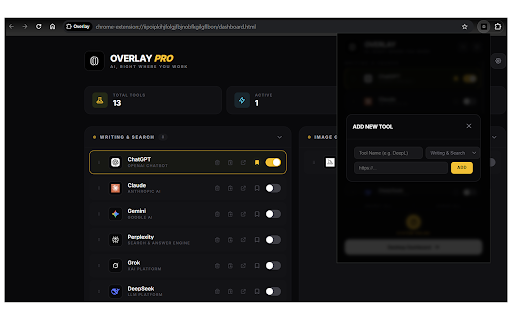
Custom AI Tools
You can add your own AI tools and customize your workspace based on the tools you use most.

Simple Popup Interface
All tools are accessible through a clean popup interface that appears on top of the current page, allowing you to work without disrupting your workflow.

Tool Management
Easily add, remove, and organize AI tools depending on your needs.

How It Works

Install the extension.

Open any webpage.

Press Alt + A.

The AI assistant popup will appear instantly.

Choose an AI tool and enter your prompt.

Privacy & Data

This extension does not collect or store personal browsing data.

AI requests are only sent when the user enters a prompt and chooses to interact with an AI tool. The extension only operates when the user activates it using the keyboard shortcut.

Who Is This For?

This extension is useful for:

• Students
• Developers
• Writers
• Researchers
• Content creators
• Anyone who wants faster access to AI while browsing

Work smarter, stay focused, and bring the power of AI directly into your browsing experience.
Technical
- Version
- 1.0.2
- Manifest
- V3
- Size
- 35.31KiB
- Min Chrome
- 88
- Languages
- 1
- Featured
- No
Metadata
- ID
- likfohkcaackgiflbljodnahpocbfgka
- Developer ID
- u4b155d27952cc902d919c3c750fea5c0
- Developer Email
- [email protected]
- Created
- Mar 23, 2026
- Last Updated (Store)
- Apr 22, 2026
- Last Scraped
- Jun 10, 2026
- Website
- —
- Support URL
- https://github.com/Tzgold/Overlay
- Privacy Policy
- https://overlay-extension.vercel.app/privacy.html
Data sourced from the Chrome Web Store · last verified Jun 10, 2026.