
BeamDesign
This intuitive and feature rich finite element app is especially useful for civil engineers, mechanical engineers, architects and…
As of May 2026, BeamDesign has 13 users and a 5.00/5 rating from 1 reviews in the Workflow & Planning category.
Usersup 62.5 percent+62.5%
13
13
Ratingno change0%
5.00
1 reviews
Reviewsno change0%
1
Version
359
Manifest V2
History
2 snapshotsTracking since Apr 23, 2026.
View as table
| Date | Users | Rating | Reviews | Version |
|---|---|---|---|---|
| Apr 23, 2026 | 8 | 5.00 | 1 | 359 |
| May 18, 2026 | 11 | 5.00 | 1 | 359 |
| Now | 13 | 5.00 | 1 | 359 |
Permissions & access
- Permissions
- unlimitedStoragenotificationsclipboardReadaccessibilityFeatures.readclipboardWritealarmsstorageidentity
- Host access
- https://clients2.google.com/
Screenshots
About
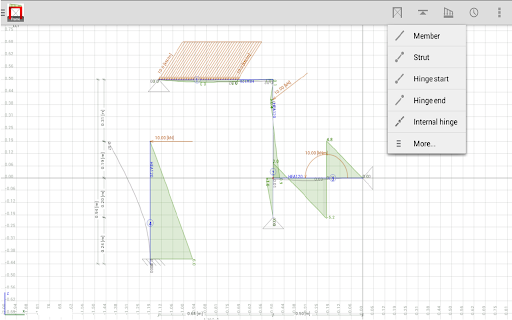
This intuitive and feature rich finite element app is especially useful for civil engineers, mechanical engineers, architects and students who wish to design continuous beams.

You may input and edit hyperstatic beams, forces, supports etc both graphically and textually. The calculations are performed transparently in the background without disturbing your work and presented almost immediately.

Main features are:
✓ F, T and q (rectangular and triangular) loads
✓ Fixed and hinge connections at beam ends
✓ Moment, Shear, Stress, Deflection, Reaction forces and Unity checks
✓ Imposed deflections
✓ M, N, V, ux, uz, utot, phi, sigma and unity checks output
✓ Fixed, hinge and roller supports in any direction
✓ Load cases and load combinations, including safety factors
✓ Profile groups; each group can have its own color

✓ Import any steel profile or general section from our free Engineering Libraries (EU, UK, AU, US & CA profiles)
✓ Import dxf files
✓ Export to our Concrete Design and Steel Design apps
✓ Share picture

✓ Snap points
✓ Undo function
✓ Annotations
✓ Formulas
✓ Multi copy
✓ Scale entire structure
✓ Trim/extend
✓ Automatic dimension lines (Autocad look)
✓ Element and node numbers
✓ Both graphical and textual edit modes
✓ Metric & Imperial units
✓ Multitouch zoom (pinch zooming)
✓ Many options for showing/hiding items
✓ Options to set almost all colors in the app
✓ Dark and light theme
✓ Available in 10 Languages
✓ Save your structures in the cloud (CloudConstruct)
✓ Built-in simple scientific calculator
✓ Wobbly effect
Technical
- Version
- 359
- Manifest
- V2
- Size
- 2.43MiB
- Min Chrome
- 41
- Languages
- 54
- Featured
- No
Metadata
- ID
- liicfikddjbndnfgolagaccpafolppme
- Developer ID
- u4b11fd312c72bc90512eba22641c6c7c
- Developer Email
- —
- Created
- Apr 7, 2015
- Last Updated (Store)
- Apr 7, 2015
- Last Scraped
- May 18, 2026
- Website
- http://letsconstruct.nl/
- Support URL
- http://www.letsconstruct.nl
- Privacy Policy
- —
Similar extensions
Alternatives to BeamDesign, ranked by description similarity.

FrameDesign
This intuitive and feature rich finite element app is especially useful for civil engineers, mechanical engineers, architects and…
—

MechConvert - Enhanced Metric↔Imperial Converter
Professional Metric↔Imperial converter for mechanics. Convert torque, length, pressure, threads with automotive specs & drill charts
11

Scientific Calculator
Awesome Scientific Calculator for Google Chrome
90.0K
★ 4.3

Scientific Calculator
A powerful, dark-themed scientific calculator with trigonometry, logarithms, and memory functions.
2
★ 5.0

Calculator For Engineers
This is a Calculator For Engineers
2

SnapFlow!
Create complex flowcharts easily with intuitive operations
10

Simple Calculator
Simple Easy Access Calculator
428
★ 5.0

Engineer Unit Converter
A unit converter for engineers, including length, area, volume, weight, flowrate, hydraulic loading rate, pressure, temperature.
47
Data sourced from the Chrome Web Store · last verified May 18, 2026.