
AIClip
Clip and save AI chatbot responses with one click. Organize into notebooks, tag, search, and export.
As of July 2026, AIClip has — users in the Productivity category.
Usersno change0%
—
—
Ratingno change0%
—
— reviews
Reviewsno change0%
—
Version
1.0.0
Manifest V3
History
1 snapshotsTracking since Jul 1, 2026.
Not enough history yet for this metric — the chart fills in as we collect more snapshots.
View as table
| Date | Users | Rating | Reviews | Version |
|---|---|---|---|---|
| Jul 1, 2026 | — | — | — | 1.0.0 |
| Now | — | — | — | 1.0.0 |
Permissions & access
- Permissions
- storageactiveTabcontextMenusscripting
- Host access
- https://chat.openai.com/*, https://chatgpt.com/*, https://claude.ai/*, https://gemini.google.com/*, https://www.perplexity.ai/*, https://perplexity.ai/*, https://grok.x.com/*, https://chat.deepseek.com/*
Screenshots


About
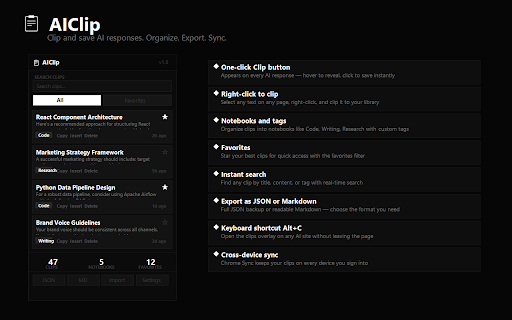
AIClip is your personal AI response library. Save any AI chatbot response with one click, organize it into notebooks, and find it instantly when you need it again.

HOW IT WORKS

When you visit a supported AI chatbot site, a Clip button appears on every AI response. Hover over any response to reveal it. Click it once — the response is saved to your library. That's it.

You can also select any text on any webpage, right-click, and choose "Clip to AIClip" to save it.

ORGANIZE YOUR LIBRARY

Create notebooks to group clips by topic — code snippets, writing samples, research notes, business ideas, or anything else. Add tags to clips for fine-grained filtering. Mark your best clips as favorites for instant access.

SEARCH INSTANTLY

Find any saved clip by searching across titles, content, or tags. Filter by notebook or view only your favorites.

EXPORT IN TWO FORMATS

JSON — full backup with all metadata. Re-importable into AIClip on any device.
Markdown — clean, readable format perfect for notes, documentation, or sharing with others.

Import clips from a JSON file to merge them into your library.

INSERT CLIPS BACK

Click any saved clip to insert it directly into an AI chatbot input field. Reuse great outputs without copy-pasting.

IN-PAGE OVERLAY

Press Alt+C on any supported AI chatbot site to open the clips overlay without leaving the page. Search, browse, and insert clips right from the overlay.

CROSS-DEVICE SYNC

Your clip library syncs automatically across all devices where you are signed into Chrome. No account setup, no servers — Chrome handles it.

KEY FEATURES

- One-click Clip button on every AI chatbot response
- Right-click context menu to clip any selected text
- Notebooks for organizing clips by topic
- Tags for fine-grained filtering
- Favorite clips for quick access
- Real-time search across your library
- Export as JSON or Markdown
- Import clips from JSON files
- Insert saved clips back into AI chatbot inputs
- In-page overlay with Alt+C keyboard shortcut
- Cross-device sync via Chrome storage
- Works on 6 popular AI chatbot platforms
- 100% local processing — no external servers
- No account required
- No data collection or tracking

PRIVACY

AIClip stores all data in Chrome sync storage. No data is sent to external servers. No analytics, no tracking, no account needed. Your clips stay yours.
Technical
- Version
- 1.0.0
- Manifest
- V3
- Size
- 161KiB
- Min Chrome
- 88
- Languages
- 1
- Featured
- No
Metadata
- ID
- libgeeampnkkgpfnhcgedjmehpafempk
- Developer ID
- uad3dcacc3909aaca56c84dddf724fc24
- Developer Email
- [email protected]
- Created
- Jun 30, 2026
- Last Updated (Store)
- Jun 30, 2026
- Last Scraped
- Jul 1, 2026
- Website
- —
- Support URL
- https://github.com/ASX-Labs/AIClip/issues
- Privacy Policy
- https://github.com/ASX-Labs/AIClip/blob/main/PRIVACY.md
Data sourced from the Chrome Web Store · last verified Jul 1, 2026.