
Markdown↔HTML Dual Converter
Convert between Markdown, HTML, and Rich Text.Convert from markdown to HTML & HTML to markdown automatically.
As of May 2026, Markdown↔HTML Dual Converter has 312 users and a 5.00/5 rating from 2 reviews in the Workflow & Planning category.
Usersup 16.0 percent+16.0%
312
312
Ratingno change0%
5.00
2 reviews
Reviewsno change0%
2
Version
2.2
Manifest V3
History
5 snapshotsTracking since Apr 1, 2026.
View as table
| Date | Users | Rating | Reviews | Version |
|---|---|---|---|---|
| Apr 1, 2026 | 269 | 5.00 | 2 | 2.2 |
| Apr 20, 2026 | 284 | 5.00 | 2 | 2.2 |
| May 5, 2026 | 288 | 5.00 | 2 | 2.2 |
| May 17, 2026 | 284 | 5.00 | 2 | 2.2 |
| May 30, 2026 | 297 | 5.00 | 2 | 2.2 |
| Now | 312 | 5.00 | 2 | 2.2 |
Permissions & access
- Permissions
- clipboardWritestorage
- Host access
- None declared
Screenshots


About
HTML↔Markdown Converter - Chrome Extension Store Description
Short Description (132 characters max)
Bidirectional HTML to Markdown converter with real-time preview, auto-copy, themes, and persistent content storage.

Detailed Description
Transform Your Content Workflow with the Ultimate HTML↔Markdown Converter
Streamline your content creation and documentation workflow with this powerful, feature-rich HTML to Markdown converter Chrome extension. Whether you're a developer, technical writer, blogger, or content creator, this tool provides seamless bidirectional conversion between HTML and Markdown formats.

🚀 Key Features
Dual Conversion Modes:

Convert Mode: Traditional side-by-side HTML ↔ Markdown conversion with separate input/output areas
Preview Mode: Real-time live preview with instant conversion as you type
Seamless switching between modes without losing your work
Smart Auto-Copy System:

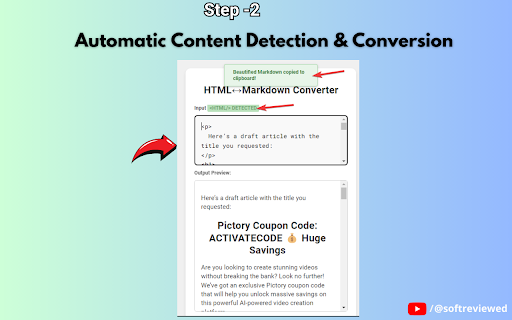
One-click toggle to enable/disable automatic clipboard copying
Instantly copy converted content without manual selection
Visual indicators show current auto-copy status
Manual copy buttons always available as backup
Advanced Content Management:

Auto-save functionality preserves your work automatically
Session persistence - never lose content when switching tabs or reloading
Cross-tab content preservation maintains your workflow
Intelligent debounced saving prevents performance issues
Professional Theming:

Multiple built-in themes for different preferences
Dark mode and light mode options
Expandable workspace for enhanced productivity
Responsive design adapts to any screen size
Developer-Friendly Features:

Works both as Chrome extension and standalone web application
Clean, semantic HTML output
Proper Markdown formatting with standard syntax
No external dependencies or data transmission
💼 Perfect For:
Developers & Programmers:

Convert HTML documentation to Markdown for README files
Transform legacy HTML content for modern documentation systems
Create Markdown content for GitHub, GitLab, and other platforms
Convert between formats for different CMS requirements
Technical Writers & Documentation Specialists:

Migrate content between documentation platforms
Convert HTML articles to Markdown for static site generators
Transform legacy documentation to modern formats
Create consistent formatting across different platforms
Bloggers & Content Creators:

Convert HTML blog posts to Markdown for different platforms
Transform rich text content for Jekyll, Hugo, or Gatsby sites
Create platform-agnostic content that works everywhere
Maintain formatting consistency across multiple publishing platforms
Students & Researchers:

Convert web content to Markdown for note-taking applications
Transform HTML research materials to readable Markdown format
Create clean, formatted documents for academic work
Export content for LaTeX or other academic publishing systems
Project Managers & Team Leads:

Convert HTML reports to Markdown for team wikis
Transform meeting notes between different collaboration tools
Create standardized documentation across team platforms
Maintain consistent formatting in project documentation
🎯 Use Cases & Scenarios
Content Migration:

Moving from WordPress to static site generators (Jekyll, Hugo, Gatsby)
Migrating documentation from Confluence to GitHub/GitLab wikis
Converting legacy HTML content to modern Markdown-based systems
Transforming email newsletters to blog post format
Development Workflows:

Creating README files from existing HTML documentation
Converting API documentation between formats
Transforming HTML comments to Markdown documentation
Preparing content for version control systems
Publishing & Distribution:

Converting articles for multiple publishing platforms
Creating cross-platform compatible content
Preparing content for different CMS requirements
Standardizing content format across team projects
Educational & Research:

Converting web articles to readable study materials
Transforming HTML research papers to Markdown format
Creating clean notes from web content
Preparing academic content for different publishing systems
⚡ Why Choose This Extension?
Reliability: Offline functionality means your sensitive content never leaves your browser
Speed: Instant conversion with real-time preview capabilities
Flexibility: Works in any environment - extension or standalone application
Persistence: Never lose your work with automatic saving and session management
User Experience: Intuitive interface designed for productivity and efficiency

🔧 Technical Specifications
Conversion Engine: Advanced HTML parsing with semantic Markdown output
Storage: Local browser storage with Chrome extension API integration
Compatibility: Works in Chrome extension context and standalone web environments
Performance: Optimized with debounced operations and efficient DOM manipulation
Security: No external API calls - all processing happens locally
📱 Cross-Platform Compatibility
Chrome Extension (recommended)
Standalone web application
Works on Windows, macOS, and Linux
Responsive design for desktop and tablet use
No installation required for web version
🎨 Customization Options
Multiple theme choices for different working environments
Expandable workspace for large content projects
Configurable auto-copy behavior
Persistent user preferences across sessions
Customizable layout options
🚀 Get Started Instantly
Install the extension from Chrome Web Store
Click the extension icon in your browser toolbar
Choose Convert or Preview mode based on your needs
Paste your HTML or Markdown content
Get instant, accurate conversion results
Copy to clipboard with one click or use auto-copy
Technical
- Version
- 2.2
- Manifest
- V3
- Size
- 102KiB
- Min Chrome
- 88
- Languages
- 1
- Featured
- No
Metadata
- ID
- libchoekhjjanmelmaoeifognmoohjei
- Developer ID
- u360c8120450439b1efda75c4ab66a001
- Developer Email
- [email protected]
- Created
- Sep 7, 2024
- Last Updated (Store)
- Aug 28, 2025
- Last Scraped
- May 30, 2026
- Website
- https://softreviewed.com/
- Support URL
- —
Similar extensions
Alternatives to Markdown↔HTML Dual Converter, ranked by description similarity.

Any Page to MD
Convert any webpage to clean Markdown. Copy or save with one click.
76

Markdown To Word
Convert Markdown to Word and back. Easily transform md to docx and Word to Markdown with one click. Fast, offline!
618
★ 5.0

Markie - Copy as Markdown
It's super simple. Copy any selected content as Markdown.
89

HTML to Markdown
Convert webpages to Markdown. Easily convert headers, text, tables or code snippets to Markdown.
3.0K
★ 4.5

Copy as Markdown
Convert and copy text as Markdown with formatting preserved
201
★ 5.0

selection-to-markdown
A browser extension that converts selected text to markdown format and downloads it as a .md file
42
★ 5.0

Markdown Page Clipper
Copy the main content—or a selection—of any page to the clipboard in Markdown.
12

Clipdown — Web to Markdown
Smart Markdown copier. Copy web content as clean Markdown with source citations, smart titles & reading time estimates.
14
Data sourced from the Chrome Web Store · last verified May 30, 2026.