
Icon Converter
Converts images into .ico files
As of June 2026, Icon Converter has 28 users and a 5.00/5 rating from 1 reviews in the Developer Tools category.
Usersup 75.0 percent+75.0%
28
28
Ratingno change0%
5.00
1 reviews
Reviewsno change0%
1
Version
2.0
Manifest V3
History
9 snapshotsTracking since Apr 17, 2026.
View as table
| Date | Users | Rating | Reviews | Version |
|---|---|---|---|---|
| Apr 17, 2026 | 16 | 5.00 | 1 | 2.0 |
| Apr 22, 2026 | 27 | 5.00 | 1 | 2.0 |
| Apr 27, 2026 | 22 | 5.00 | 1 | 2.0 |
| May 5, 2026 | 21 | 5.00 | 1 | 2.0 |
| May 10, 2026 | 25 | 5.00 | 1 | 2.0 |
| May 16, 2026 | 26 | 5.00 | 1 | 2.0 |
| May 22, 2026 | 31 | 5.00 | 1 | 2.0 |
| May 29, 2026 | 26 | 5.00 | 1 | 2.0 |
| Jun 4, 2026 | 27 | 5.00 | 1 | 2.0 |
| Now | 28 | 5.00 | 1 | 2.0 |
Permissions & access
- Permissions
- downloads
- Host access
- None declared
Screenshots


About
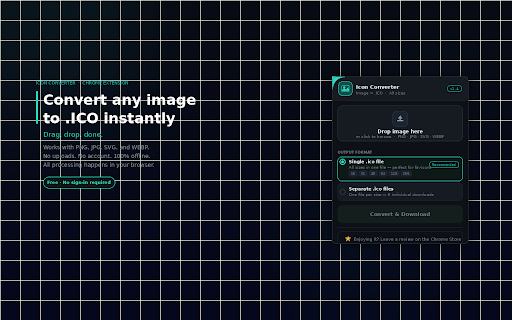
Quickly convert your images into professional Windows Icon (.ico) files without ever leaving your browser.

Unlike online converters that require you to upload your private images to a remote server, Icon Converter processes everything locally on your machine. Your data never leaves your computer, ensuring 100% privacy and lightning-fast conversion speeds.

Key Features:
Multi-Size Support: Generate a single .ico file containing multiple layers (16x16, 32x32, 48x48, 64x64, 128x128, and 256x256 pixels).

Individual Export: Option to save sizes as individual files if you only need specific dimensions.

Drag & Drop Interface: Simple, intuitive workflow—just drag your image and click convert.

Privacy First: No server uploads, no tracking, and no data collection.

Broad Compatibility: Supports PNG, JPG, BMP, and GIF as source files.

How to Use:
Open the extension.

Drag and drop your image into the workspace (or click to select a file).

Choose whether you want a single multi-size icon or separate files.

Click "Convert & Save"—your files will appear instantly in your Downloads folder.

Perfect for software developers, UI/UX designers, and power users who need quick, reliable icons for Windows applications, folders, or web shortcuts.
Technical
- Version
- 2.0
- Manifest
- V3
- Size
- 17.35KiB
- Min Chrome
- 88
- Languages
- 1
- Featured
- No
Metadata
- ID
- lhlcblljmcbakpcfadcbgkmpgabdhkdn
- Developer ID
- ua36d645a2383edd52836f4df7351c7e0
- Developer Email
- [email protected]
- Created
- Feb 11, 2026
- Last Updated (Store)
- Mar 3, 2026
- Last Scraped
- Jun 4, 2026
- Website
- —
- Support URL
- —
Similar extensions
Alternatives to Icon Converter, ranked by description similarity.

Chrome Extension Icon Generator
Chrome extension for generating and resizing icons
37
★ 5.0

SVG to Icon
Convert SVG to various icon sizes
19

App Icon Sizes Generator
Generate perfectly sized icons for iOS, Android, macOS, and Web offline directly from your browser.
13
★ 5.0

Browser Extension Icon Resizer
Browser Extension Icon Resizer is a simple, fast, and lightweight tool that converts a single source image into all the common icon…
9

Favicon Generator
Quickly create favicons from images or text and download single sizes or all icons in a ZIP package.
92

Image Formatter Pro
Format images for Chrome Extension uploads with ease. Pro features include bulk processing and custom resolutions.
33

AppIconly
A Chrome extension to generate app icons for android and ios
—

IconResizer Pro
Convert images to PNG format with specific icon sizes
14
★ 5.0
Data sourced from the Chrome Web Store · last verified Jun 4, 2026.