
TabGroups AI - Organize & Group Chrome Tabs
One-click AI tab organizer: sort tabs into native Chrome tab groups by topic. On-device local AI tab manager.
As of June 2026, TabGroups AI - Organize & Group Chrome Tabs has — users in the Workflow & Planning category.
Usersno change0%
—
—
Ratingno change0%
—
— reviews
Reviewsno change0%
—
Version
1.0.0
Manifest V3
History
1 snapshotsTracking since Jun 11, 2026.
Not enough history yet for this metric — the chart fills in as we collect more snapshots.
View as table
| Date | Users | Rating | Reviews | Version |
|---|---|---|---|---|
| Jun 11, 2026 | — | — | — | 1.0.0 |
| Now | — | — | — | 1.0.0 |
Permissions & access
- Permissions
- tabstabGroupsstoragesidePanel
- Host access
- None declared
Screenshots

About
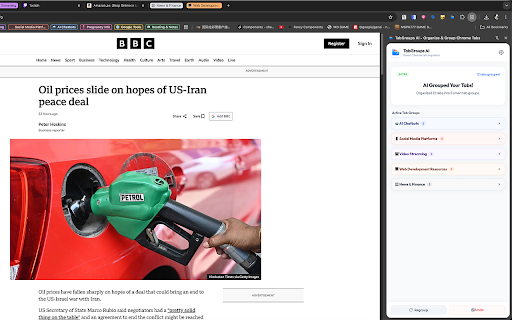
TabGroups AI helps you tidy a busy browser window by sorting open tabs into native Chrome tab groups when you ask it to.

Open the side panel and tap "1-Click Arrange." The extension reviews tab titles and domains in your current window—not the text on the page—and suggests topic-based groups with names and colors. You stay in control: regroup from scratch, collapse groups, or undo everything with one action.

What you can do:
• Group all ungrouped tabs in the active window in one step
• See groups in the side panel and jump between them quickly
• Regroup after a research session or shopping spree
• Undo to return tabs to an ungrouped list
• Turn on auto-collapse so only the active group stays expanded
• Block sensitive domains (banking, login, work tools) from being grouped

Privacy and how it works:
Classification runs on your device using Chrome’s built-in language model when available. Tab data is used only to build groups in your browser and is not uploaded to our servers.

If you often end up with dozens of tabs open, TabGroups AI gives you a simple way to turn that pile into labeled groups you can scan at a glance.
Technical
- Version
- 1.0.0
- Manifest
- V3
- Size
- 146KiB
- Min Chrome
- 88
- Languages
- 1
- Featured
- No
Metadata
- ID
- lhdjghblicbgkmmbbngoonjgfgekflfh
- Developer ID
- u15f4a58255194606b10f88ea0a2ea272
- Developer Email
- [email protected]
- Created
- Jun 10, 2026
- Last Updated (Store)
- Jun 10, 2026
- Last Scraped
- Jun 11, 2026
- Website
- joyboy.ae
- Support URL
- https://www.joyboy.ae/
- Privacy Policy
- —
Data sourced from the Chrome Web Store · last verified Jun 11, 2026.