
Full Webpage Screenshot
Our Full-Page Screenshot Capture Extension offers a solution to the tedious process of capturing multiple screenshots of long…
As of June 2026, Full Webpage Screenshot has 336 users and a 1.00/5 rating from 1 reviews in the Workflow & Planning category.
Usersup 20.0 percent+20.0%
336
336
Ratingno change0%
1.00
1 reviews
Reviewsno change0%
1
Version
1.1
Manifest V3
History
4 snapshotsTracking since Apr 18, 2026.
View as table
| Date | Users | Rating | Reviews | Version |
|---|---|---|---|---|
| Apr 18, 2026 | 280 | 1.00 | 1 | 1.1 |
| Apr 28, 2026 | 298 | 1.00 | 1 | 1.1 |
| May 19, 2026 | 321 | 1.00 | 1 | 1.1 |
| Jun 2, 2026 | 353 | 1.00 | 1 | 1.1 |
| Now | 336 | 1.00 | 1 | 1.1 |
Permissions & access
- Permissions
- activeTabtabsscriptingdownloads
- Host access
- <all_urls>
Screenshots
About
Our Full-Page Screenshot Capture Extension offers a solution to the tedious process of capturing multiple screenshots of long webpages. No more scrolling and taking multiple screenshots or using the print screen button and editing later. With our extension, you can capture an entire webpage, including scrolling pages, with a single click!

The extension uses a cloud-based screenshot service to render the whole webpage and return a full-page screenshot. It supports both desktop and mobile views, so you can get the screenshot as it would appear on a variety of devices.

Key Features:

Full-Page Screenshots: Capture the entire content of a webpage, even those with long content that requires scrolling, in one single image.
Desktop and Mobile Views: Choose whether to capture the screenshot as it would appear on a desktop browser or a mobile device.
Automatic Downloads: Screenshots are automatically downloaded to your default download folder, saving you the hassle of manually saving images.
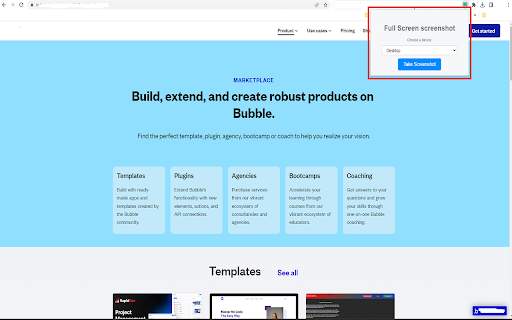
Simple to Use: Just input the URL or use the auto-detect feature, select the device view, and click capture - it's that simple!
How to Use:

Install the Extension: Add the Full-Page Screenshot Capture Extension to your browser.
Navigate to the Page or Input URL: You can either navigate to the webpage you want to capture and click the extension icon, or manually input the URL into the extension popup.
Select Device View (Optional): Choose whether to capture the screenshot in 'desktop' or 'mobile' view.
Click Capture: Click the 'Capture' button and wait for a few seconds as the extension captures the full-page screenshot and automatically downloads it to your device.
Simplify your screenshot process and enhance productivity with our Full-Page Screenshot Capture Extension. Try it today!
Technical
- Version
- 1.1
- Manifest
- V3
- Size
- 22.96KiB
- Min Chrome
- 88
- Languages
- 1
- Featured
- Yes
Metadata
- ID
- lhbbnmodgimabaafjdifcokabggngpmh
- Developer ID
- u2b9134ba0412e121257af0cca96d75eb
- Developer Email
- [email protected]
- Created
- Jul 8, 2023
- Last Updated (Store)
- Nov 3, 2025
- Last Scraped
- Jun 2, 2026
- Website
- —
- Support URL
- —
- Privacy Policy
- —
Similar extensions
Alternatives to Full Webpage Screenshot, ranked by description similarity.

Full Page Screenshot
Capture full-page screenshots of any webpage
687
★ 1.0

Full Page Screen Capture
Enable this extension to capture screenshots whether it's a visible screen, crop capture andfull-page screen
70.0K
★ 3.9

Easy Screenshot
Capture full-page screenshots instantly. Manually select any part of the page to capture exactly what you need.
4

Full Page Screenshot - Screen Capture
Screenshot tool for making a full page or partial screen capture with further edit, text adding and download.
3.0K
★ 4.3

Full Page Screenshot: ScreenTool.io
Take Full Page Screenshots effortlessly, snip specific areas, and share in seconds.
9.0K
★ 3.9

webpage screenshots
One-click generation of webpage screenshots
122

Capture Full Page
Use Capture Full Page — a lightweight Chrome extension for creating online screen and full web page
screenshots.
1.0K
★ 4.8

InstaScroll: Full Page Screenshots for Chrome
Capture full-page screenshots
137
★ 5.0
Data sourced from the Chrome Web Store · last verified Jun 2, 2026.