
Crawlr - Data Scraping and Monitoring
Effortlessly scrape web data with Crawlr. Extract data, export, schedule alerts, and manage your data with ease.
As of May 2026, Crawlr - Data Scraping and Monitoring has 133 users and a 5.00/5 rating from 2 reviews in the Productivity category.
Usersup 0.8 percent+0.8%
133
133
Ratingno change0%
5.00
2 reviews
Reviewsno change0%
2
Version
1.0
Manifest V3
History
2 snapshotsTracking since Apr 23, 2026.
View as table
| Date | Users | Rating | Reviews | Version |
|---|---|---|---|---|
| Apr 23, 2026 | 132 | 5.00 | 2 | 1.0 |
| May 18, 2026 | 128 | 5.00 | 2 | 1.0 |
| Now | 133 | 5.00 | 2 | 1.0 |
Permissions & access
- Permissions
- identityactiveTabstoragescripting
- Host access
- None declared
Screenshots


About
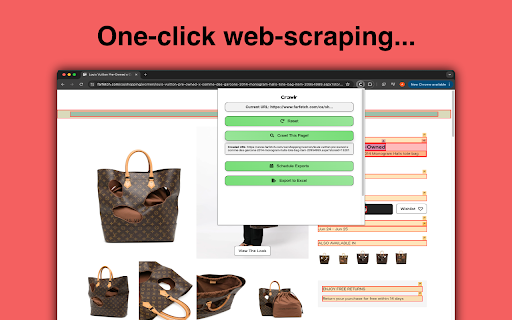
Crawlr is a powerful web scraping extension designed to help you effortlessly extract and manage data from websites. Whether you need to collect product information, track content changes, or export data for analysis, Crawlr makes the process simple and efficient.

Key Features:

• One-Click Crawling: Easily crawl and scrape data from any webpage with a single click. Crawlr highlights content elements for seamless data extraction.
• Content Highlighting: Visualize scraped elements with intuitive color-coded highlights, ensuring you capture exactly what you need.
• Instantly Export or Schedule Exports: Instantly export to Excel and schedule automatic reports to your preferred format (CSV or Excel) and receive data on your schedule. Choose daily full exports or alert-based notifications for changes.
• Flexible Data Management: Customize column names and configure alerts to receive notifications for specific data changes. Perfect for tracking price updates, content changes, and more.
• User-Friendly Interface: Enjoy a clean, intuitive interface that makes web scraping easy for everyone, from beginners to advanced users.
How to Use Crawlr:

Install Crawlr: Add the Crawlr extension to your Chrome browser.
1. Crawl a Page: Navigate to the webpage you want to scrape and click the "Crawl This Page!" button.
2. View Scraped Data: Review the highlighted elements and extracted data in the extension's popup.
3. Build Export: Crawlr will extract all data from the webpage, from there you must specify what is of importance to you. Use the checkboxes to select what you want in your export and input the column names as well.
4. Instant Export or Schedule Exports: Instantly export to Excel or specify your export preferences and schedule your report.
5. Manage and Monitor: Customize alerts and column names to keep track of important data changes.

Crawlr is the perfect tool for data enthusiasts, researchers, e-commerce professionals, and anyone needing reliable and efficient web scraping capabilities. Get started with Crawlr today and take control of your web data like never before!

Privacy and Compliance:

Crawlr respects your privacy and data security. We do not collect or store any personal information. All data is processed locally within your browser, and you have full control over your exported data.
Technical
- Version
- 1.0
- Manifest
- V3
- Size
- 945KiB
- Min Chrome
- 88
- Languages
- 1
- Featured
- No
Metadata
- ID
- lglihhafgjnnffikmllnanaleedbccah
- Developer ID
- ud5b834079b5f590336f64d4419269c69
- Developer Email
- [email protected]
- Created
- Jun 27, 2024
- Last Updated (Store)
- Jun 27, 2024
- Last Scraped
- May 18, 2026
- Website
- crawlrlabs.com
- Support URL
- https://www.crawlrlabs.com/contact
Similar extensions
Alternatives to Crawlr - Data Scraping and Monitoring, ranked by description similarity.

Spider ListCrawling Extension
Web page element selection and data extraction tool
25

Page Scraper
Simple and easy to use scraper tool.
57

Web Crawler Extension
A simple and effective web crawler extension designed to help users easily extract and manage data from web pages.
344
★ 5.0

Crawell
Crawell – All-in-one web asset extractor & knowledge organizer
110

ScrapR
Scrape data from any web page easily and efficiently
877
★ 5.0
Visual Web Scraper
Easily extract data from any website and export as CSV or JSON files.
10.0K
★ 4.5

Easy Data Scraper - Instant Data Scraper
Easy Data Scraper - Automatically detects, scrapes, and highlights data from multiple sections on a page.
308
★ 5.0

ScraperCity - Data Scraper & Table Extractor
Free data scraper to extract tables & lists from any page. One-click CSV export. No code data collector and screen scraper tool.
17
Data sourced from the Chrome Web Store · last verified May 18, 2026.