Focus Project
Group your tabs by project. Switch projects and the right tabs open while the rest close.
As of June 2026, Focus Project has — users in the Productivity category.
Usersno change0%
—
—
Ratingno change0%
—
— reviews
Reviewsno change0%
—
Version
1.0.0
Manifest V3
History
1 snapshotsTracking since Jun 21, 2026.
Not enough history yet for this metric — the chart fills in as we collect more snapshots.
View as table
| Date | Users | Rating | Reviews | Version |
|---|---|---|---|---|
| Jun 21, 2026 | — | — | — | 1.0.0 |
| Now | — | — | — | 1.0.0 |
Permissions & access
- Permissions
- tabsstoragesidePanel
- Host access
- None declared
Screenshots

About
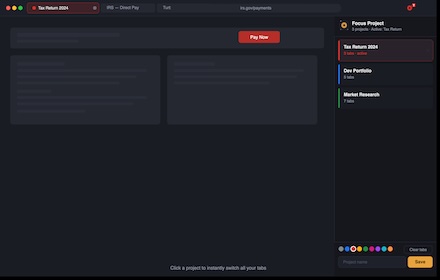
Focus Project keeps your browser organized by letting you save groups of tabs as named projects — and switch between them instantly.
How it works
Open the side panel, type a project name, pick a color, and hit Save. Your open tabs are now saved as that project. When you switch to a different project, its tabs open and everything else closes. No clutter, no lost work.
Key features

Persistent side panel — stays open while you browse, so your project list is always one glance away
One-click switching — click a project and the right tabs appear immediately
Auto-save — tabs are saved automatically as you open or close them; no manual saving needed
Color-coded toolbar icon — the extension icon changes color to match your active project, so you always know where you are at a glance
Clear tabs — wipe the window clean and start a fresh project without touching your saved ones
Multi-window support — run different projects in different windows simultaneously
Pinned tabs are untouched — pin Gmail, Slack, or any always-on tab and it will never be closed during a switch
100% local — no account, no server, no data leaves your machine

Perfect for
Developers juggling multiple codebases, researchers switching between topics, freelancers moving between clients, or anyone who wants a clean, focused browser.
Technical
- Version
- 1.0.0
- Manifest
- V3
- Size
- 64.65KiB
- Min Chrome
- 88
- Languages
- 1
- Featured
- No
Metadata
- ID
- lgiefoapaipgjjhfpngbkbonodlkdbgc
- Developer ID
- udee63f2686ddb2b7c927f4410ddc5cb2
- Developer Email
- [email protected]
- Created
- Jun 20, 2026
- Last Updated (Store)
- Jun 20, 2026
- Last Scraped
- Jun 21, 2026
- Website
- enpoi.com
- Support URL
- www.enpoi.com
Data sourced from the Chrome Web Store · last verified Jun 21, 2026.