
Prompt Picker
Pick page elements, annotate, and copy as a structured prompt for AI.
As of June 2026, Prompt Picker has 18 users in the Developer Tools category.
Usersno change0%
18
18
Ratingno change0%
—
— reviews
Reviewsno change0%
—
Version
1.0.1
Manifest V3
90-day change · In the last 90 days this extension 1 version update.
History
3 snapshotsTracking since May 19, 2026.
Not enough history yet for this metric — the chart fills in as we collect more snapshots.
View as table
| Date | Users | Rating | Reviews | Version |
|---|---|---|---|---|
| May 19, 2026 | — | — | — | 1.0.0 |
| May 25, 2026 | — | — | — | 1.0.0 |
| Jun 1, 2026 | — | — | — | 1.0.1 |
| Now | 18 | — | — | 1.0.1 |
Permissions & access
- Permissions
- activeTabscriptingstorage
- Host access
- None declared
Screenshots


About
Prompt Picker turns "this thing on the page" into a high-signal prompt your
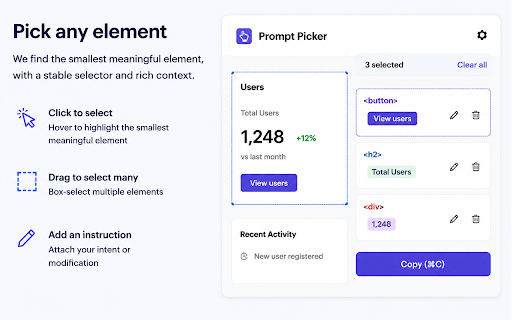
  AI coding assistant can act on. Click any element on the current page,
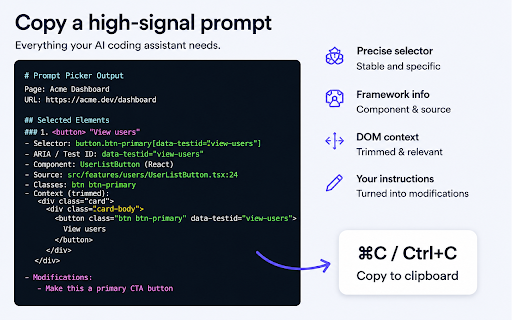
  optionally add an instruction, and copy a structured description that
  includes a stable selector, framework component info, surrounding DOM
  context, and your annotations.

  ────────────────────────────
  WHAT IT DOES
  ────────────────────────────

  • Click any element to pick it. Drag to box-select multiple at once.
  • Cmd+C / Ctrl+C copies all picks as a single, well-structured prompt.
  • Each selection gets a precise CSS selector, ARIA / data-testid anchors,
    detected React / Vue 2 / Vue 3 / Svelte / Angular component name and
    source file (when available), filtered class signature (CSS-in-JS
    hash classes are stripped), and a trimmed DOM skeleton.
  • Add a free-form instruction per element ("change copy to X", "make this
    primary button"). Instructions are emitted as a "Modifications" section
    in the copied prompt.
  • Copy history is kept locally with full-text search across prompt body,
    page title, and URL.

  ────────────────────────────
  DESIGNED FOR AI WORKFLOWS
  ────────────────────────────

  The output is optimized for tools like Claude, Cursor, GitHub Copilot Chat,
  and any LLM-based pair programmer. Instead of pasting a screenshot or
  describing the element in prose, you give the model the exact selector,
  the framework component, the source path, and a strategy for finding it
  in the codebase.

  ────────────────────────────
  HOW TO USE
  ────────────────────────────

  1. Click the toolbar icon to toggle Prompt Picker on the current tab.
  2. Hover over the page; a blue outline shows the smallest meaningful
     element under the cursor. Click to select.
  3. Press Cmd+C (Mac) / Ctrl+C (Win/Linux) to copy. Paste into your AI tool.
  4. Press Esc to exit picker mode.

  Tips:
  - Drag a rectangle to select many elements at once.
  - Click a selected element again to deselect.
  - Click the pencil icon on a selected element to attach an instruction.

  ────────────────────────────
  PRIVACY
  ────────────────────────────

  Prompt Picker does not collect, transmit, or share any user data.
  - Copy history is stored locally via chrome.storage.local.
  - Nothing is sent to any remote server, including the developer.
  - The extension only activates on the current tab when you click the icon.

  ────────────────────────────
  PERMISSIONS EXPLAINED
  ────────────────────────────

  • activeTab — Required to inject the picker into the page you are
    currently viewing when you click the toolbar icon.
  • scripting — Required to programmatically inject the picker scripts
    and stylesheet, including running in the page's main world to read
    framework component metadata (React fibers, Vue instances, etc.).
  • storage — Required to keep your local copy history between sessions.

  ────────────────────────────
  OPEN TO FEEDBACK
  ────────────────────────────

  Bug reports, feature ideas, and pull requests are welcome.
Technical
- Version
- 1.0.1
- Manifest
- V3
- Size
- 39.03KiB
- Min Chrome
- 88
- Languages
- 1
- Featured
- No
Metadata
- ID
- lgcmgmlbomeodhmikhiphmonogmfdeeg
- Developer ID
- u8537fb1df31230347e1ad55ddf67d533
- Developer Email
- [email protected]
- Created
- May 18, 2026
- Last Updated (Store)
- May 21, 2026
- Last Scraped
- Jun 7, 2026
- Website
- —
- Support URL
- —
- Privacy Policy
- —
Data sourced from the Chrome Web Store · last verified Jun 7, 2026.