
FeedSpotter
Rediscover the pulse of the internet with 'FeedSpotter'—the Chrome extension that proves RSS feeds are just undead!
As of June 2026, FeedSpotter has 5 users in the Accessibility category.
Usersup 150.0 percent+150.0%
5
5
Ratingno change0%
—
— reviews
Reviewsno change0%
—
Version
1.0
Manifest V3
History
3 snapshotsTracking since Apr 23, 2026.
View as table
| Date | Users | Rating | Reviews | Version |
|---|---|---|---|---|
| Apr 23, 2026 | 2 | — | — | 1.0 |
| May 13, 2026 | 5 | — | — | 1.0 |
| Jun 8, 2026 | 4 | — | — | 1.0 |
| Now | 5 | — | — | 1.0 |
Permissions & access
- Permissions
- activeTabclipboardWrite
- Host access
- None declared
Screenshots

About
Welcome to the digital treasure hunt with FeedSpotter, the Chrome extension that turns your browser into an RSS oasis! In the sprawling desert of the web, RSS feeds remain the hidden streams of content that keep you nourished with the latest news, updates, and blog posts.

What does FeedSpotter do?
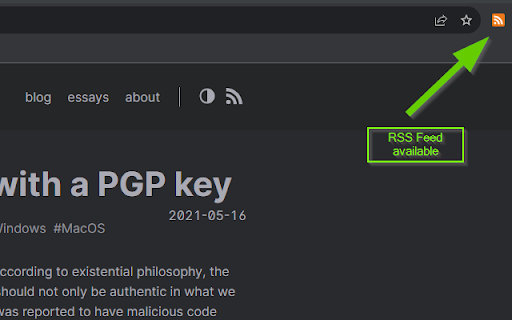
FeedSpotter is your trusty RSS divining rod. It diligently detects RSS feeds embedded within the pages you visit. With a discreet color change of the icon, it proudly displays the availability of feeds - a subtle nod to the richness of content awaiting your exploration.

Why is FeedSpotter a must-have?
Think of FeedSpotter as your personal content concierge. You no longer need to dig through page source or search for subscription buttons. The extension’s icon serves as a dynamic indicator—colored when feeds are found and grayscale in their absence, guiding you with visual cues.

One-Click Clipboard Magic:
The magic happens when you click the FeedSpotter icon. The RSS feed link is instantly copied to your clipboard, as seamless as a sleight of hand. It's a single-step shortcut to staying informed without the hassle of manual copying.

Why install FeedSpotter?

Discover content that matters: Unveil the hidden feeds that align with your interests.
Save time: No more manual searches; access RSS links with one click.
Stay organized: Keep your favorite feeds at your fingertips, ready to be added to your reader.
Enjoy simplicity: A user-friendly interface that doesn’t clutter your browser.
Keep informed: Be the first to know when your favorite sites post new content.
With FeedSpotter, become part of a community that values streamlined, efficient browsing. It’s a tool for the curious, the knowledge seekers, and the content aficionados. RSS isn’t just alive; it’s thriving. Join the revival with FeedSpotter because the best of the web is just a click away. Install now and never miss a beat in the ever-evolving rhythm of the internet!
Technical
- Version
- 1.0
- Manifest
- V3
- Size
- 25.78KiB
- Min Chrome
- 88
- Languages
- 1
- Featured
- Yes
Metadata
- ID
- lfnbcggkaejpolgnffemfneolfbeofcp
- Developer ID
- u7c0c5113f094dec91fa39d17657bde81
- Developer Email
- [email protected]
- Created
- Nov 14, 2023
- Last Updated (Store)
- Nov 14, 2023
- Last Scraped
- Jun 8, 2026
- Website
- —
- Privacy Policy
- —
Similar extensions
Alternatives to FeedSpotter, ranked by description similarity.

GoFetch
GoFetch Internet Companion
7
★ 5.0

Click to Copy - Unified Content Grabbing
A focused tool to instantly capture any web content—text, links, or image files—using a single Alt+Click gesture.
3

IntentSeek
Highlight the text you want efficiently to summarise or analyse in order to reveal the hidden message or underlying intent.
155
★ 4.8

CrawlerNest URL Extractor
Extract URLs from Google SERP and Websites
87
★ 5.0

Readable
Clean and readable web pages with one click
—

LinkList
Instantly save and copy your most used URLs. A minimal, blazing-fast tool to manage your frequently accessed links.
2
★ 5.0

QuickBite - Read, Learn & Save Faster
QuickBite refines and optimizes the content on the web page and helps you Read, Learn & Save Faster.
8
★ 5.0

The Filter They Forgot for Roblox
Hide blur or highlight Roblox content your way; filter out what you don’t want, or focus on what truly clicks with you.
275
★ 5.0
Data sourced from the Chrome Web Store · last verified Jun 8, 2026.