Command Palette
A command palette to navigate in Google Chrome faster.
As of June 2026, Command Palette has 301 users and a 3.70/5 rating from 10 reviews in the Workflow & Planning category.
Usersdown 3.5 percent−3.5%
301
301
Ratingno change0%
3.70
10 reviews
Reviewsno change0%
10
Version
1.0.1
Manifest V3
History
3 snapshotsTracking since Apr 23, 2026.
View as table
| Date | Users | Rating | Reviews | Version |
|---|---|---|---|---|
| Apr 23, 2026 | 312 | 3.70 | 10 | 1.0.1 |
| May 13, 2026 | 307 | 3.70 | 10 | 1.0.1 |
| Jun 8, 2026 | 321 | 3.70 | 10 | 1.0.1 |
| Now | 301 | 3.70 | 10 | 1.0.1 |
Permissions & access
- Permissions
- activeTabscriptingsearchtabs
- Host access
- None declared
Screenshots

About
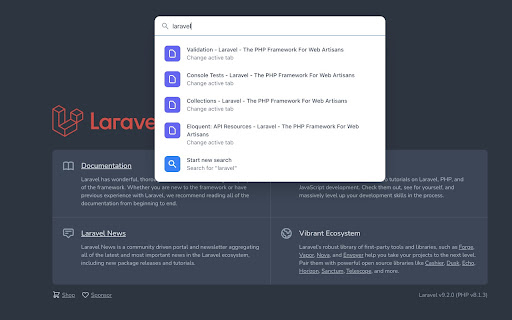
An extension that allows you to quickly switch between active tabs, open new tabs, execute commands and more.

Open the command palette by pressing CTRL/COMMAND + SHIFT + K at anytime. The shortcut is editable in the Chrome's shortcuts settings (chrome://extensions/shortcuts).
Technical
- Version
- 1.0.1
- Manifest
- V3
- Size
- 86.21KiB
- Min Chrome
- 88
- Languages
- 1
- Featured
- No
Metadata
- ID
- lfmfhlofoaleegdogpmknfbibciflfek
- Developer ID
- u704cf92ea06ff0ecfa4107656a4598ce
- Developer Email
- [email protected]
- Created
- Mar 22, 2022
- Last Updated (Store)
- Aug 9, 2022
- Last Scraped
- Jun 8, 2026
- Website
- —
- Privacy Policy
- —
Similar extensions
Alternatives to Command Palette, ranked by description similarity.

Jumpstart - Bookmarks Popup
A Chrome extension popup for quick access to bookmarks, pinned items, and open tabs
—

Tablyt
Quickly access tabs, bookmarks, history, and context-aware actions through a command-palette.
47
★ 5.0

Command Palette by Single Dispatch
Command palette for any website. Manage tabs and bookmarks, open links, or trigger button clicks just with your keyboard.
35

Command Palette
Search Tabs and Bookmarks like in VS Code
34
★ 5.0

quick tabs
Quick and easy text search for Chrome tabs
9
★ 5.0
Switch tabs shortcuts
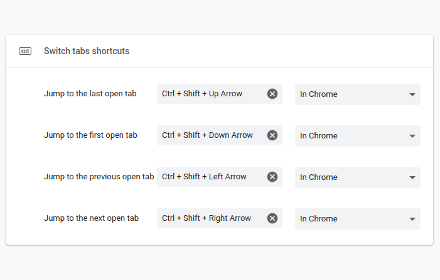
Adds custom shortcuts for switching tabs.
707
★ 4.7

quickToggleTab
快速切换Tab
3

Last Two Tabs Toggler
Toggle between the two latest active tabs using Control+Space.
4
Data sourced from the Chrome Web Store · last verified Jun 8, 2026.