
The Maps Express
A Shortcut to Google Maps, but Rich and Beautiful.
As of June 2026, The Maps Express has 1,000 users and a 5.00/5 rating from 9 reviews in the Productivity category.
Usersno change0%
1.0K
1,000
Ratingno change0%
5.00
9 reviews
Reviewsno change0%
9
Version
1.15.1
Manifest V3
90-day change · In the last 90 days this extension 3 version updates.
History
3 snapshotsTracking since Apr 17, 2026.
View as table
| Date | Users | Rating | Reviews | Version |
|---|---|---|---|---|
| Apr 17, 2026 | 1.0K | 5.00 | 9 | 1.14.0 |
| May 11, 2026 | 1.0K | 5.00 | 9 | 1.14.1 |
| Jun 2, 2026 | 1.0K | 5.00 | 9 | 1.15.0 |
| Now | 1.0K | 5.00 | 9 | 1.15.1 |
Permissions & access
- Permissions
- activeTabcontextMenusstoragescriptingtabGroups
- Host access
- https://generativelanguage.googleapis.com/*, https://extensionpay.com/*, https://www.youtube.com/*, https://www.google-analytics.com/*
Screenshots


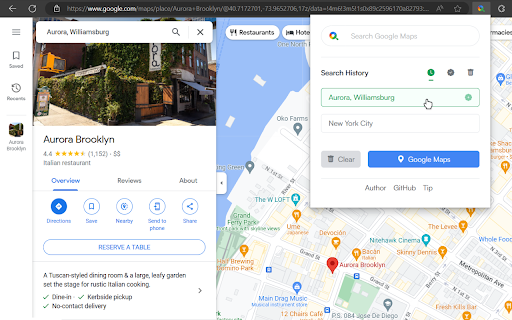
About
Search and save locations effortlessly with The Maps Express, experiencing rapid integration and minimal workflow disruption.

——————————————————

FEATURES
❇️ Quick Search: Use the shortcut (Ctrl+Shift+S / ⌘+⇧+S) or right-click highlighted text for quick searches, ideal for reading web pages.
❇️ Search Bar: Use the shortcut (Alt+Shift+S / ⌥+⇧+S) or click to open the extension, ideal for watching videos.
❇️ Search History: Saves up to 10 locations for quick redirection to Google Maps.
❇️ Favorite List: Click the plus icon in the search history to save. Import or export favorites as needed.
❇️ Delete Mode: Simply check and delete items.
❇️ Place Summary: Set up the API key to summarize the locations on the current page. The results will be preserved and automatically cleared after 1 day.
❇️ Video Summary: Switch to Video Summary Mode with one click from the Place Summary tab, extracting key locations from YouTube videos.
❇️ Quick Directions: Use the shortcut (Alt+R / ⌥+R) or right-click to launch a map with directions from the starting address to the highlighted text.

——————————————————

PREMIUM FEATURES
❇️ Auto-attach Link: Attach a map link to all locations on any website with one shortcut (Alt+S / ⌥+S).
❇️ Tidy Location List: Auto-categorize any list via the context menu.

——————————————————

TROUBLESHOOTING
❇️ How can I adjust the keyboard shortcuts if they don't work or conflict with other functions' shortcuts?
▶️ You can use the hyperlinks on the extension's "Hints" page, or follow these steps to customize the shortcuts in your browser:
1️⃣ Locate the "Manage extensions" page (may vary depending on the browser)
2️⃣ Select "Keyboard shortcuts"
3️⃣ Click the input field and press the shortcut
4️⃣ For some browsers, you may need to change the scope to "Global"

❇️ How to Apply for a Gemini API Key (1 min):
▶️ Google AI Studio > Sign In > Consent to Legal Notice & Continue > Get API key > Create API key > Create API key in new project > Copy

❇️ Are there usage limits for the Gemini Summary feature?
▶️ According to the latest plan information from Google AI Studio, the Gemini (1.5 Flash) API free tier allows 15 requests per minute, 1,500 requests per day, and up to 1 million tokens per minute.

❇️ Will my personal records or API key be leaked?
▶️ No, all information is stored locally in your browser. As recommended by Google AI Studio, always use your API keys securely.

——————————————————

IMPORTANT CHANGELOG
❇️ 1.11.0 Added the right-click menu
❇️ 1.10.0 Added summarize from YouTube Video
❇️ 1.9.0 Added route with Google Maps
❇️ 1.8.11 Added list height resizing feature
❇️ 1.8.0 Added AI premium feature
❇️ 1.7.0 Detached the extension pop-up into a floating iframe
❇️ 1.6.0 Renamed extension to "The Maps Express"
❇️ 1.5.12 Added disambiguating terms to summary results
❇️ 1.5.1 Added Japanese language support
❇️ 1.5.0 Added location summary feature powered by Google's Gemini AI
❇️ 1.4.7 Fixed the early firing issue when using the Chinese input method in the search bar on macOS and Linux
❇️ 1.4.2 Added Chinese language support

——————————————————

Feel free to contact me or share your feedback 🖐🏼
Technical
- Version
- 1.15.1
- Manifest
- V3
- Size
- 1.13MiB
- Min Chrome
- 88
- Languages
- 3
- Featured
- Yes
Metadata
- ID
- lfkhadednlnfhmhagkhapejkhpjibaic
- Developer ID
- u20e6709168e2a152d5a5a6a1c698b5b4
- Developer Email
- [email protected]
- Created
- Apr 16, 2023
- Last Updated (Store)
- Jun 1, 2026
- Last Scraped
- Jun 24, 2026
- Website
- —
- Support URL
- https://bento.me/the-maps-express
Similar extensions
Alternatives to The Maps Express, ranked by description similarity.

Trufflepiggy - Quick Search
The all-in-one search tool: select and search. Find on multiple websites at once. Easy anonymous setup. Cross-browser sync.
2.0K
★ 4.3

Google Maps Quick Search: Popup, Right-Click & Shortcut
Quick access to Google Maps
197
★ 5.0

Search It All
Search across multiple search engines with one click - no retyping needed
936
★ 3.9

SumIt! - Smart Page Summarizer
Get a quick summary of the current page using Gemini AI.
44

Gemini Keyboard Shortcuts
Add keyboard shortcuts to Google Gemini for faster navigation
487
★ 5.0

Google Maps List Filter
Easily search and filter your saved places in Google Maps lists by name, type, price, or notes with a convenient search overlay
428
★ 4.6

AI要約 with Gemini
長文のWebページを「Gemini」が瞬時に要約。特に、読むのが大変な利用規約やプライバシーポリシーのポイント理解を強力にサポートします。要約内容についてチャット形式で追加質問もでき、理解をアシスト。ユニークで楽しい「ギャル人格モード👩」も搭載。
42
★ 3.0

Putenza Gemini
Putenza Gemini - Rendi Gemini flessibile, organizzato, alla massima PUUTENZAA!
9
★ 5.0
Data sourced from the Chrome Web Store · last verified Jun 24, 2026.