
Google Calendar Tonton
Auto-send Tonton's schedule from Google Calendar.
As of June 2026, Google Calendar Tonton has 30 users in the Accessibility category.
Usersup 3.4 percent+3.4%
30
30
Ratingno change0%
—
— reviews
Reviewsno change0%
—
Version
1.4.0
Manifest V3
History
5 snapshotsTracking since Apr 18, 2026.
View as table
| Date | Users | Rating | Reviews | Version |
|---|---|---|---|---|
| Apr 18, 2026 | 29 | — | — | 1.4.0 |
| Apr 28, 2026 | 34 | — | — | 1.4.0 |
| May 7, 2026 | 32 | — | — | 1.4.0 |
| May 19, 2026 | 30 | — | — | 1.4.0 |
| Jun 2, 2026 | 28 | — | — | 1.4.0 |
| Now | 30 | — | — | 1.4.0 |
Permissions & access
- Permissions
- storageunlimitedStorage
- Host access
- https://calendar.google.com/*
Screenshots

About
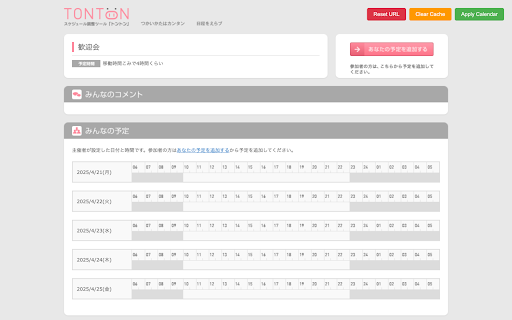
Google Calendar Tonton seamlessly connects your Google Calendar with the Tonton scheduling interface, keeping your availability up to date without any extra effort.

Key Features
- Automated schedule synchronization using your private Google Calendar ICS link
- 24‑hour local cache to minimize fetch requests and speed up performance
- One‑click marking of busy time slots directly on Tonton’s booking page
- Easy URL management: set, reset or clear cache at any time
- Built with Manifest V3, React 19, TypeScript and Vite for security and performance

How It Works
1. On first use you will be prompted to enter your Google Calendar ICS URL.
2. That URL is stored locally and is refreshed every 24 hours.
3. When you visit any Tonton schedule page, click the Apply Calendar button.
4. The extension fetches and parses your calendar events, then highlights and blocks all overlapping time slots in Tonton’s UI.
5. Use the Clear Cache button to force a fresh fetch or Reset URL to switch to a different calendar.

Installation and Usage
1. Install the extension from the Chrome Web Store.
2. Click Reset URL to enter your ICS link.
3. Visit a Tonton page and click Apply Calendar to sync your busy times instantly.

Eliminate manual entry and avoid double‑bookings—Google Calendar Tonton does the work for you.
Technical
- Version
- 1.4.0
- Manifest
- V3
- Size
- 103KiB
- Min Chrome
- 88
- Languages
- 1
- Featured
- No
Metadata
- ID
- lfgjlkfemoaaindkcgdncghkomgmmemi
- Developer ID
- u745aef2ebdbfa448aad2cc2015baf487
- Developer Email
- [email protected]
- Created
- Apr 24, 2025
- Last Updated (Store)
- Oct 31, 2025
- Last Scraped
- Jun 2, 2026
- Website
- minagishl.com
- Support URL
- —
- Privacy Policy
- https://minagishl.com/terms-and-privacy
Similar extensions
Alternatives to Google Calendar Tonton, ranked by description similarity.

Call Timer for Meet
This extension adds a timer to your Google Meet calls with customizable time limits and alerts.
70.0K
★ 3.8

Cambly Sync Calendar
Cambly Sync Calendar extension allows you to see your upcoming Cambly reservations and download them in calendar format (.ics…
212
★ 2.3

Tally Connect - Ingenious CRM
Tally Connect, A support extension for 'Ingenious CRM' by TYMK Softwares
15

Enhanced Tab Manager
Manage tabs with grouping, colors, and save/restore functionality.
12
★ 3.0

Live Preview Opener
Enter your workspace url and click on any button to open Frontend Preview OR Backend Data
78
★ 5.0

Hako Calendar
Display Hako Calendar Note button on Google Calendar
6

BCS-Enhancer
A ton of tweaks for Projektron BCS to improve your quality of booking.
250
★ 4.7

Google Meet Attendance Management
You can check the Google Meet attendance of users who are going to attend in the Google Calendar.
6.0K
★ 3.8
Data sourced from the Chrome Web Store · last verified Jun 2, 2026.