
BrowseScope — Tab & History Insights
View all open tabs, browse history, and get AI-powered insights on your browsing patterns.
As of June 2026, BrowseScope — Tab & History Insights has — users in the Productivity category.
Usersno change0%
—
—
Ratingno change0%
—
— reviews
Reviewsno change0%
—
Version
1.0.0
Manifest V3
Permissions & access
- Permissions
- tabshistorystorageactiveTab
- Host access
- None declared
Screenshots



About
Take control of your browser. BrowseScope puts your open tabs, full browsing history, and usage analytics into a single, beautifully designed popup — no new tabs, no clutter.
Open Tabs
See every tab across all your windows, grouped and searchable. Filter by keyword, copy a single link or all of them at once, export your full tab list as a text file, or close tabs you no longer need — without switching away from what you're doing.
Browsing History
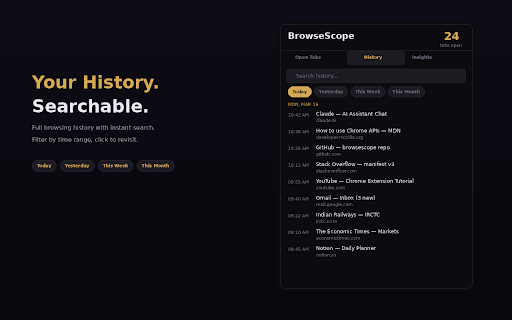
Search your complete browsing history with instant results. Filter by Today, Yesterday, This Week, or This Month. Click any entry to reopen it. Clean, timestamped, and easy to scan.
Browsing Insights
This is where BrowseScope stands apart. It passively tracks the time you spend on each site and gives you a real-time dashboard with:

Total browsing time and average daily usage
Top sites ranked by time spent (visual bar chart)
Automatic category breakdown — Social Media, Video, Productivity, Dev & Tech, Communication, Shopping, News, and more
A 7-day usage trend chart so you can spot patterns at a glance
Filterable by Today, 7 Days, or All Time

100% Private
All data stays on your device. BrowseScope uses Chrome's local storage only — nothing is transmitted, no accounts, no analytics servers, no third-party tracking. Your browsing habits are yours alone.
Permissions — and why we need them:

tabs — to list your open tabs across windows
history — to search and display your browsing history
storage — to save usage data locally on your machine
activeTab — to interact with your current tab

Built for anyone who wants to stay organized, reclaim focus, or simply understand where their screen time goes.
Technical
- Version
- 1.0.0
- Manifest
- V3
- Size
- 17.81KiB
- Min Chrome
- 88
- Languages
- 1
- Featured
- No
Metadata
- ID
- lfepehbjencoampklllmogfmlllefdmk
- Developer ID
- ucf904aec5b4eac7d0d24e156f95975fe
- Developer Email
- [email protected]
- Created
- Mar 19, 2026
- Last Updated (Store)
- Mar 19, 2026
- Last Scraped
- Jun 7, 2026
- Website
- —
- Support URL
- —
Similar extensions
Alternatives to BrowseScope — Tab & History Insights, ranked by description similarity.

Browsing Log
Privacy-focused browsing activity tracker. Tracks visit time, frequency, and patterns with local data storage.
4

TabLogger
Track and analyze your browser tab lifecycle with visual charts
26

Browselytics
Track how long sites stay open, active, or in background. View browsing analytics locally with no data leaving your device.
2

Chrome Browsing Visualizer
Chrome extension that tracks browsing and tab activity over time with a focus on allowing users to visualize their browsing habits.…
1

Bookmark Backlog (bmbl)
Save all tabs with one click. Triage your reading backlog.
2

Focus Scope - Smart Website Blocker
Block SNS and time-wasting sites. A site blocker to keep your focus going with sprints and day-of-week schedules.
5

Browser History Insights
Visualize your browsing habits through interactive charts
598
★ 4.8

TabTime – Time Spent on Tab
Track how long you spend on each tab or site.
8
Data sourced from the Chrome Web Store · last verified Jun 7, 2026.