
蓝湖D2C扩展(非官方)
增强蓝湖设计图转代码功能,生成React Native 代码
As of June 2026, 蓝湖D2C扩展(非官方) has 160 users and a 5.00/5 rating from 1 reviews in the Developer Tools category.
Usersup 14.3 percent+14.3%
160
160
Ratingno change0%
5.00
1 reviews
Reviewsno change0%
1
Version
0.1.7
Manifest V3
History
3 snapshotsTracking since Apr 23, 2026.
View as table
| Date | Users | Rating | Reviews | Version |
|---|---|---|---|---|
| Apr 23, 2026 | 140 | 5.00 | 1 | 0.1.7 |
| May 13, 2026 | 160 | 5.00 | 1 | 0.1.7 |
| Jun 8, 2026 | 153 | 5.00 | 1 | 0.1.7 |
| Now | 160 | 5.00 | 1 | 0.1.7 |
Permissions & access
- Permissions
- None declared
- Host access
- https://*.lanhuapp.com/*, https://lanhu-dds-backend.oss-cn-beijing.aliyuncs.com/*
Screenshots
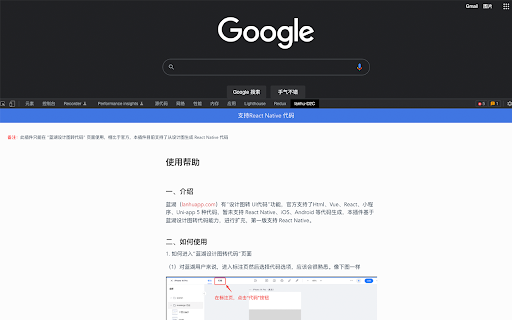


About
蓝湖(lanhuapp.com)有“设计图转 UI代码”功能,官方支持了Html、Vue、React、小程序、Uni-app 5 种代码,暂未支持 React Native、iOS、Android 等代码生成,本插件基于蓝湖设计图转代码能力,进行扩充。

谁适合安装本插件:必须是蓝湖用户,且想通过设计图生成 React Native UI 代码,则可以安装此插件。
本插件提供的功能:支持从"设计图生成 React Native 代码",能帮助 React Native 开发者用户提升效率

使用步骤:
1. 如果是蓝湖用户,进入标注页面,选择“代码”功能
2. 打开 DevTools,选择“蓝湖 D2C 扩展”,即可生成代码
3. 将生成的代码复制到个人的 React Native 项目中,进行调试。
Technical
- Version
- 0.1.7
- Manifest
- V3
- Size
- 2.94MiB
- Min Chrome
- 88
- Languages
- 2
- Featured
- No
Metadata
- ID
- lfcojhgmebmdkalfgcbchmoiblfpjoai
- Developer ID
- u1b1830f63cd523c85f53b0070f5ebb2e
- Developer Email
- [email protected]
- Created
- Oct 20, 2022
- Last Updated (Store)
- Oct 27, 2022
- Last Scraped
- Jun 8, 2026
- Website
- —
- Support URL
- —
- Privacy Policy
- —
Similar extensions
Alternatives to 蓝湖D2C扩展(非官方), ranked by description similarity.

蓝湖设计助手
增强蓝湖设计稿体验:自动显示标注、便捷下载切图
81
★ 5.0

AI Code Generator
Using AI technology, convert screenshots, design drafts, and prompts into front-end code(HTML/Tailwind/React/Vue/Bootstrap/Ionic).
807
★ 5.0

天空之城UI2Code
天空之城平台拓展
—
Screenshot to Code
A extension which convert screenshots to React tailwind code
707
★ 1.0

AI Code Preview
Preview, copy, and download code from AI responses. Supports HTML+CSS+JS, React components, and Vue single-file components.
178
★ 5.0

DirectCodeUI Capture
Select any area on any webpage to capture a screenshot
16
★ 4.0

Component Code Picker
Select, preview, and extract clean HTML/CSS from any web component.
2
Jinno: code any React component with AI
Develop html or react components with AI and chat GPT4. We can modify the React, HTML and CSS code for you.
3.0K
★ 4.8
Data sourced from the Chrome Web Store · last verified Jun 8, 2026.