
AI ChatWorks
Pioneering prompt management and bi-directional text control for ChatGPT, Claude, and Gemini. Your ultimate AI workflow companion.
As of June 2026, AI ChatWorks has 67 users and a 5.00/5 rating from 1 reviews in the Productivity category.
Usersup 4.7 percent+4.7%
67
67
Ratingno change0%
5.00
1 reviews
Reviewsno change0%
1
Version
1.1.1
Manifest V3
History
6 snapshotsTracking since Apr 1, 2026.
View as table
| Date | Users | Rating | Reviews | Version |
|---|---|---|---|---|
| Apr 1, 2026 | 64 | 5.00 | 1 | 1.1.1 |
| Apr 18, 2026 | 58 | 5.00 | 1 | 1.1.1 |
| May 8, 2026 | 62 | 5.00 | 1 | 1.1.1 |
| May 16, 2026 | 67 | 5.00 | 1 | 1.1.1 |
| May 24, 2026 | 64 | 5.00 | 1 | 1.1.1 |
| Jun 6, 2026 | 63 | 5.00 | 1 | 1.1.1 |
| Now | 67 | 5.00 | 1 | 1.1.1 |
Permissions & access
- Permissions
- storagetabsscriptingactiveTabunlimitedStoragecontextMenus
- Host access
- https://chat.openai.com/*, https://chatgpt.com/*, https://claude.ai/*, https://gemini.google.com/*, https://bard.google.com/*
Screenshots



About
Get 3X Faster AI Output: The Command Center that Kills Repetitive Prompting on ChatGPT, Claude, & Gemini.

Stop losing money and time repeating yourself. The bottleneck in your AI workflow isn't the chatbot, it's your system for managing prompts. You are forced to copy, paste, and re-type the same high-value instructions, costing you hours every week.

AI ChatWorks is your AI Command Center—the only system built to eliminate prompt repetition and give you a keyboard-driven "Flow" state across all major platforms. Install AI ChatWorks to transform your AI workflow from repetitive to profitable.

Why You Need It (The Outcome)?
Zero Repetition, Pure Output: Stop re-typing or hunting for prompts. Build an unlimited, searchable library and access your best prompts in under 2 seconds.

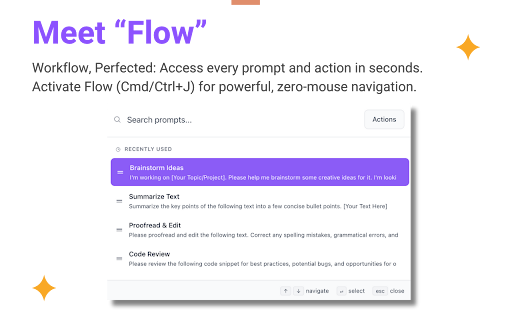
Keyboard-Driven Flow State: Work faster with "Flow" (Cmd/Ctrl+J)—a quick-access command palette to instantly search your library, summarize chats, or run powerful actions without your hands leaving the keyboard.

RTL Alignment Perfected: Automatically fix messy text alignment in real-time for all languages (Hebrew, Arabic, etc.). No more visual friction for bilingual users.
Key Features (The How)

Ultimate Prompt Library: Organized for Speed. Build an unlimited, private library of your best instructions. Organize with color-coded folders, favorites, and recents. It's stored locally—no limits on your power prompts.

AI ChatWorks Flow: The Command Palette. Press Cmd+J (Mac) or Ctrl+J (Windows) to open a Spotlight-style interface. Instantly search your entire library or run powerful quick actions.

Intelligent Text Direction: Seamless Bilingual Support. AI ChatWorks automatically ensures your text aligns correctly, whether you're writing in English, Hebrew, Arabic, or mixing languages. It's a truly seamless experience.

Full Management & Analytics: Optimize Your ROI. A beautiful, full-screen interface to create, edit, search, and organize. See which prompts you use most with built-in stats, and easily back up or restore your entire library.

Seamless & Polished UI: A clean, modern interface with smooth animations that integrates perfectly with the native look and feel of your favorite AI platforms.

––––––––––––––
Supported Platforms
––––––––––––––
ChatGPT (chat.openai.com & chatgpt.com)
Claude (claude.ai)
Google Gemini (gemini.google.com)

––––––––––––––
Versioning Changelog
––––––––––––––
Version 1.1.1 (November 24, 2025)
 -- NEW: Ghost Text Autocomplete (Flow) - Begin typing a prompt name for instant, Tab-to-accept suggestions. Instant suggestions save you keystrokes and time.
 -- NEW: Prompt Enhancer (Flow Action) - Automatically re-engineer your current prompt for improved performance, clarity, and structure.
 -- NEW: Context Menu Integration - Right-click selected text on any supported site to directly save it as a new prompt in your library.
 -- NEW: Bulk Actions - Added multi-select, bulk delete, and bulk move options to the Prompt Library. Manage hundreds of prompts in minutes.
 -- IMPROVEMENT: Enhanced Onboarding - Streamlined the initial setup to a 5-step flow, improving first-time user experience.
 -- IMPROVEMENT: Import/Export Tree View - Improved data management with a hierarchical tree view for granular selection of prompts and folders during import/export.

Version 1.1.0 (November 04, 2025)
 -- NEW: Full Fidelity Chat Summaries - Auto-copies summaries to clipboard using a complete 7-section enhanced structure.
 -- NEW: Right-Click Integration - Right-click selected text on any supported site to directly save it as a new prompt in your library.
 -- NEW: Flow Command Palette - Quick access to actions and prompts with keyboard navigation.
 -- IMPROVEMENT: Flow UX - Better spacing for prompt icons, smoother animations.
 -- IMPROVEMENT: Favorite Animation - Visual feedback when marking prompts as favorite.
 -- FIX: Dark Mode - Sort dropdown now displays correctly in dark theme.
 -- FIX: Collapse Animations - Significantly slower, smoother transitions for sidebar and folder list.

Version 1.0.0 (October 07, 2025)
 -- NEW Official public release! Standardized versioning and prepared all package files for the Chrome Web Store.
Technical
- Version
- 1.1.1
- Manifest
- V3
- Size
- 3.16MiB
- Min Chrome
- 88
- Languages
- 1
- Featured
- No
Metadata
- ID
- legmkjenpjbcgmmifpdhehgbmbkofmmc
- Developer ID
- u41a8395539c75e8e55536ce00e38a1d2
- Developer Email
- [email protected]
- Created
- Oct 9, 2025
- Last Updated (Store)
- Nov 25, 2025
- Last Scraped
- Jun 6, 2026
- Website
- —
- Support URL
- https://www.ai-chatworks.com
- Privacy Policy
- —
Similar extensions
Alternatives to AI ChatWorks, ranked by description similarity.

Prompt Station - AI Prompt Manager & Automation for ChatGPT, Claude, Gemini
AI prompt manager with Side Panel chat, prompt chains, and API access. Works on ChatGPT, Claude, Gemini, Grok, Mistral, and more.
105
★ 5.0

PromptPack – Save, Enhance & Organize AI Prompts
Save, enhance, and organize AI prompts across ChatGPT, Claude, and Gemini with one click.
53
★ 4.0

SnapPrompt
Quickly insert pre-configured text snippets into any text field through right-click context menu
49

SidePC - AI Prompt Manager for ChatGPT, Claude & Gemini
Create, organize, and launch configurable AI prompts across your favorite AI chatbots — no coding required
55
★ 5.0

PromptUp - Save AI Prompts
Save prompts from any website to your PromptUp library. Select text and save!
8

Multi-AI-Prompt
Send the same prompt to multiple AI chatbots simultaneously
471
★ 5.0

Prompt Engineer Pro
Rewrites rough prompts into optimized, best-practice prompts for AI models. Opens in a side panel beside ChatGPT.
15
★ 5.0

Prompt Archer - AI Prompt Manager & System Prompt Injector
1 click prompt injection and management for LLM Chat apps.
99
★ 5.0
Data sourced from the Chrome Web Store · last verified Jun 6, 2026.