
Spots
Speed up your browser workflow with the most powerful keyboard driven command bar
As of May 2026, Spots has 8 users and a 5.00/5 rating from 2 reviews in the Workflow & Planning category.
Usersdown 27.3 percent−27.3%
8
8
Ratingno change0%
5.00
2 reviews
Reviewsno change0%
2
Version
1.0.0
Manifest V3
History
2 snapshotsTracking since Apr 25, 2026.
View as table
| Date | Users | Rating | Reviews | Version |
|---|---|---|---|---|
| Apr 25, 2026 | 11 | 5.00 | 2 | 1.0.0 |
| May 22, 2026 | 12 | 5.00 | 2 | 1.0.0 |
| Now | 8 | 5.00 | 2 | 1.0.0 |
Permissions & access
- Permissions
- tabshistorybookmarksscripting
- Host access
- *://*/*
Screenshots


About
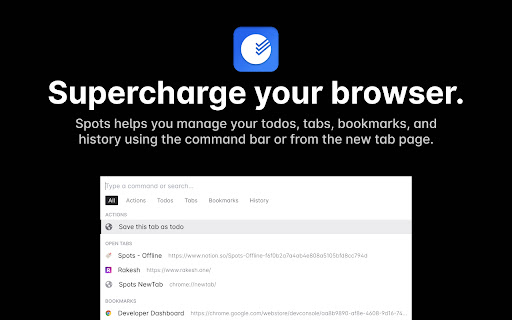
Spots helps you manage your todos, tabs, bookmarks, and history using the command bar or from the new tab page. Everything you do is saved locally. Nothing leaves your browser. The keyboard first design helps you boost your productivity.

We specifically designed it for those of you who want the best. Any action can be accessed and completed in seconds with the command menu.

FEATURES:
🗓 Manage your time by using the inbuilt to-do list
🗄 Switch, open, close, and search your tabs
📚 Browse and manage your bookmarks
🔍 Search your browsing history
⌨️ Shortcuts for actions such as muting, pinning, bookmarking...
...and much more - all for free & totally offline!

Spots is built and maintained by Rakesh (https://rakesh.one)
Technical
- Version
- 1.0.0
- Manifest
- V3
- Size
- 7.97MiB
- Min Chrome
- 88
- Languages
- 1
- Featured
- No
Metadata
- ID
- ledpmcpafebmnnbomolpbldanadcapgm
- Developer ID
- u86ff6bc4ede08e7f68bb7a3855797f64
- Developer Email
- [email protected]
- Created
- Jul 13, 2022
- Last Updated (Store)
- Aug 23, 2022
- Last Scraped
- May 22, 2026
- Website
- joinspots.com
- Support URL
- —
- Privacy Policy
- —
Similar extensions
Alternatives to Spots, ranked by description similarity.

SpotLine
The ultimate command palette for Chrome. Search tabs, bookmarks, and history instantly.
1

SpotNote
Take quick notes and manage todos while browsing
19
★ 5.0

Bookmark Manager + Quick Search
Search, organize, and manage your bookmarks the smart way. Instant results every time.
542
★ 3.7

Snackbar
Organize projects with links, notes, and todos. Stay focused with a visual timer that tracks where your time goes.
18
★ 4.3

SideMark - Manage Apps, Bookmarks in Sidebar
Manage apps and bookmarks directly from your sidebar for faster, organized browsing.
5
★ 1.0

Control Space
A kanban-style tab manager to browse, organise, search and switch tabs with one simple shortcut.
226
★ 4.4

Pondr: Tab Manager & Bookmark Reminder
The extension that manages bookmarks and finds the best time to remind you to revisit.
258
★ 4.7

BoardTab – Visual Kanban Tab Manager with Tab Analytics
Visual Order for Tab Hoarders
81
★ 5.0
Data sourced from the Chrome Web Store · last verified May 22, 2026.