
SidePortal
A helper sidebar: group bookmarks, my links, calendar preview, Drive search, and simple email/chat notifications.
As of June 2026, SidePortal has 1 users in the Productivity category.
Usersdown 50.0 percent−50.0%
1
1
Ratingno change0%
—
— reviews
Reviewsno change0%
—
Version
1.0.2
Manifest V3
History
7 snapshotsTracking since Apr 19, 2026.
View as table
| Date | Users | Rating | Reviews | Version |
|---|---|---|---|---|
| Apr 19, 2026 | 2 | — | — | 1.0.2 |
| Apr 24, 2026 | 2 | — | — | 1.0.2 |
| May 1, 2026 | 2 | — | — | 1.0.2 |
| May 8, 2026 | — | — | — | 1.0.2 |
| May 18, 2026 | 2 | — | — | 1.0.2 |
| May 24, 2026 | 3 | — | — | 1.0.2 |
| Jun 3, 2026 | — | — | — | 1.0.2 |
| Now | 1 | — | — | 1.0.2 |
Permissions & access
- Permissions
- alarmsidentitystoragetabssidePanelnotifications
- Host access
- https://www.googleapis.com/*, https://chat.google.com/*, https://chat.googleapis.com/*
Screenshots


About
SidePortal brings the tools you already live in into one clean side panel so you can stay in flow instead of bouncing between tabs.

Designed for busy staff and teams, SidePortal gives you fast access to:

Email at a glance

See whether you have unread email without opening Gmail

Jump straight to your inbox with one click

Calendar, always visible

View your upcoming events inside the side panel

Open an event instantly in Google Calendar when you need details

Quick Drive search

Search Google Drive in seconds

Opens results directly in Drive so you can keep working

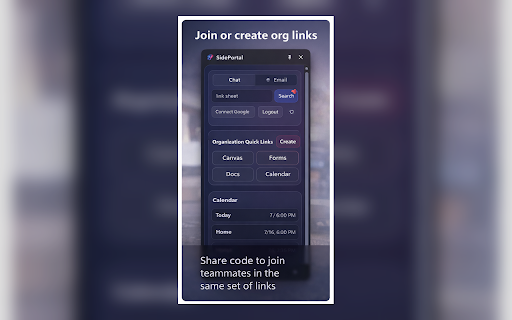
Organization Quick Links (shared by admins)

Join an organization group using a share code

Access a shared set of “official” links your team uses every day

Examples: Canvas, Gmail, Calendar, shared forms, internal resources, department tools

Keeps everyone aligned without having to send the same links repeatedly

Personal links

Add your own frequently used links inside SidePortal

One click access from the same panel you use for everything else

Built for real workplace needs

SidePortal is built to reduce tab clutter and speed up the tiny repetitive actions that steal your attention throughout the day: checking email, confirming the next meeting, pulling up a common link, finding a file, and getting back to work.

Privacy and data handling

SidePortal is designed with privacy in mind:

Your Google access is only used to power features you initiate (email indicator, calendar events, Drive search links)

Organization Quick Links are stored in a shared database so teams can share the same set of links

Personal links are stored locally in your browser (so they persist for you)

Permissions explained (plain English)

SidePortal requests permissions needed to:

Show a side panel UI

Let you sign in with Google (Chrome Identity) so email and calendar features can work

Read your unread email count and calendar events (read only)

Open Gmail, Calendar, Chat, and Drive pages when you click buttons

Store your saved links and group membership in Chrome storage

Who it’s for

SidePortal is ideal for:

College staff, instructional designers, faculty, support teams

Anyone who lives in Gmail + Calendar + Drive + shared links

People who want fewer tabs and faster access to daily tools
Technical
- Version
- 1.0.2
- Manifest
- V3
- Size
- 2.96MiB
- Min Chrome
- 88
- Languages
- 1
- Featured
- No
Metadata
- ID
- lebemjbpmdgelheoojlfdfheiajcopkn
- Developer ID
- udd0d5aa3e58677e60c8567d9a922f8cf
- Developer Email
- [email protected]
- Created
- Feb 18, 2026
- Last Updated (Store)
- Feb 19, 2026
- Last Scraped
- Jun 3, 2026
- Website
- —
- Privacy Policy
- https://kaganlove.github.io/SidePortal/privacy.html
Similar extensions
Alternatives to SidePortal, ranked by description similarity.

Tab Portal
Your cinematic workspace for managing tabs with glassmorphism elegance.
22
★ 5.0

Move Google Tasks™ to Sidebar
Access Google Tasks directly from the sidebar in Chrome (side panel).
91

SuperGoogle
Boost your productivity with a powerful sidebar for quick access to your favorite sites, AI assistants, email, maps, and more.
10
★ 5.0

Side Tab Manager
Clean tab search and management in a permanent side panel, optimized for space and usability.
20
★ 5.0

URL Sidebar Manager
A persistent sidebar to manage and access your favorite URLs
—

SideKeep - open Keep in side panel/popup
Open Google Keep in side panel/popup. Open source
3.0K
★ 4.3

Scrollable Tabs - scroll, search, AI group
Scrollable tab strip Side Panel for managing tabs with search, groups, drag-and-drop sorting, and optional Gemini AI grouping.
163
★ 1.7

Arc Sidebar
Arc-style vertical sidebar for Chrome
12
Data sourced from the Chrome Web Store · last verified Jun 3, 2026.