Google Scholar Button
Lookup scholarly articles as you browse the web.
As of May 2026, Google Scholar Button has 3,000,000 users and a 4.57/5 rating from 1,423 reviews in the Productivity category.
Usersno change0%
3.0M
3,000,000
Ratingno change0%
4.57
1.4K reviews
Reviewsno change0%
1.4K
Version
3.6
Manifest V3
History
2 snapshotsTracking since Apr 25, 2026.
View as table
| Date | Users | Rating | Reviews | Version |
|---|---|---|---|---|
| Apr 25, 2026 | 3.0M | 4.57 | 1.4K | 3.6 |
| May 22, 2026 | 3.0M | 4.57 | 1.4K | 3.6 |
| Now | 3.0M | 4.57 | 1.4K | 3.6 |
Permissions & access
- Permissions
- storageactiveTabscripting
- Host access
- *://scholar.google.com/
Screenshots
About
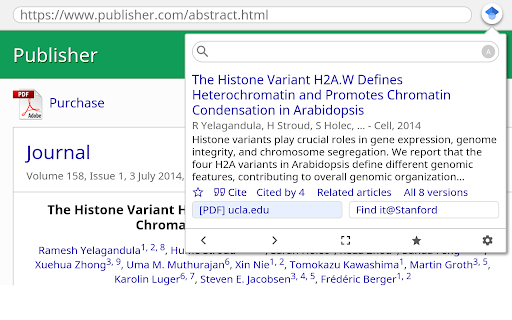
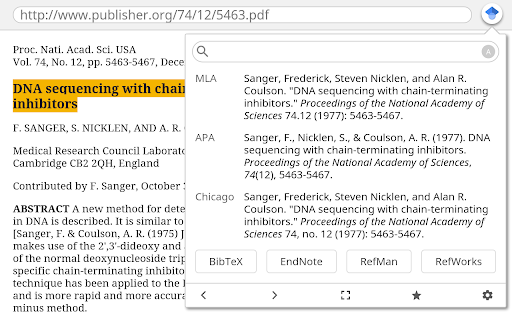
This extension adds a browser button for easy access to Google Scholar from any web page. Click the Scholar button to:

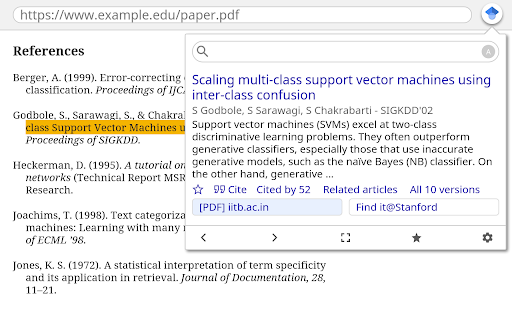
- Find full text on the web or in your university library. Select the title of the paper on the page you're reading, and click the Scholar button to find it.

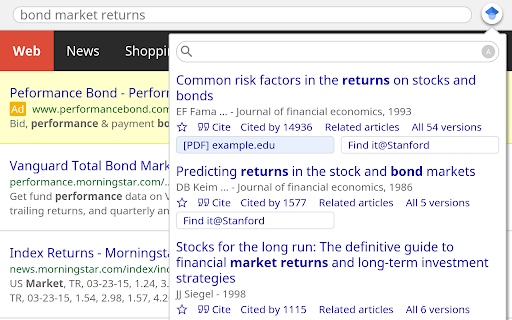
- Transfer your query from web search to Scholar. Press the Scholar button to see top three results; click "full screen" at the bottom of the popup to see them all.

- Format references in widely used citation styles. Press the quote button below the result to see a formatted reference and copy it into the paper you're writing.

- Save the article to your Scholar library, so you can read it or cite it later.  Press the blue star below the result to save it, or the gray star at the bottom to see all saved articles.

Library links work best when you're on campus. To configure them for off-campus use, visit Google Scholar Settings at https://scholar.google.com/scholar_settings (you may need to login with your library password or to set up your browser to use a library proxy; please visit your library's website or ask a local librarian for assistance).

To search the US case law, click the gear icon at the bottom of the popup, and configure your preferred collection in Google Scholar Settings.

By installing this extension, you agree to the Google Terms of Service and Privacy Policy at https://www.google.com/intl/en/policies/.
Technical
- Version
- 3.6
- Manifest
- V3
- Size
- 65.68KiB
- Min Chrome
- 102.0
- Languages
- 41
- Featured
- Yes
Metadata
- ID
- ldipcbpaocekfooobnbcddclnhejkcpn
- Developer ID
- u82f405672d3940aaa330186551178ec9
- Developer Email
- [email protected]
- Created
- Apr 8, 2015
- Last Updated (Store)
- May 16, 2024
- Last Scraped
- May 22, 2026
- Website
- https://scholar.google.com/
- Support URL
- —
- Privacy Policy
- https://policies.google.com/privacy
Similar extensions
Alternatives to Google Scholar Button, ranked by description similarity.

Google Scholar BibTeX Copy
Add a button on Google Scholar results to copy BibTeX to clipboard.
11

Google Scholar PDF Linker
Connect your local PDF library to Google Scholar search results.
9
★ 5.0

Library Search Quick Launcher
Toolbar & context-menu search for any library using a customizable URL template and name
3

ScholarX
Enhance your Google Scholar and PubMed experience with automatic display of detailed publication information.
113

Scholar Scope - Research & PDF Finder
Highlight text to instantly search Google, YouTube, PDFs, and custom site bundles. Research smarter from any webpage. Free.
915
★ 5.0

Right-Click Search Google Scholar
This extension searches for selected text on Google Scholar via right-click and shows the result on a new 'passive' tab
1.0K
★ 5.0

Scholar Journal Filter
Filter Google Scholar results by journal. Highlight, dim, or hide results based on a customizable journal whitelist or blacklist.
739
★ 5.0

Academic Search Navigator
Instantly search across multiple academic and research databases directly from your right-click menu.
39
★ 4.5
Data sourced from the Chrome Web Store · last verified May 22, 2026.