
Noor Tab — Islamic New Tab
Islamic new tab: daily Quran verse, prayer times, Salah & habit tracker, notes, browser lock.
As of June 2026, Noor Tab — Islamic New Tab has — users in the Workflow & Planning category.
Usersno change0%
—
—
Ratingno change0%
—
— reviews
Reviewsno change0%
—
Version
2.0.0
Manifest V3
History
1 snapshotsTracking since Jun 17, 2026.
Not enough history yet for this metric — the chart fills in as we collect more snapshots.
View as table
| Date | Users | Rating | Reviews | Version |
|---|---|---|---|---|
| Jun 17, 2026 | — | — | — | 2.0.0 |
| Now | — | — | — | 2.0.0 |
Permissions & access
- Permissions
- storagetabswindowsbookmarksalarmsgeolocation
- Host access
- https://api.alquran.cloud/*, https://cdn.islamic.network/*, https://everyayah.com/*, https://verses.quran.com/*, https://api.aladhan.com/*, https://nominatim.openstreetmap.org/*, https://api.unsplash.com/*, https://www.google.com/s2/favicons*, https://duckduckgo.com/*
Screenshots




About
Noor Tab transforms your new tab into a beautiful Islamic experience — designed for Muslims who want to stay connected to their faith while browsing.

✨ FEATURES

📖 Quran Verse of the Day
A new ayah every day with full Arabic text, English and Bangla translation, and Alafasy audio recitation. Save your favourite verses and revisit them anytime.

🕌 Live Prayer Times
Accurate Salah times for any city in the world. Just enter your city name or use your location. Countdown timer shows exactly how long until the next prayer.

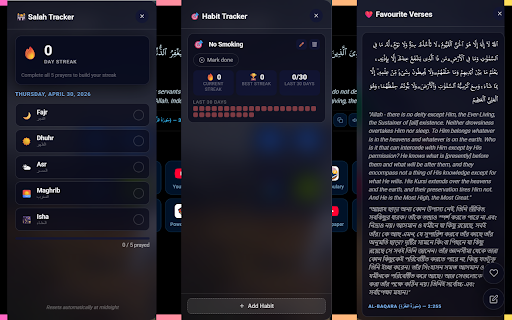
☪ Salah Tracker
Mark each of your 5 daily prayers and build a streak. See your consistency over time and never miss a prayer.

🤲 Dhikr Reminders
Set a timer (5, 10, 15, 30, or 60 minutes) and receive a gentle Dhikr popup on every page you browse — not just the new tab.

🎯 Habit Tracker
Add custom daily habits with emoji icons. Track streaks and build consistent routines.

❤️ Favourite Verses
Save Quran verses you love and access them from a dedicated panel anytime.

📝 Quick Notes
A persistent scratchpad always one click away. Your notes are saved automatically.

🔗 Quick Links
Add your favourite websites with auto-detected favicons. Drag to reorder. Fully customisable icon size and grid layout.

📁 Browser Bookmarks
Your Chrome bookmarks displayed beautifully in glassmorphism style.

📊 Site Usage Stats
See a daily bar chart of time spent on your top websites. Resets at midnight.

💾 Backup & Restore
Export all your data — links, notes, favourites, settings — to a JSON file and import it anytime.

🖼️ Unsplash Backgrounds
Stunning auto-fetched photos by any category you choose (nature, city, mosque, etc.). Requires a free Unsplash API key.

🎨 5 Beautiful Themes
Dark, Light (warm earth tones), AMOLED Black, Ocean Depths, and Forest.

⚙️ Full Customisation
Toggle every section on or off. Adjust icon size, icons per row, layout split between Quran and links, and background blur — all with live preview.

---

🔒 PRIVACY
Noor Tab does not collect, transmit, or sell any personal data. All your data (links, notes, habits, settings) is stored locally in your browser using Chrome's built-in storage. Prayer times are fetched from the free Aladhan API using only your city name. Quran data is fetched from the free AlQuran Cloud API. Background images are fetched from Unsplash using your own API key.

---

📦 SETUP
1. Install the extension
2. Open a new tab
3. Click ⚙️ Settings to set your name, theme, and Unsplash API key
4. Click 📍 on the prayer card to set your city
5. Enable Dhikr reminders in Settings → Dhikr Reminder

Made with ❤️ by Tasneem Sahat
Technical
- Version
- 2.0.0
- Manifest
- V3
- Size
- 283KiB
- Min Chrome
- 88
- Languages
- 1
- Featured
- No
Metadata
- ID
- ldgpcichhcjigfnebabgddfodbmeccac
- Developer ID
- u89d736db95fe350a910d9325c1cb2d0c
- Developer Email
- [email protected]
- Created
- Jun 16, 2026
- Last Updated (Store)
- Jun 16, 2026
- Last Scraped
- Jun 17, 2026
- Website
- —
- Support URL
- https://github.com/t4sn33m-s4h4t/
- Privacy Policy
- —
Data sourced from the Chrome Web Store · last verified Jun 17, 2026.