
MyCard
A bookmark management tool to import and manage your bookmark cards.
As of June 2026, MyCard has 3 users in the Productivity category.
Usersno change0%
3
3
Ratingno change0%
—
— reviews
Reviewsno change0%
—
Version
1.1.4
Manifest V3
History
5 snapshotsTracking since Apr 1, 2026.
View as table
| Date | Users | Rating | Reviews | Version |
|---|---|---|---|---|
| Apr 1, 2026 | 3 | — | — | 1.1.4 |
| Apr 21, 2026 | 5 | — | — | 1.1.4 |
| May 6, 2026 | 5 | — | — | 1.1.4 |
| May 18, 2026 | 3 | — | — | 1.1.4 |
| Jun 1, 2026 | 2 | — | — | 1.1.4 |
| Now | 3 | — | — | 1.1.4 |
Permissions & access
- Permissions
- storagecontextMenusactiveTabnotificationstabsidentityhistorybookmarks
- Host access
- https://accounts.google.com/, https://www.googleapis.com/
Screenshots

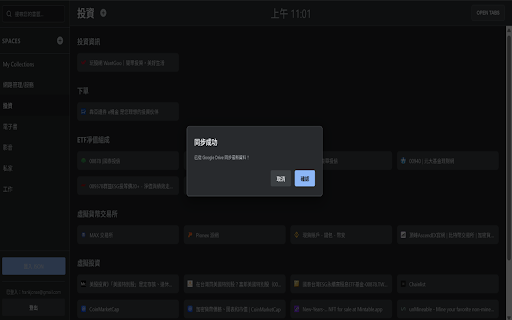


About
MyCard: Your Next-Gen Smart Bookmark Manager & Workspace

Tired of disorganized bookmarks and countless tabs? MyCard is the ultimate **bookmark manager** and **tab manager** designed for professionals, researchers, and anyone looking to boost their **productivity**. It transforms your browser into a highly organized **workspace** for all your projects and interests.

**Core Feature Highlights**

MyCard is more than just bookmarks; it's a smart **organizer** tailored for your digital life.

**Multi-Level Organization, Infinite Possibilities**
* **Spaces**: Create a dedicated **workspace** for each of your projects, hobbies, or workflows to keep all related information perfectly organized.
* **Lists**: Within each Space, group and categorize your bookmark cards with customizable Lists.
* **Cards**: Every card is a feature-rich bookmark, complete with a title, link, and favicon.

**Lightning-Fast Information Gathering**
* **One-Click Save**: Quickly **save tabs** to any list using the toolbar popup or the global hotkey (Ctrl+Shift+S).
* **Right-Click to Save**: Right-click on any webpage to save it directly to your chosen Space and List in a seamless workflow.
* **Full-Window Capture (Session Manager)**: Acting as a powerful **session manager**, MyCard can capture all tabs in an entire browser window and save them as a new list with a single click—perfect for research and meeting notes.

**Global Lightning Search**
* **One Entry to Search All**: Press Shift+S to launch the powerful global search. Not only can you search your saved Cards, but you can also simultaneously find currently open tabs, browsing history, and native bookmarks.
* **Smart Filtering**: Quickly switch between search scopes and filter by tags to precisely locate any information you need, making **data organizing** a breeze.
* **Batch Open**: Open all searchable results (Cards, Bookmarks, History) in new tabs with a single click directly from the search window.

**Enterprise-Grade Cloud Sync**
* **Private Google Drive Sync**: All your data is securely stored in a dedicated application folder within your personal **Google Drive**. This **cloud sync** ensures we never have access to any of your other files, providing maximum privacy and security.
* **Intelligent Merge Engine**: Utilizes an advanced 3-Way Merge algorithm. Even if you edit offline on multiple computers, all changes will be merged perfectly upon reconnection, ensuring zero data loss.
* **Offline Availability**: All changes are saved locally when you're offline and automatically synced once a connection is restored.

**High-Efficiency Advanced Management**
* **Drag & Drop Sorting**: Intuitively reorder Spaces, Lists, and Cards with simple drag-and-drop gestures.
* **Tag Management**: Categorize your information with a flexible tag system. Supports batch adding or removing tags for multiple items at once.
* **Batch Operations**: Select multiple Lists or Cards to move, merge, delete, or export them simultaneously, dramatically increasing your management efficiency.

**Why Choose MyCard?**
* **Privacy & Security First**: We use the strictest Google Drive permission (`drive.appdata`) to ensure your data always belongs to you and you alone.
* **Modern Architecture**: Built on the latest Manifest V3 standard for top-tier performance, security, and stability.
* **Designed for Efficiency**: From global hotkeys (Ctrl+Shift+H to open/focus MyCard, Ctrl+Shift+S to quick-save, Shift+S for global search) to the right-click menu, every detail is designed to save you precious time.
* **Reliable Data Backup**: In addition to seamless **cloud sync**, you can export all your data as a JSON file for local backup at any time.

Whether you're a researcher organizing data, a manager handling multiple projects, or a digital citizen craving a clean browsing experience, MyCard is your indispensable smart companion. Install now and start a new chapter of efficient information management!
Technical
- Version
- 1.1.4
- Manifest
- V3
- Size
- 751KiB
- Min Chrome
- 88
- Languages
- 10
- Featured
- No
Metadata
- ID
- lcodgkagkdpbjgldiaceonflbfofonmp
- Developer ID
- u2eb9a8c606d5dbd515ca1cf020e88e77
- Developer Email
- [email protected]
- Created
- Jul 30, 2025
- Last Updated (Store)
- Sep 3, 2025
- Last Scraped
- Jun 1, 2026
- Website
- —
- Support URL
- —
Similar extensions
Alternatives to MyCard, ranked by description similarity.

Bookmark Manager
Manage your bookmarks with custom categories and notes.
6

BookmarkCat: Sidebar Bookmark Manager with Tags, Notes & Search
Add notes to bookmarks and manage everything with tags in a clean sidebar—no folders needed.
179
★ 5.0

Bookmark Manager+
Bookmark Manager+ is a comprehensive browser bookmark enhancement tool that supports one-click access via shortcut keys and offers…
7

Bookmark Lab: AI Bookmark Manager
AI-powered bookmark manager. One-click to remove dead links & duplicates. Auto-categorize with AI. Organize efficiently.
49

BookMarkItAll
Save any webpage as a visual bookmark with one click. Organize, search, and manage all your bookmarks in a beautiful dashboard.
2
★ 5.0

Advanced Bookmark Manager
Manage and organize your bookmarks with advanced features.
124
★ 4.2

FindMark: Smart Bookmark Search & Manager
Powerful bookmark search & manager with fuzzy search, shortcuts, cloud backup & smart organization for efficient browsing.
360

WebSaver
Your favorite sites, categorized!
26
Data sourced from the Chrome Web Store · last verified Jun 1, 2026.