
Recording Plugin | edvi
edvi Recorder helps authenticated edvi users record class sessions and browser content directly from Chrome. What you can do:…
As of June 2026, Recording Plugin | edvi has 17 users in the Education category.
Usersup 13.3 percent+13.3%
17
17
Ratingno change0%
—
— reviews
Reviewsno change0%
—
Version
v4.2.0
Manifest V3
90-day change · In the last 90 days this extension 1 version update.
History
4 snapshotsTracking since May 13, 2026.
View as table
| Date | Users | Rating | Reviews | Version |
|---|---|---|---|---|
| May 13, 2026 | 15 | — | — | v4.1.0 |
| May 18, 2026 | 15 | — | — | v4.1.0 |
| May 25, 2026 | 18 | — | — | v4.1.0 |
| Jun 1, 2026 | 17 | — | — | v4.1.0 |
| Now | 17 | — | — | v4.2.0 |
Changelog
- May 18, 2026description
edvi Recorder helps authenticated edvi users record class sessions and browser content directly from Chrome.
What you can do:

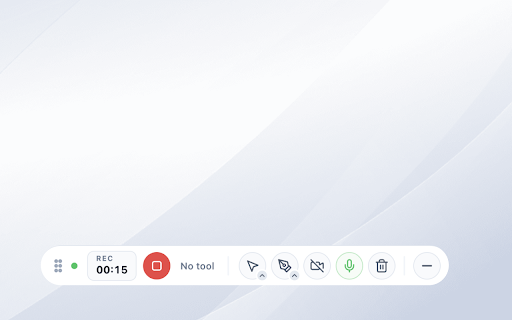
Start recording from the extension popup or in-page floating controls.
Choose capture mode:
 - Tab capture
 - Screen/window capture
 - Selected tab area (region) capture

Toggle microphone, system audio, and camera controls during recording.
Use in-recording utility tray tools (including annotation controls).
Pause, resume, and stop recording.
Open post-record editor in a new tab to trim/cut and export.
Download recordings locally from the browser.

Authentication:
Sign-in is required to use recording workflows.
Supported sign-in methods:
 - Email + password
 - Google sign-in
 - Phone OTP

Notes:

 - Browser capture permission prompts are shown by Chrome and require user action.
 - Some pages may restrict script injection or capture behavior due to browser/site restrictions.
 - This extension does not claim endorsement by Google or any third-party entity.`
edvi Recorder helps authenticated edvi users record class sessions and browser content directly from Chrome.
What you can do:

Start recording from the extension popup or in-page floating controls.
Choose capture mode:
 - Tab capture
 - Screen/window capture
 - Selected tab area (region) capture

Toggle microphone, system audio, and camera controls during recording.
Use in-recording utility tray tools (including annotation controls).
Pause, resume, and stop recording.
Open post-record editor in a new tab to trim/cut and export.
Download recordings locally from the browser.

Authentication:
Sign-in is required to use recording workflows.
Supported sign-in methods:
 - Email + password
 - Google sign-in
 - Phone OTP

Notes:

 - Browser capture permission prompts are shown by Chrome and require user action.
 - Some pages may restrict script injection or capture behaviour due to browser/site restrictions.
 - This extension does not claim endorsement by Google or any third-party entity.
Permissions & access
- Permissions
- storageactiveTabscriptingdownloadstabsalarmsidentity
- Host access
- <all_urls>
Screenshots



About
edvi Recorder helps authenticated edvi users record class sessions and browser content directly from Chrome.
What you can do:

Start recording from the extension popup or in-page floating controls.
Choose capture mode:
 - Tab capture
 - Screen/window capture
 - Selected tab area (region) capture

Toggle microphone, system audio, and camera controls during recording.
Use in-recording utility tray tools (including annotation controls).
Pause, resume, and stop recording.
Open post-record editor in a new tab to trim/cut and export.
Download recordings locally from the browser.

Authentication:
Sign-in is required to use recording workflows.
Supported sign-in methods:
 - Email + password
 - Google sign-in
 - Phone OTP

Notes:

 - Browser capture permission prompts are shown by Chrome and require user action.
 - Some pages may restrict script injection or capture behaviour due to browser/site restrictions.
 - This extension does not claim endorsement by Google or any third-party entity.
Technical
- Version
- v4.2.0
- Manifest
- V3
- Size
- 1.1MiB
- Min Chrome
- 88
- Languages
- 1
- Featured
- No
Metadata
- ID
- lclakjeaikhmmnhoegdopnfijpmdpnem
- Developer ID
- u2c989732620a92c0924e95514602d376
- Developer Email
- [email protected]
- Created
- Oct 16, 2024
- Last Updated (Store)
- May 25, 2026
- Last Scraped
- Jun 7, 2026
- Website
- —
- Support URL
- https://edvi.app/help
- Privacy Policy
- https://policies.edvi.app/privacy
Data sourced from the Chrome Web Store · last verified Jun 7, 2026.