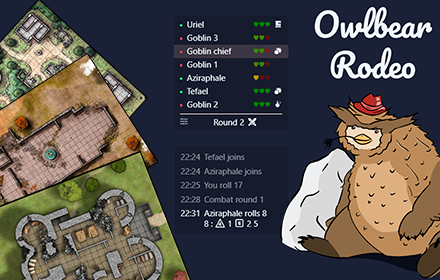
Owlbear Rodeo Tracker
Add-on for Owlbear Rodeo tabletop map simulator. Track dice rolls, combat turns, health and conditions of characters on the map.
As of June 2026, Owlbear Rodeo Tracker has 1,000 users and a 4.29/5 rating from 7 reviews in the fun category.
Usersno change0%
1.0K
1,000
Ratingno change0%
4.29
7 reviews
Reviewsno change0%
7
Version
1.3.0
Manifest V3
History
1 snapshotsTracking since May 3, 2026.
View as table
| Date | Users | Rating | Reviews | Version |
|---|---|---|---|---|
| May 3, 2026 | 1.0K | 4.29 | 7 | 1.3.0 |
| Now | 1.0K | 4.29 | 7 | 1.3.0 |
Permissions & access
- Permissions
- tabsstorage
- Host access
- None declared
Screenshots
About
Simple browser extension, adding combat tracker for Owlbear Rodeo tabletop map simulator. It lets you track dice rolls, combat turns, health and conditions of characters on the map.

This extension adds following functions to the Owlbear Rodeo:

- Combat tracker, that lets you track rounds and turns of the characters on the map.
- Dice tracker, that lets you track who rolled what and when it happened.
- Extension button allows toggling modules on/off and keeps track of your games.

OBR Tracker works only with Owlbear Rodeo (https://owlbear.rodeo) and depends on its updates. The latest OBR version that was tested with the extension is specified in the extension menu.

Note: OBR Tracker is developed independently, and is not officially endorsed by or affiliated with Owlbear Rodeo.

Combat tracker

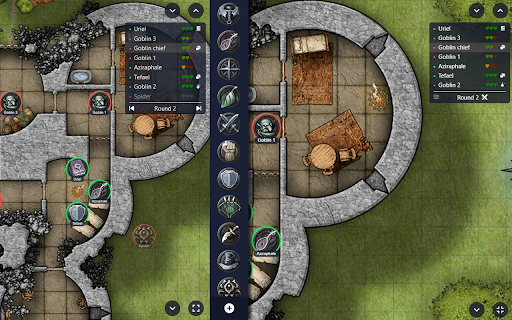
Adds small collapsible overlay window to keep track of whose turn it is, and other optional minor stuff like HP, damage and conditions. It takes named tokens from the map and allows assigning them INIT values as well as other data. Then you can switch turns, it will count combat rounds for you. Conditions will automatically drop after set amount of rounds.

Combat tracker should be managed by one player (usually GM) and other OBRT users on the same map can just see the info. They won't see the exact HP values, just general condition & damage done. To initialize combat tracker data sharing, GM needs to create a Note with "!" (exclamation mark) somewhere outside the map.

Dice tracker

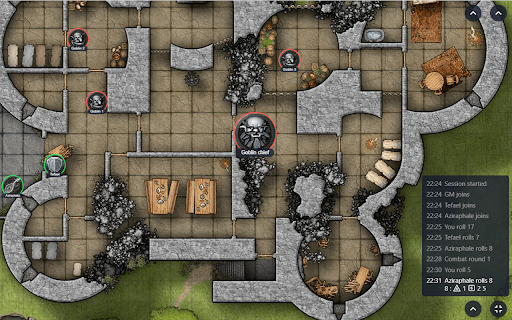
Adds dice log to keep track of player's dice rolls, with information on what exactly happened and when. It takes the dice values from left panel and puts them to a new small log overlay in the bottom-right corner of the screen. Unlike the native dice panel, it shows individual dice rolls with the timestamp, so no more wondering what dice were cast if the player has multiple dice in his tray.

It also optionally adds dice roll sounds when a dice is cast by user or other players. It also prevents abusing dice rerolls, and makes dice tray collapse on click.

Extension button

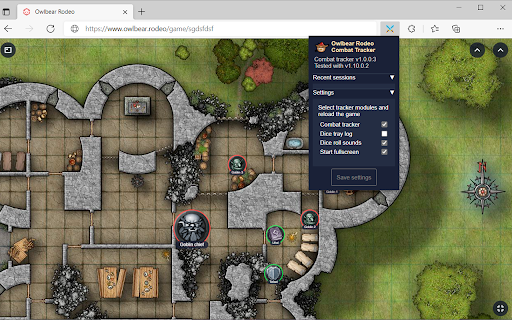
Each feature can be enabled or disabled via extension button. To apply settings you need to reload the page. Extension menu also keeps track of the recent games, and lets you quickly open a recent game or just switch to the Owlbear Rodeo tab if it's already open somewhere.
Technical
- Version
- 1.3.0
- Manifest
- V3
- Size
- 189KiB
- Min Chrome
- 88
- Languages
- 2
- Featured
- Yes
Metadata
- ID
- lcfcmebjoechmikocfjjeocnljconfdp
- Developer ID
- u59948bce32ad4a6f3c626e0329ea4a6c
- Developer Email
- [email protected]
- Created
- Oct 16, 2021
- Last Updated (Store)
- Jan 31, 2022
- Last Scraped
- Jun 2, 2026
- Website
- —
- Support URL
- —
- Privacy Policy
- —
Similar extensions
Alternatives to Owlbear Rodeo Tracker, ranked by description similarity.

Google Meet Dice Roller
Dice roller extension for RPG players using Google Meet
3.0K
★ 4.2

Crypto Raiders Companion
The crypto raiders extentions you always needed!
345
★ 4.1

BestBall Edge — Draft Assistant
Draft overlay for best ball. Matchup badges, stack indicators, value scores, and scarcity.
9
Roll20 Dice Stats
Calculates statistics for dice roll results from a Roll20 game chat
236
★ 5.0

CONfetti
A set of improvements for the Conflict of Nations UI experience.
128
★ 4.8

ShadowDork
Integrates ShadowDork with Roll20
192

The DM Companion
A lightweight, overlay-based DM screen for managing combat, lookup rules and take notes on any webpage.
37
★ 5.0

Dice Roller by BusicMusic
A simple extension that lets you roll up to 10 of any type of D&D dice at a time.
1
Data sourced from the Chrome Web Store · last verified Jun 2, 2026.