ClassForge Offline
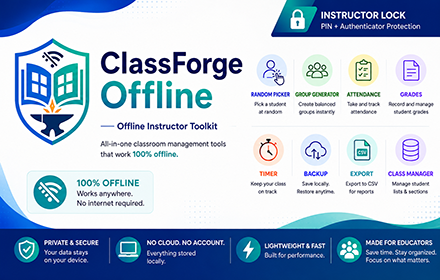
Offline class toolkit: classes, picker, groups, attendance, grades, timer, CSV/JSON backup, fullscreen tools, PIN/MFA lock.
As of June 2026, ClassForge Offline has — users in the Education category.
Usersno change0%
—
—
Ratingno change0%
—
— reviews
Reviewsno change0%
—
Version
1.10.0
Manifest V3
History
1 snapshotsTracking since Jun 28, 2026.
Not enough history yet for this metric — the chart fills in as we collect more snapshots.
View as table
| Date | Users | Rating | Reviews | Version |
|---|---|---|---|---|
| Jun 28, 2026 | — | — | — | 1.10.0 |
| Now | — | — | — | 1.10.0 |
Permissions & access
- Permissions
- storage
- Host access
- None declared
Screenshots


About
ClassForge Offline is an instructor-focused Chrome Extension designed to help teachers manage classroom activities directly inside the browser, even without an internet connection.

Built for classroom use, lab sessions, recitations, group activities, and grading workflows, ClassForge Offline provides essential teaching tools in one simple offline toolkit.

Features include:

• Class Manager
Create and manage class sections with separate student lists. Saved students can be used across random picking, group generation, attendance tracking, and grade recording.

• Random Student Picker
Randomly pick students for recitation, checking, code explanation, reporting, or participation activities. Includes shuffle animation, skip option, pick history, and fullscreen mode.

• Random Group Generator
Generate student groups quickly for activities, reporting, pair programming, lab work, or collaborative tasks. Includes animated generation, group naming, copy/export options, fullscreen mode, and image export.

• Attendance Checker
Record student attendance by date with status options such as Present, Absent, Late, and Excused. Includes notes, color-coded records, calendar markers, and CSV export.

• Grades
Record activity, quiz, exam, or performance scores with automatic percentage and pass/fail status. Includes date-based activity records, color coding, and CSV export.

• Class Timer
Use a simple countdown timer for quizzes, presentations, group activities, coding challenges, and class exercises. Includes fullscreen mode and optional sound effects.

• Backup and Export
Export data as JSON backups and CSV files for attendance and grades. Import backups when transferring or restoring data.

• Instructor Lock
Adds a required access-control layer using a 6-digit PIN and optional authenticator code to help prevent casual access while using the toolkit.

ClassForge Offline stores data locally in the user’s Chrome browser profile. It does not require an online account, cloud database, or external server for its core features.

This extension is ideal for instructors, teachers, trainers, lab facilitators, and educators who want a lightweight offline classroom management toolkit.
Technical
- Version
- 1.10.0
- Manifest
- V3
- Size
- 1.01MiB
- Min Chrome
- 88
- Languages
- 1
- Featured
- No
Metadata
- ID
- lcaafpaopnjfcenahcbmjdibinpjmhnb
- Developer ID
- u071345913e63c2b1347f99118e46d46c
- Developer Email
- [email protected]
- Created
- Jun 27, 2026
- Last Updated (Store)
- Jun 27, 2026
- Last Scraped
- Jun 28, 2026
- Website
- —
- Support URL
- —
Data sourced from the Chrome Web Store · last verified Jun 28, 2026.