
Formatted Email Subject Lines by cloudHQ
Formatted email subject lines: underscore, bold, italics, strikethrough
As of June 2026, Formatted Email Subject Lines by cloudHQ has 10,000 users and a 4.50/5 rating from 26 reviews in the Communication category.
Usersno change0%
10.0K
10,000
Ratingno change0%
4.50
26 reviews
Reviewsno change0%
26
Version
1.0.1.6
Manifest V3
History
1 snapshotsTracking since Apr 19, 2026.
View as table
| Date | Users | Rating | Reviews | Version |
|---|---|---|---|---|
| Apr 19, 2026 | 10.0K | 4.50 | 26 | 1.0.1.6 |
| Now | 10.0K | 4.50 | 26 | 1.0.1.6 |
Permissions & access
- Permissions
- scriptingstoragebackground
- Host access
- https://mail.google.com/, https://mail-attachment.googleusercontent.com/, https://inbox.google.com/, https://www.cloudhq.net/
Screenshots



About
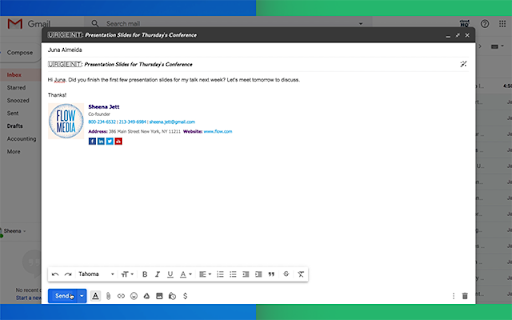
Are you looking for a way to make your emails stand out in someone's inbox?
This extension lets you to change the format style of your email subject line, and helps your emails get opened faster because they stand out from the crowd.

You can change your email subject line formats to:
- 𝗕𝗼𝗹𝗱
- 𝙄𝒕𝒂𝒍𝒊𝒄𝒔
- 𝘽𝙤𝙡𝙙 𝙄𝙩𝙖𝙡𝙞𝙘
- U̲n̲d̲e̲r̲l̲i̲n̲e̲
- 𝔻𝕠𝕦𝕓𝕝𝕖 𝕊𝕥𝕣𝕦𝕔𝕜
- S̶t̶r̶i̶k̶e̶t̶h̶r̶o̶u̶g̶h̶
- 🅆🄷🄸🅃🄴🅂🅀🅄🄰🅁🄴
- B🅻🅰🅲🅺🆂🆀🆄🅰🆁🅴
- Ⓦⓗⓘⓣⓔⓑⓤⓑⓑⓛⓔ
- 🅑🅛🅐🅒🅚🅑🅤🅑🅑🅛🅔

To change the format style of your email subject line, just do the following:
1. Select text in the subject line by highlighting it
2. Click on the "Subject Style" icon on right side of subject line
3. Select the format style you prefer!

You can can have formatted subject line like:
- *𝟮𝗡𝗗 𝗥𝗘𝗤𝗨𝗘𝗦𝗧* I'd really appreciate your help
- U̲R̲G̲E̲N̲T̲: Must respond by 𝗘𝗢𝗗 𝗧𝗢𝗗𝗔𝗬
- 𝘚𝘱𝘦𝘤𝘪𝘢𝘭 𝘊𝘢𝘳𝘦 𝘐𝘯𝘴𝘵𝘳𝘶𝘤𝘵𝘪𝘰𝘯𝘴 𝘐𝘯𝘴𝘪𝘥𝘦
- Holiday Gift to You (was $2̶0̶0̶.0̶0̶, now $𝟭𝟬.𝟬𝟬)

This is an excellent solution for:
- Marketing professionals
- Sales professionals
- Teammates
- Anyone who wants their emails to stand out


cloudHQ. Helping your productivity, 1 click at a time.

cloudHQ website: https://www.cloudhq.net/
App website: https://www.format-email-subject.com
Pricing: https://www.format-email-subject.compricing
Support page: https://support.cloudhq.net/category/browser-extensions/format-email-subject/
Blog: https://blog.cloudhq.net
Demo: https://www.cloudhq.net/demo

Google Workspace, Google Sheets, Google Drive, Google Alerts and Gmail are trademarks of Google LLC. Use of this trademark is subject to Google Permissions.

cloudHQ is trademark of CloudHQ LLC. https://www.cloudhq.net/trademark
Technical
- Version
- 1.0.1.6
- Manifest
- V3
- Size
- 625KiB
- Min Chrome
- 88
- Languages
- 1
- Featured
- Yes
Metadata
- ID
- lbnejjahbkciooojokighdfkmcgkpjfb
- Developer ID
- u4a6681ad10967be47ff28a54f9291df1
- Developer Email
- [email protected]
- Created
- Jan 30, 2020
- Last Updated (Store)
- Nov 29, 2025
- Last Scraped
- Jun 4, 2026
- Privacy Policy
- https://www.cloudhq.net/privacy
Similar extensions
Alternatives to Formatted Email Subject Lines by cloudHQ, ranked by description similarity.

Rename Email Subject by cloudHQ
Rename email subjects for Gmail.
10.0K
★ 4.2

HTML Editor for Gmail by cloudHQ
HTML Editor for Gmail™ - code HTML email directly from Gmail
50.0K
★ 4.1

Gmail™ Email Templates by cloudHQ
Beautiful email templates for Gmail. Design your templates or import templates from Mailchimp. With team sharing!
100.0K
★ 4.2

Email Signature Generator by cloudHQ
Email signature generator and signature templates
20.0K
★ 4.5

Outlook Email Templates by cloudHQ
Beautiful email templates for Microsoft Outlook
3.0K
★ 5.0

Auto Follow Up for Gmail™ by cloudHQ
Automated follow up emails and mail merge
9.0K
★ 4.9

Mailto: Set Default Email to Gmail by cloudHQ
Set Gmail as default email application when clicking on an email address on the internet
7.0K
★ 4.0

HubSpot Templates for Gmail™ by cloudHQ
Send HubSpot marketing email templates using Gmail™
2.0K
★ 5.0
Data sourced from the Chrome Web Store · last verified Jun 4, 2026.