
Github Sidebar
Make shortcuts to repositories you frequently use on Github. Faster navigation and better control over your repositories.
As of June 2026, Github Sidebar has 160 users and a 4.00/5 rating from 3 reviews in the Developer Tools category.
Usersdown 3.6 percent−3.6%
160
160
Ratingno change0%
4.00
3 reviews
Reviewsno change0%
3
Version
4.1.0
Manifest V3
History
15 snapshotsTracking since Apr 1, 2026.
View as table
| Date | Users | Rating | Reviews | Version |
|---|---|---|---|---|
| Apr 1, 2026 | 166 | 4.00 | 3 | 4.1.0 |
| Apr 16, 2026 | 168 | 4.00 | 3 | 4.1.0 |
| Apr 22, 2026 | 175 | 4.00 | 3 | 4.1.0 |
| Apr 27, 2026 | 170 | 4.00 | 3 | 4.1.0 |
| May 2, 2026 | 176 | 4.00 | 3 | 4.1.0 |
| May 7, 2026 | 175 | 4.00 | 3 | 4.1.0 |
| May 11, 2026 | 158 | 4.00 | 3 | 4.1.0 |
| May 14, 2026 | 160 | 4.00 | 3 | 4.1.0 |
| May 19, 2026 | 154 | 4.00 | 3 | 4.1.0 |
| May 23, 2026 | 162 | 4.00 | 3 | 4.1.0 |
| May 28, 2026 | 169 | 4.00 | 3 | 4.1.0 |
| Jun 2, 2026 | 163 | 4.00 | 3 | 4.1.0 |
| Jun 6, 2026 | 155 | 4.00 | 3 | 4.1.0 |
| Jun 10, 2026 | 147 | 4.00 | 3 | 4.1.0 |
| Jun 22, 2026 | 152 | 4.00 | 3 | 4.1.0 |
| Now | 160 | 4.00 | 3 | 4.1.0 |
Permissions & access
- Permissions
- storagetabsalarms
- Host access
- https://github.com/*
Screenshots



About
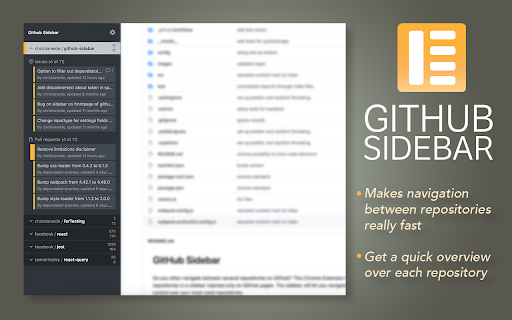
Do you often navigate between several repositories on GitHub? This Chrome Extension lets you bookmark repositories in a sidebar injected only on GitHub.com pages. The sidebar will let you navigate faster and give you better control over your most used repositories.

Features

- Easy to bookmark and navigate repositories
- Overview over active Pull requests or Issues for your repos
- Periodically checks for new or updated items
- Optional to show badge in GitHub favicon if new items
- Works across multiple tabs
- Color coding of items based on status (Approved, Changes Requested)
- Hide or show the panel whenever you like

Settings
- Repositories

Simply navigate to any Github repository you would like to add a shortcut to and press the button for *Add current repository*.

You can sort the order of repositories by simply drag&drop.

- Access Token

For all features of this extension to work, you will need to provide an access token from Github. This is not a requirement, but it will make the extension load data about issues and pull requests from your repositories. Please create an access token here https://github.com/settings/tokens/new?scopes=repo&description=Github%20sidebar%20browser%20extension to allow this extension to fetch necessary data from Github. The necessary scopes for the token is already selected if you follow the link above. All you need is to press "Generate Token", and copy/paste the token into the extension.

Note: The token is only saved to your browsers local *chrome.storage.local* and only used to communicate with Githubs API.

- Other settings
Should (hopefully) be pretty self-explanatory
Technical
- Version
- 4.1.0
- Manifest
- V3
- Size
- 107KiB
- Min Chrome
- 88
- Languages
- 1
- Featured
- Yes
Metadata
- ID
- lblnbldblpeiikndppnekobccdocccho
- Developer ID
- uc5ffec8bc1fcd30fc0ca0abcbc2dfc56
- Developer Email
- [email protected]
- Created
- May 18, 2019
- Last Updated (Store)
- Mar 17, 2026
- Last Scraped
- Jun 22, 2026
- Website
- —
Similar extensions
Alternatives to Github Sidebar, ranked by description similarity.

GitHub Repo List
A browser extension that shows GitHub repositories in a convenient sidebar
12

GitHub Favorites
Build and manage your own list of favorite GitHub repositories with drag-and-drop sorting.
87

Github Notifications
This extension displays an icon in Chrome indicating your open pull-requests
16
★ 5.0

GitHub Hyper
A Chrome extension that enhances GitHub's user interface with helpful features.
1

Git Repos Browser
Quickly browse GitHub repositories and manage your favorites for fast navigation.
2

GitHub Repo Search
Quick GitHub repository search with Alt+G hotkey. Search across all repositories or filter by organization.
24

Github buttons for own pr's and code reviews
Github buttons for own pr's and code reviews
7

GitHub Keyboard Navigator
Keyboard shortcuts for faster GitHub navigation with leader key support
—
Data sourced from the Chrome Web Store · last verified Jun 22, 2026.