
Create QR
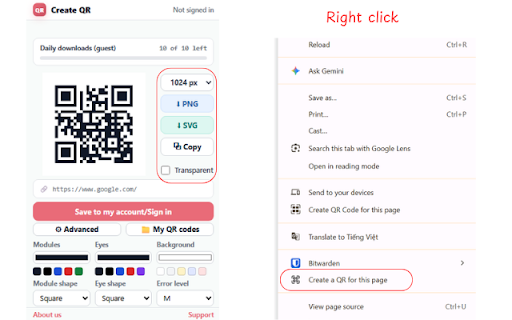
Create custom QR codes for the current tab. Support download, copy, save to your private account.
As of June 2026, Create QR has 5 users and a 5.00/5 rating from 1 reviews in the Productivity category.
Usersno change0%
5
5
Ratingno change0%
5.00
1 reviews
Reviewsno change0%
1
Version
1.1.1
Manifest V3
90-day change · In the last 90 days this extension 1 version update.
History
2 snapshotsTracking since Jun 2, 2026.
Not enough history yet for this metric — the chart fills in as we collect more snapshots.
View as table
| Date | Users | Rating | Reviews | Version |
|---|---|---|---|---|
| Jun 2, 2026 | — | — | — | 1.1.0 |
| Jun 8, 2026 | — | — | — | 1.1.0 |
| Now | 5 | 5.00 | 1 | 1.1.1 |
Permissions & access
- Permissions
- activeTabstoragecontextMenusclipboardWrite
- Host access
- https://createqr.online/*
Screenshots

About
Main features:
- Create a QR for the current tab in one click.
- Create a QR for a page or selected link from the right-click menu.
- Customize QR colors, shapes, size, error correction, and background transparency.
- Copy the QR image or download PNG.
- Export SVG with a Premium account.
- Save dynamic QR codes to a signed-in Create QR account.
- Open the full generator and private dashboard at https://createqr.online.
- Use secure passwordless email-code sign-in.

Privacy:
- No fingerprinting, no cross-site tracking, no analytics pixels.
- We never sell, rent, or trade your information.
- We do not analyze the URLs, text, or contact info inside your QR codes.

Privacy: https://createqr.online/privacy
Contact: [email protected]
Technical
- Version
- 1.1.1
- Manifest
- V3
- Size
- 18.0KiB
- Min Chrome
- 88
- Languages
- 1
- Featured
- No
Metadata
- ID
- lbjgnpddlfcbjhbbnclfmdgbbjijokmm
- Developer ID
- uefd853f4255d43f820efc09fbd3c1571
- Developer Email
- [email protected]
- Created
- Jun 1, 2026
- Last Updated (Store)
- Jun 2, 2026
- Last Scraped
- Jun 8, 2026
- Website
- —
- Support URL
- createqr.online/privacy
- Privacy Policy
- https://createqr.online/privacy
Data sourced from the Chrome Web Store · last verified Jun 8, 2026.