
Uber Eats Spending Tracker
Track your Uber Eats spending with auto-scan, monthly charts, filters, and CSV export.
As of June 2026, Uber Eats Spending Tracker has 5 users and a 1.00/5 rating from 1 reviews in the Productivity category.
Usersno change0%
5
5
Ratingno change0%
1.00
1 reviews
Reviewsno change0%
1
Version
1.0.0
Manifest V3
History
7 snapshotsTracking since Apr 1, 2026.
View as table
| Date | Users | Rating | Reviews | Version |
|---|---|---|---|---|
| Apr 1, 2026 | — | — | — | 1.0.0 |
| Apr 16, 2026 | — | 1.00 | 1 | 1.0.0 |
| May 7, 2026 | 1 | 1.00 | 1 | 1.0.0 |
| May 12, 2026 | 2 | 1.00 | 1 | 1.0.0 |
| May 18, 2026 | 1 | 1.00 | 1 | 1.0.0 |
| May 24, 2026 | 2 | 1.00 | 1 | 1.0.0 |
| May 31, 2026 | 3 | 1.00 | 1 | 1.0.0 |
| Now | 5 | 1.00 | 1 | 1.0.0 |
Permissions & access
- Permissions
- activeTabstorage
- Host access
- None declared
Screenshots


About
Ever wondered how much you've spent on Uber Eats? This extension gives you the answer in seconds.

Uber Eats Spending Tracker automatically scans your entire order history and turns it into a clean, visual dashboard — so you can finally see where your money's been going.

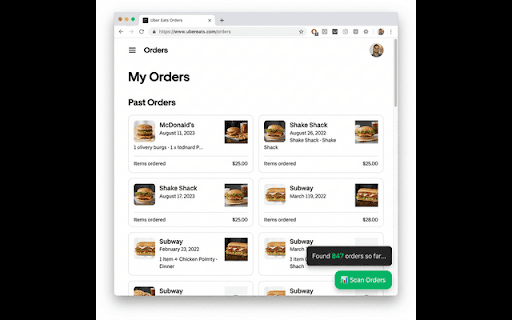
🔍 One-Click Scanning Just visit your Uber Eats orders page and click "Scan Orders." The extension automatically loads all your orders — even if you have thousands — and captures every detail.

📊 Beautiful Dashboard See your total spending, order count, average order value, and largest order at a glance. A monthly spending chart helps you spot trends over time.

📅 Date Range Filters Want to see how much you spent last month? Last year? Use the built-in date filters to zoom into any time period.

📥 Export to CSV Download your order data as a CSV file for use in Excel, Google Sheets, or any budgeting app.

🌍 Works in Every Country Supports all currencies worldwide — USD, EUR, GBP, JPY, INR, LKR, AUD, and 40+ more. No matter where you are, it just works.

🔒 100% Private All data stays on your device. Nothing is sent to any server. No account needed. No tracking.

How to use:

Install the extension

Go to ubereats.com/orders
Click the green "Scan Orders" button
Click the extension icon to view your dashboard

Perfect for budgeting, tracking food expenses, or just satisfying your curiosity. Take control of your spending today!
Technical
- Version
- 1.0.0
- Manifest
- V3
- Size
- 34.84KiB
- Min Chrome
- 88
- Languages
- 1
- Featured
- No
Metadata
- ID
- lbhccadadihmkiofdogjjeekdgigbiob
- Developer ID
- u08a0963037649ff7b848463f46935bef
- Developer Email
- [email protected]
- Created
- Mar 9, 2026
- Last Updated (Store)
- Mar 9, 2026
- Last Scraped
- Jun 6, 2026
- Website
- kaveeshainduwara.lk
- Support URL
- https://kaveeshainduwara.lk/#contact
- Privacy Policy
- https://uber-eats-tracker-privacy.netlify.app
Similar extensions
Alternatives to Uber Eats Spending Tracker, ranked by description similarity.

Uber Rides Spending Tracker
Track your Uber ride spending with auto-scan, monthly charts, filters, and CSV export.
27

Uber Eats Spending Analyzer
Analyze Uber Eats spending and export your order history.
29

Zomato Food Expense Calculator
Calculate your total lifetime spending on Zomato with a beautiful dashboard.
8

Food Stats
Calculate your total lifetime spending on Zomato with a beautiful dashboard.
112
★ 5.0

SwigZom Analyzer: Food Expense Tracker
Calculates your total lifetime spending on Swiggy and Zomato, displaying your order history in a beautiful analytical dashboard.
9

Wolt.com Spending Tracker
Track and calculate the total amount spent on your Wolt orders. Supports English and German.
114

Zepto Expense Calculator
Calculates total expenses and stats from Zepto order history.
59

Spending Calculator for Amazon
Easily track your total Amazon spending across Brazil, UK, US, and Spain with one smart browser extension.
19
Data sourced from the Chrome Web Store · last verified Jun 6, 2026.