
Record Voice Comments in Google Docs - Beep
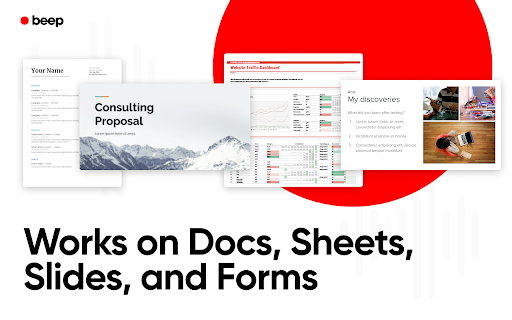
Record and listen to voice comments and audio feedback on Google Docs, Sheets, Slides, and Forms.
As of June 2026, Record Voice Comments in Google Docs - Beep has 10,000 users and a 4.91/5 rating from 461 reviews in the Productivity category.
Usersdown 50.0 percent−50.0%
10.0K
10,000
Ratingno change0%
4.91
461 reviews
Reviewsup 0.2 percent+0.2%
461
Version
2.18
Manifest V3
90-day change · In the last 90 days this extension lost 10.0K users, 9 version updates.
History
13 snapshotsTracking since Apr 5, 2026.
View as table
| Date | Users | Rating | Reviews | Version |
|---|---|---|---|---|
| Apr 5, 2026 | 20.0K | 4.91 | 460 | 2.05 |
| Apr 16, 2026 | 20.0K | 4.91 | 458 | 2.05 |
| Apr 20, 2026 | 20.0K | 4.91 | 458 | 2.06 |
| Apr 23, 2026 | 20.0K | 4.91 | 458 | 2.07 |
| Apr 26, 2026 | 20.0K | 4.91 | 458 | 2.08 |
| May 2, 2026 | 20.0K | 4.91 | 458 | 2.10 |
| May 8, 2026 | 20.0K | 4.91 | 458 | 2.11 |
| May 15, 2026 | 20.0K | 4.91 | 458 | 2.12 |
| May 23, 2026 | 20.0K | 4.91 | 458 | 2.14 |
| May 25, 2026 | 20.0K | 4.91 | 459 | 2.16 |
| Jun 8, 2026 | 20.0K | 4.91 | 460 | 2.18 |
| Jun 11, 2026 | 20.0K | 4.91 | 459 | 2.18 |
| Jun 15, 2026 | 20.0K | 4.91 | 460 | 2.18 |
| Now | 10.0K | 4.91 | 461 | 2.18 |
Changelog
- May 8, 2026short_description
The best way to record voice notes and audio feedback on Google Docs, Sheets, Slides, and Forms.
Record and listen to voice comments and audio feedback on Google Docs, Sheets, Slides, and Forms.
Permissions & access
- Permissions
- storageactiveTab
- Host access
- None declared
Screenshots


About
Beep for Google Docs is a voice commenting and feedback tool for Google Docs. You can comment on Google Docs, Google Slides, Google Sheets, and Google Forms with your voice.

You never have to leave Google Docs to record or listen to voice notes as everything is integrated into Docs.

Why audio comments?

Giving feedback can be challenging. You have to capture all your thoughts but also convey them in a tone that's constructive and positive.  This is a lot harder to do if you're just trying to type comments. With voice, you can more quickly convey what you want to get across and make sure the tone is positive and clear.

How it works?
1. Install the extension above.
2. Visit Google Docs, Google Sheets, Google Slides, or Google Forms.
3. Add a comment and click "voice comment" to record.

That’s all it takes. A link will be inserted into the comment and that link will be auto-magically converted into an embedded player for anyone who has the extension installed.  So you can listen to all the comments without leaving Google docs!

*New Feature* Automatically expire voice comments to auto-delete after a certain length of time.

Who’s it for?

Collaborative Teams
Great teams know the value of feedback. With Beep you can leave comments with a positive, constructive tone and make your team feel more connected.

Editors
Reading manuscripts or article drafts can be exhausting. With voice memos, you can convey more, faster.

Professors
Grading papers and providing feedback can take a serious amount of time. Beep saves you time by allowing you to voice your feedback and allows you to have a more personal connection with your students.


***Disclaimer***
This app is not affiliated with or officially endorsed by Google or Google Docs, Slides, Sheets, or Forms in any way
Technical
- Version
- 2.18
- Manifest
- V3
- Size
- 3.0MiB
- Min Chrome
- 88
- Languages
- 4
- Featured
- Yes
Metadata
- ID
- lbfofpndjldbnhnhibhmggblcbpoomon
- Developer ID
- uc7c8ac3d766bd5e10bcb38c13de6bc08
- Developer Email
- [email protected]
- Created
- May 13, 2021
- Last Updated (Store)
- May 24, 2026
- Last Scraped
- Jun 15, 2026
- Website
- beepaudio.com
- Support URL
- https://www.beepaudio.com
- Privacy Policy
- https://www.beepaudio.com/privacy
Similar extensions
Alternatives to Record Voice Comments in Google Docs - Beep, ranked by description similarity.

VoiceNoty
Google doc voice comments
8

Text to Speech Google Docs
Try Text to Speech Google Docs: Convert text to voice Google in seconds. Efficient TTS Google extension for all your document needs
30.0K
★ 3.1

VoicePad
A Chrome extension for voicepad
18

Dictaphone
Audio capture software Dictaphone directly in your browser online. Try this sound recorder app for effective voice notes and memos.
88

Speech to Text
Convert speech to text instantly with this voice dictation extension. Transcribe audio,voice memos files to text with high accuracy
1.0K
★ 4.2
Voice Recorder
Embrace Voice recorder, your perfect Audio recorder companion to capture a voice memo or conduct a mic test.
30.0K
★ 4.8

Talk to Text
Smart Talk to Text – Accurate speech to text with voice typing via microphone dictation, focused on your field in your browser.
754
★ 4.0

VoiceNote Meeting Recorder
Record and transcribe meetings from Google Meet, Teams, and other platforms with speaker identification
5
Data sourced from the Chrome Web Store · last verified Jun 15, 2026.