
PageSplitty - PDF Tool Assistant
Quickly upload PDF files to PageSplitty website, supporting split, crop, beautify and other functions
As of June 2026, PageSplitty - PDF Tool Assistant has 20 users and a 5.00/5 rating from 1 reviews in the Education category.
Usersup 42.9 percent+42.9%
20
20
Ratingno change0%
5.00
1 reviews
Reviewsno change0%
1
Version
1.0.1
Manifest V3
History
6 snapshotsTracking since Apr 1, 2026.
View as table
| Date | Users | Rating | Reviews | Version |
|---|---|---|---|---|
| Apr 1, 2026 | 14 | 5.00 | 1 | 1.0.1 |
| Apr 19, 2026 | 15 | 5.00 | 1 | 1.0.1 |
| Apr 29, 2026 | 16 | 5.00 | 1 | 1.0.1 |
| May 8, 2026 | 19 | 5.00 | 1 | 1.0.1 |
| May 21, 2026 | 591 | 5.00 | 1 | 1.0.1 |
| Jun 4, 2026 | — | 5.00 | 1 | 1.0.1 |
| Now | 20 | 5.00 | 1 | 1.0.1 |
Permissions & access
- Permissions
- activeTabscriptingnotificationsstorage
- Host access
- https://pagesplitty.pixzens.com/*
Screenshots
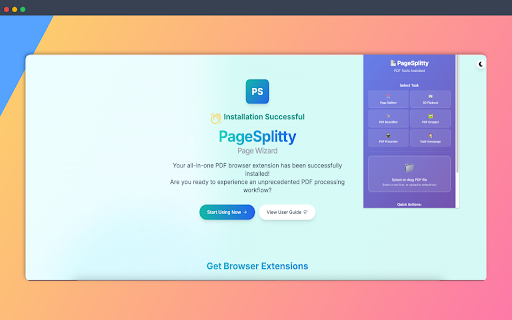


About
PageSplitty - PDF All-in-One Tools Assistant

Five powerful functions in one, local processing for privacy protection, making PDF handling simple and efficient!

🎯 Say Goodbye to Complicated PDF Processing

PageSplitty is a powerful browser extension that provides an all-in-one PDF processing solution. Whether you're dealing with study materials, work documents, or presentations, this tool makes your PDF workflow unprecedentedly simple and efficient. All processing is done locally in your browser, protecting your file privacy and security.

✨ Five Core Functions to Meet All PDF Processing Needs


- 📄 PDF High-Definition Page Export - Convert PDFs to high-quality images, supporting multiple formats like PNG, JPEG, WebP, with customizable resolution and quality

- 📖 3D Flipbook PDF Reader - Experience realistic page-turning effects, with keyboard navigation, thumbnail previews, and fullscreen reading mode

- ✨ PDF Beautifier - Add elegant templates, watermarks, and headers/footers to make your documents more professional and attractive

- 🖼️ PDF Cropping Master - Precisely crop and adjust PDF pages, remove excess margins, and optimize document layout

- 📺 PDF Presentation Tool - Present PDF files like PowerPoint, with speaker notes and laser pointer functionality

🚀 Three Convenient Ways to Use

Extension Popup Upload - Click the toolbar icon, select a tool, and upload your PDF file
Web PDF Link Enhancement - When browsing websites, a "PageSplitty" button automatically appears next to PDF links for one-click processing

Right-Click Menu Quick Access - Right-click on PDF links and select "Process with PageSplitty"

🔒 Privacy and Security First

We take your privacy seriously. All document processing in PageSplitty happens locally in your browser, with no need to upload files to any server. Your files never leave your device unless you actively share them.

We will never:

❌ Collect any personal information
❌ Upload documents to external servers
❌ Track your browsing behavior

We promise:

✅ 100% local processing
✅ Request minimal necessary permissions
✅ Complete functional transparency
✅ Full respect for user privacy

👥 Suitable for a Wide Range of Users

Students and Teachers - Process study materials, create handouts, prepare course materials
Office Workers - Organize work documents, create reports, prepare meeting materials

Designers - Process design files, create portfolios, showcase projects

Researchers - Organize research materials, extract key pages, create academic documents
Presenters - Prepare presentations, create professional slides

🌍 Multilingual Support

Chinese and English bilingual interface
Automatically switches based on browser language
Manually select language in settings

🛠️ Personalization Options

Customize default tools
Choose preferred website version
Set language preferences

🚀 Quick Start

After installation, click the PageSplitty icon in your browser toolbar
Select the PDF tool you want to use
Upload a PDF file or directly process PDF links on webpages
Enjoy an efficient, professional PDF processing experience

📞 Official Support

🌐 Official Website: https://pagesplitty.pixzens.com
✉️ Technical Support: [email protected]

Install PageSplitty now and experience the all-in-one PDF processing solution!
Technical
- Version
- 1.0.1
- Manifest
- V3
- Size
- 62.98KiB
- Min Chrome
- 88
- Languages
- 20
- Featured
- No
Metadata
- ID
- lbemamhbmcpahbejkamcfldocdohfpae
- Developer ID
- u1fd6382c9c32994758f8901f8bf1a3ff
- Developer Email
- [email protected]
- Created
- Jun 30, 2025
- Last Updated (Store)
- Nov 9, 2025
- Last Scraped
- Jun 4, 2026
- Website
- pixzens.com
- Support URL
- https://pagesplitty.pixzens.com/guide
- Privacy Policy
- https://pagesplitty.pixzens.com/privacy
Similar extensions
Alternatives to PageSplitty - PDF Tool Assistant, ranked by description similarity.

Simple Page Saver
Save the current page with one click and open it later from the extension.
29
★ 5.0

SelectSavePDF
Convert selected text to PDF while preserving style.
11

AI Chat PDF Exporter - Save ChatGPT & Claude As PDF
Export AI conversations from ChatGPT, Claude & Perplexity as high-quality PDFs. Save code blocks, formatting & tables intact.
—

PDF Reference Helper
Extract references from academic PDFs and quickly access them on Google Scholar with one click.
23

DeepSeek to PDF
Export DeepSeek conversations to PDF with questions and answers.
573
★ 3.4

AI PDF Summarizer
This AI PDF Summarizer is an efficient PDF AI tool that quickly extracts main ideas and offers chatPDF for effortless interaction.
728
★ 5.0

SlideMaker App - AI Presentation Generator
Transform any webpage into beautiful AI-powered presentations (Login required)
217

Webpage to PDF (Fast, Selectable)
One-click, fast, lightweight PDF export that preserves selectable text and images and avoids awkward page breaks.
41
Data sourced from the Chrome Web Store · last verified Jun 4, 2026.