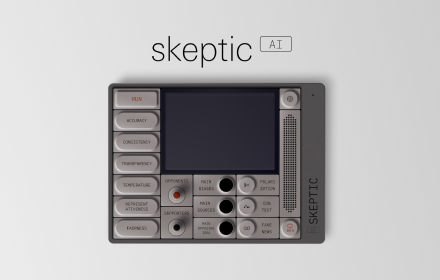
Skeptic AI - ChatGPT Bias Analysis
Evaluate biases, quality and reliability of your last ChatGPT answer.
As of June 2026, Skeptic AI - ChatGPT Bias Analysis has 71 users and a 5.00/5 rating from 7 reviews in the Education category.
Usersup 7.6 percent+7.6%
71
71
Ratingno change0%
5.00
7 reviews
Reviewsno change0%
7
Version
0.0.1.2
Manifest V3
History
2 snapshotsTracking since Apr 1, 2026.
View as table
| Date | Users | Rating | Reviews | Version |
|---|---|---|---|---|
| Apr 1, 2026 | 66 | 5.00 | 7 | 0.0.1.2 |
| May 3, 2026 | 64 | 5.00 | 7 | 0.0.1.2 |
| Now | 71 | 5.00 | 7 | 0.0.1.2 |
Permissions & access
- Permissions
- scriptingactiveTab
- Host access
- None declared
Screenshots


About
Use Skeptic AI to enhance your understanding and critical thinking in an AI-driven World.

Skeptic AI is driven by two primary objectives that shape its purpose:

1. Unveiling AI’s Quality and Reliability:

Skeptic AI enables users to comprehend the quality and reliability of chat responses generated by Chat GPT. It serves as a powerful tool that enables individuals to assess the accuracy, validity, and credibility of AI-generated information, fostering a more discerning approach.

2. Conscientizing about AI Biases:

While AI proves immensely useful, it is not immune to the biases and pitfalls that afflict human beings. It too can perpetuate misinformation, contribute to echo chambers, lack of transparency, and fall short in representing diverse perspectives.

By recognizing the inherent biases within AI systems and highlighting the risks of unquestioning acceptance, Skeptic AI encourages individuals to explore diverse perspectives. It promotes critical thinking and encourages the consideration of alternative viewpoints, cultivating a more inclusive and well-rounded understanding.

Instructions:

1. Open Chat GPT at 'chat.openai.com'.
2. Engage in a conversation on a complex/polarized subject.
3. Activate Skeptic AI by clicking the extension icon at the top right corner of the browser.
4. Play the Run button.
5. Use the buttons to analyze Chat GPT's response. Explore Accuracy, Consistency, Transparency, Representativeness, Main Sources, Main Biases, Fake news, and more.

Full credit of design inspiration from Teenage Engineering OP-1.
Technical
- Version
- 0.0.1.2
- Manifest
- V3
- Size
- 1.75MiB
- Min Chrome
- 88
- Languages
- 1
- Featured
- No
Metadata
- ID
- lannhkepnlandidnenkhjbpbenjoefic
- Developer ID
- uf685efe7ad5109c9e369582644681f4f
- Developer Email
- [email protected]
- Created
- May 22, 2023
- Last Updated (Store)
- Jan 24, 2024
- Last Scraped
- Jun 2, 2026
- Website
- —
- Support URL
- https://forms.gle/kNSFBpaEmPAfPxk78
- Privacy Policy
- https://gonzalominuto.wixsite.com/skeptic-ai-privacy-p
Similar extensions
Alternatives to Skeptic AI - ChatGPT Bias Analysis, ranked by description similarity.
ChatGPT PromptCounter
Counts user prompts to ChatGPT
19

BrainBooster: Cognition Courage Catalyst
Powers up the BrainBooster (metacognitive scaffolding) prompt into your AI chat.
17

AI Trust Analysis
Analyse the trustworthiness of your conversations with AI chatbots.
12

Chat GPT Detector
Chat GPT Detector - smart AI detector extension that checks if text was written by AI. Instantly know: was this written by AI?
31

Reasonly
Your logic-enhancing assistant that detects logical fallacies and biased language on web pages.
6
★ 5.0

QuestionAI Homework Powered AI Assistant
AI Copilot can answer screenshot queries and assist with writing, summarizing, translating, and grammar checking.
100.0K
★ 4.8

Promptimize
Learn to write better AI prompts with real-time analysis and specific, actionable feedback
10

Beyond Copy-Paste: AI-Resilient Teaching Toolkit
Transform lessons and generate worksheets, rubrics, discussions, and units where student judgment is the unfakeable input.
93
★ 5.0
Data sourced from the Chrome Web Store · last verified Jun 2, 2026.