
Link Saver
A minimal link saver to quickly bookmark and manage your web pages.
As of June 2026, Link Saver has 1 users in the Productivity category.
Usersno change0%
1
1
Ratingno change0%
—
— reviews
Reviewsno change0%
—
Version
1.0.0
Manifest V3
History
2 snapshotsTracking since May 1, 2026.
Not enough history yet for this metric — the chart fills in as we collect more snapshots.
View as table
| Date | Users | Rating | Reviews | Version |
|---|---|---|---|---|
| May 1, 2026 | — | — | — | 1.0.0 |
| May 24, 2026 | — | — | — | 1.0.0 |
| Now | 1 | — | — | 1.0.0 |
Permissions & access
- Permissions
- storageactiveTab
- Host access
- None declared
Screenshots


About
Save any page in one click. No account, no cloud, no clutter.

  Link Saver is a lightweight bookmark manager that lives in your browser toolbar. When you find a page worth keeping,
  click the extension and hit Bookmark — the title and URL are saved instantly. That's it.

  Why install it instead of using built-in bookmarks?

  Chrome's bookmark system gets messy fast. Link Saver gives you a focused, distraction-free list of only the links you
  deliberately saved — separate from your bookmark bar chaos. You can search by title or URL in real time, delete with a
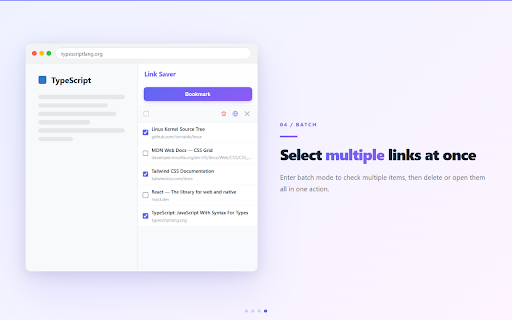
   confirmation prompt so you never lose something by accident, and select multiple links at once to bulk-delete or open
   them all in one go.

  Everything stays on your device. No sign-up, no sync to external servers, no permissions beyond reading the current
  tab. Your links are stored locally using Chrome's built-in storage — private by default.

  Key features:
  - One-click save of the current tab's title and URL
  - Instant search across all saved links
  - Click any title to open it in a new tab
  - Safe delete with ✔ / ✘ confirmation
  - Batch select to delete or open multiple links at once
  - Works in 8 languages: English, Chinese, Japanese, Korean, German, French, Spanish, Russian

  Minimal, fast, and entirely offline. Install it once and it stays out of your way until you need it.
Technical
- Version
- 1.0.0
- Manifest
- V3
- Size
- 16.68KiB
- Min Chrome
- 88
- Languages
- 1
- Featured
- No
Metadata
- ID
- laibjjknekjhfbbjliajphfmkehhmoep
- Developer ID
- u7b0c8ece644cc06913bc3b530466ea99
- Developer Email
- [email protected]
- Created
- Apr 30, 2026
- Last Updated (Store)
- Apr 30, 2026
- Last Scraped
- Jun 6, 2026
- Website
- —
- Support URL
- —
- Privacy Policy
- —
Data sourced from the Chrome Web Store · last verified Jun 6, 2026.