
LogoFetch by Treatzone
Detect and download high-quality logos (SVG, PNG, WebP, GIF) from any website.
As of June 2026, LogoFetch by Treatzone has 20 users and a 5.00/5 rating from 2 reviews in the art category.
Usersup 66.7 percent+66.7%
20
20
Ratingno change0%
5.00
2 reviews
Reviewsno change0%
2
Version
1.0.0
Manifest V3
History
7 snapshotsTracking since Apr 1, 2026.
View as table
| Date | Users | Rating | Reviews | Version |
|---|---|---|---|---|
| Apr 1, 2026 | 12 | 5.00 | 2 | 1.0.0 |
| Apr 16, 2026 | 13 | 5.00 | 2 | 1.0.0 |
| Apr 24, 2026 | 15 | 5.00 | 2 | 1.0.0 |
| May 1, 2026 | 16 | 5.00 | 2 | 1.0.0 |
| May 7, 2026 | 18 | 5.00 | 2 | 1.0.0 |
| May 12, 2026 | 17 | 5.00 | 2 | 1.0.0 |
| May 31, 2026 | 19 | 5.00 | 2 | 1.0.0 |
| Now | 20 | 5.00 | 2 | 1.0.0 |
Permissions & access
- Permissions
- activeTabscriptingdownloadsclipboardWrite
- Host access
- <all_urls>
Screenshots



About
LogoFetch — Logo & Asset Detector for Designers

😤 Finding logos on websites can be a real pain. Hunting through DevTools, screenshotting blurry PNGs, digging through minified source just to grab a simple SVG — there has to be a better way...

THERE IS! 👇

🔍 HOW IT WORKS
Pin LogoFetch to your toolbar, then click it on any site. The panel instantly scans the page and surfaces every logo it finds: inline SVGs, linked image files, favicons, OpenGraph images, and CSS backgrounds. Preview everything in a clean grid, filter by file type, then download exactly what you need — packaged as a ZIP.

🎨 BUILT FOR DESIGNERS

- ✅ SVG-first — vector assets sorted to the top automatically
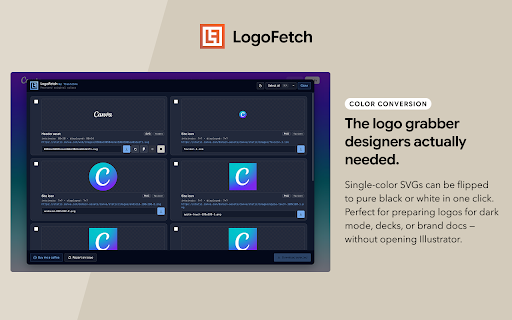
- 🎨 Convert any solid-color SVG to white or black in one click
- 📋 Copy SVG code directly to your clipboard
- 🖼 Copy straight to Figma — paste-ready in one click
- ✏️ Rename files before downloading
- 📦 Filter by file type and bulk download as a ZIP
- ⌨️ Keyboard shortcuts: ⌘A to select all, Esc to close

🧠 SMART DETECTION
LogoFetch goes beyond favicons. It scans headers, navigation, meta tags, inline SVGs, lazy-loaded images, and CSS backgrounds to find assets other tools miss. Hit "Dig deeper" to run a second pass and surface anything the first scan skipped.

⚫⚪ COLOR CONVERSION
Automatically detects whether an SVG is dark, light, or multi-color. Single-color SVGs can be converted to pure black or white — perfect for preparing logos for dark backgrounds, presentations, or brand guidelines.

🔒 PRIVACY
No accounts. No tracking. No data leaves your browser. Everything runs locally.

FREE FOREVER. Built by Treatzone.🤘
Technical
- Version
- 1.0.0
- Manifest
- V3
- Size
- 2.38MiB
- Min Chrome
- 88
- Languages
- 1
- Featured
- No
Metadata
- ID
- lagggghbllgieacecpggllckidbjdmep
- Developer ID
- u67ee3609c1bae6e56f24fbd241620bbc
- Developer Email
- [email protected]
- Created
- Mar 13, 2026
- Last Updated (Store)
- Mar 13, 2026
- Last Scraped
- Jun 6, 2026
- Website
- —
- Privacy Policy
- https://www.matthewdavis.design/logofetch-privacy
Similar extensions
Alternatives to LogoFetch by Treatzone, ranked by description similarity.

Image Download
Quickly download images (including embedded SVGs) from any web page to boost your creative workflow.
192
★ 5.0

Pixel Perfect by Workflow.design
Make sure your websites are pixel perfect with your designs
131
★ 5.0

Design Analyzer - Extract Design Elements
Extract colors, fonts, spacing, shadows & effects from any website. Export to CSS, JSON, Figma, Sketch. One-click design analysis.
220

Designer Library
Your quick hub for free designer resources: Fonts, Images, Mockups, Colors, Inspiration & more!
119

Color Inspector & Picker
Inspect colors of any element and change them with a color picker
17
★ 5.0

DesignTap - Design Inspector & Color Tools
Design toolkit: pick colors, detect fonts, generate palettes, inspect designs, export to 18+ formats. For designers & developers.
37

Inspired Design
Get to know colors and fonts from inspiring websites.
68
★ 5.0

Site Palette 2.0
Extract beautiful color palettes from any website with advanced tools for designers and developers.
14
Data sourced from the Chrome Web Store · last verified Jun 6, 2026.