
Vim Compose
Compose mail and other text on the web as markdown in vim.
As of June 2026, Vim Compose has 24 users in the Developer Tools category.
Usersup 26.3 percent+26.3%
24
24
Ratingno change0%
—
— reviews
Reviewsno change0%
—
Version
0.0.3
Manifest V3
History
2 snapshotsTracking since Apr 1, 2026.
View as table
| Date | Users | Rating | Reviews | Version |
|---|---|---|---|---|
| Apr 1, 2026 | 19 | — | — | 0.0.3 |
| May 3, 2026 | 21 | — | — | 0.0.3 |
| Now | 24 | — | — | 0.0.3 |
Permissions & access
- Permissions
- nativeMessagingactiveTabscripting
- Host access
- None declared
Screenshots
About
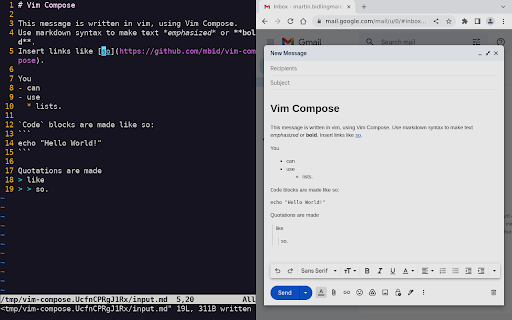
Vim Compose allows you to use the vim text editor within your browser to compose and edit text in input fields. To open the vim, simply focus on an input field and either press Ctrl-Shift-E or click the Vim Compose extension button in the toolbar. Any text you save in vim will be automatically copied back to the input field in your browser. If the input field supports formatted text, you can also use markdown for formatting.

Please note that Vim Compose is currently only compatible with Linux systems and requires the installation of a native app. You can find installation instructions for the native app at the following link: https://github.com/mbid/vim-compose
Technical
- Version
- 0.0.3
- Manifest
- V3
- Size
- 45.36KiB
- Min Chrome
- 88
- Languages
- 1
- Featured
- No
Metadata
- ID
- lafooengjljmipillledmadfcpannkbc
- Developer ID
- udeef487d3519e8279e2ddf7ed2c77dca
- Developer Email
- [email protected]
- Created
- Dec 15, 2022
- Last Updated (Store)
- Dec 27, 2022
- Last Scraped
- Jun 2, 2026
- Website
- —
- Support URL
- https://github.com/mbid/vim-compose
- Privacy Policy
- —
Similar extensions
Alternatives to Vim Compose, ranked by description similarity.

Input Vim
Vim motions for every text input in the browser
36
★ 5.0

Vimput
Edit any text input with a Vim-powered editor. Right-click on any input field to open the Vimput editor.
2

Vim on rollApp
Popular text editor for software developers. Integrated with cloud storage, available on any device and platform.
185
★ 3.5

Vim What?
Visual Vim reference: color-coded keyboard, prefix overlays, progressive lessons, plugin tips, and progress tracking.
1.0K
★ 4.9

VimNav
Professional vim-style browser navigation with advanced tab management, visual selection, and developer-focused workflow tools
41

Vim for Google Docs™
Vim for Google Docs: Supercharge Your Typing With Vim
1.0K
★ 3.8

VimBrowser
Vim motions for quick navigation in the browser
—
Edit with Notepad++
Edit content of text area elements, or inner and outer HTML of node elements in Notepad++ text editor with real-time updates
20.0K
★ 3.5
Data sourced from the Chrome Web Store · last verified Jun 2, 2026.