
YouTube Live Translator
Live-translates YouTube tab audio and plays the translated voice in real time.
As of June 2026, YouTube Live Translator has 1 users in the Accessibility category.
Usersno change0%
1
1
Ratingno change0%
—
— reviews
Reviewsno change0%
—
Version
1.1.0
Manifest V3
History
1 snapshotsTracking since Jun 24, 2026.
View as table
| Date | Users | Rating | Reviews | Version |
|---|---|---|---|---|
| Jun 24, 2026 | 1 | — | — | 1.1.0 |
| Now | 1 | — | — | 1.1.0 |
Permissions & access
- Permissions
- activeTaboffscreenstoragetabCapture
- Host access
- https://generativelanguage.googleapis.com/*
Screenshots
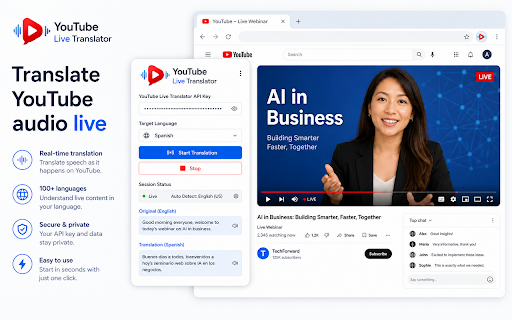


About
Live Translator for YouTube™ translates spoken audio from YouTube videos into your selected language in real time and plays the translated voice directly in your browser.

Watch educational videos, tutorials, interviews, news reports, documentaries, presentations, and other spoken content in languages you may not understand. The extension captures the audio from the active YouTube tab, processes the speech through an AI-powered live translation service, and plays the translated audio while the video continues.

WHY INSTALL LIVE TRANSLATOR FOR YOUTUBE™?

Many useful videos are available only in a foreign language. Subtitles may be unavailable, incomplete, delayed, or difficult to follow while watching the screen.

Live Translator for YouTube™ provides a more natural listening experience by translating spoken content and playing the result as audio. It is designed for language learners, students, researchers, professionals, travelers, and anyone who wants to understand international video content more easily.

KEY FEATURES

• Live audio translation
Captures spoken audio from the active YouTube tab and sends it for real-time translation.

• Translated voice playback
Plays the translated speech directly through your browser without requiring you to download the video.

• Multiple target languages
Choose from supported languages including English, Turkish, German, French, Spanish, Italian, Portuguese, Russian, Arabic, Persian, Japanese, Korean, Chinese, Hindi, Dutch, Polish, Ukrainian, Azerbaijani, Uzbek, and more.

• Detected speech transcript
View the speech detected from the original video inside the extension interface.

• Translation transcript
View the translated text while listening to the translated voice.

• Separate audio controls
Adjust the original YouTube video volume and translated voice volume independently.

• Simple start and stop controls
Open a YouTube video, choose a target language, and start the translation from the extension popup.

• Local settings storage
Your selected language, volume preferences, and API key are stored locally in Chrome storage on your device.

• Modern and easy-to-use interface
A clean corporate interface provides access to language selection, audio controls, transcripts, connection status, and translation controls.

HOW TO USE

1. Install the extension.
2. Open a YouTube video containing spoken audio.
3. Start playing the video.
4. Click the extension icon in the Chrome toolbar.
5. Enter your supported AI service API key.
6. Select the language you want to hear.
7. Adjust the original and translated audio levels.
8. Click “Start Translation.”
9. Click “Stop” when you have finished.

API KEY REQUIREMENT

This extension requires a user-provided Google Gemini API key to connect to the live translation service.

The API key is entered by the user and stored locally in Chrome storage. It is not included in the extension package and is not sent to the extension developer.

Users are responsible for their own API account, availability, quotas, usage limits, and any charges associated with the external API service.

PRIVACY

The extension processes audio only after the user manually starts a translation session.

While translation is active, audio from the selected YouTube tab is transmitted directly to the external AI translation service for processing.

The extension developer does not operate an intermediate audio-processing server and does not receive the user’s API key, audio stream, or translation transcripts.

The extension does not create a permanent local history of translated conversations. Current transcripts are displayed temporarily in the extension interface during the active session.

Translation processing is subject to the privacy policy and terms of the external AI service selected by the user.

PERMISSIONS EXPLAINED

Active tab permission
Used to identify the YouTube tab selected by the user when translation is started.

Tab capture permission
Used to capture audio from the active YouTube video tab.

Offscreen permission
Used to process and play audio in a hidden extension document because these audio features are not available directly in the Manifest V3 service worker.

Storage permission
Used to save the API key, selected target language, and volume preferences locally on the user’s device.

Host permission
Used only to establish the live translation connection with the supported AI service.

IMPORTANT INFORMATION

• The YouTube video must be playing and producing audio.
• Translation quality depends on speech clarity, background noise, speaker pronunciation, internet connection, and the external AI service.
• The first translated audio may begin after a short delay.
• Music, sound effects, and background audio may not be translated or reproduced.
• Results generated by artificial intelligence may occasionally contain mistakes.
• The extension does not download, copy, modify, or redistribute YouTube videos.
• Availability may depend on the user’s API access, quota, supported region, and service status.
• Chrome 116 or a newer version is recommended.

USE CASES

• Understand foreign-language educational videos.
• Follow international tutorials and technical presentations.
• Listen to interviews and documentaries in another language.
• Support language-learning and listening practice.
• Access international news and informational content.
• Reduce the need to constantly read subtitles.
• Compare original speech with translated text.
• Control the balance between the original speaker and translated voice.

Live Translator for YouTube™ helps make international video content easier to understand through real-time speech translation, voice playback, transcripts, and flexible audio controls.

This extension is an independent product and is not affiliated with, endorsed by, sponsored by, or officially connected with YouTube or Google LLC.

YouTube is a trademark of Google LLC. Use of this trademark is subject to Google Permissions.
Technical
- Version
- 1.1.0
- Manifest
- V3
- Size
- 208KiB
- Min Chrome
- 116
- Languages
- 1
- Featured
- No
Metadata
- ID
- laanhhnklgkkdfmbocpgaoeikekmldbl
- Developer ID
- u6007bb5d06249c75ca41b4bec6fba571
- Developer Email
- [email protected]
- Created
- Jun 23, 2026
- Last Updated (Store)
- Jun 23, 2026
- Last Scraped
- Jun 24, 2026
- Website
- —
- Support URL
- —
Data sourced from the Chrome Web Store · last verified Jun 24, 2026.