
Quick Look Inbox for Gmail
Get notifications and quick look your new Gmail messages.
As of May 2026, Quick Look Inbox for Gmail has 1,000 users and a 4.22/5 rating from 9 reviews in the Communication category.
Usersno change0%
1.0K
1,000
Ratingdown 8.9 percent−8.9%
4.22
9 reviews
Reviewsup 12.5 percent+12.5%
9
Version
0.0.23
Manifest V3
History
2 snapshotsTracking since Apr 27, 2026.
View as table
| Date | Users | Rating | Reviews | Version |
|---|---|---|---|---|
| Apr 27, 2026 | 1.0K | 4.63 | 8 | 0.0.23 |
| May 24, 2026 | 1.0K | 4.63 | 8 | 0.0.23 |
| Now | 1.0K | 4.22 | 9 | 0.0.23 |
Permissions & access
- Permissions
- identitystorageunlimitedStoragealarmsbackgroundttsidlenotifications
- Host access
- None declared
Screenshots

About
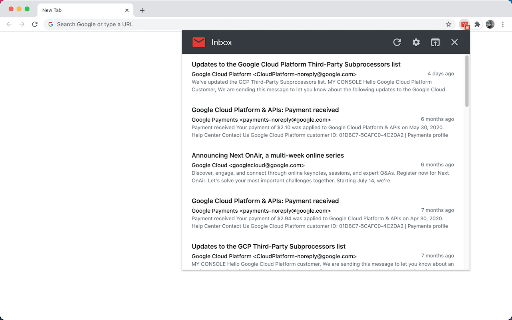
This is a high-performance and easy-to-use Gmail checking tool.

It can check the latest emails, send out notifications, view email content and perform some common operations. It also has rich settings to meet the subtle differences in needs between different users. In short, it is not a fully functional Gmail client, but it can help you quickly complete some routine email processing tasks.

This extension is implemented using the official Gmail API and only needs to be authorized through OAuth, no any website permission requirements.

Some Features:
• This extension only checks unread messages in the Gmail inbox, and you can set to check only or notify only specific categories of messages.
• The main list can display up to 1000 messages, and the loading speed is very fast.
• Supported operations include: mark as read, archive, delete, open Gmail, mark as spam, etc.
• Support system notification and voice notification.
• Support do not disturb function (no notification will be sent under certain conditions).
• The function page can be set to be displayed in the popup page or in a new tab page.
• Support archive and mark as read one-click completion.
• Support setting whether to display labels, snippets, etc.
• Support complete keyboard shortcuts (can be used without a mouse).

Notes:
1. Currently only Chrome browser is supported, and other Chromium-based browsers are not supported.
2. Multi-account simultaneous use is not supported at this time.

Privacy
This extension does not collect ANY information from you, and no tracking code. Your data is transferred only between your browser and the Google (Gmail) server, some data is cached in your browser locally, no data sent to any third party.
Technical
- Version
- 0.0.23
- Manifest
- V3
- Size
- 121KiB
- Min Chrome
- 88
- Languages
- 2
- Featured
- Yes
Metadata
- ID
- kpjfeffjdlhdafohanbfpjjbmgjpaohp
- Developer ID
- ub9d0093c83f93801cb34eac94c7e5701
- Developer Email
- [email protected]
- Created
- Dec 12, 2020
- Last Updated (Store)
- Aug 25, 2023
- Last Scraped
- May 24, 2026
- Website
- guokai.dev
- Support URL
- —
- Privacy Policy
- https://guokai.dev/privacy/
Similar extensions
Alternatives to Quick Look Inbox for Gmail, ranked by description similarity.

Ext. for Gmail
Ext. for Gmail
102
★ 4.2

Gmail Checker with Swipe
Gmail client with Swipe Mode for rapid triage. Includes real-time notifications, custom reading panes, and high-speed sync.
14

Gmail Analytics
Checks your Gmail for unread messages and displays a count.
15
★ 5.0

Gmail Badge Notifier
Modern and lightweight extension that displays the number of unread messages on Gmail, with customizable options and a modern design
17
Notifier for Gmail™
Multiple label and account notifier for Google Mail (Gmail™)
200.0K
★ 4.4

GMessenger - Gmail Messenger Sender Sidebar
Adds a messenger-like sidebar to Gmail that helps you filter emails by sender with just one click.
21

Gmail Labels and Search Queries as Tabs
Injects a user-configurable tabs bar into Gmail linked to labels.
184
★ 5.0

Bulk Unsubscribe for Gmail
Bulk unsubscribe automation for Gmail Manage subscriptions.
5
Data sourced from the Chrome Web Store · last verified May 24, 2026.