
JSON Formatter Tool
Format and beautify JSON text quickly from the browser popup.
As of June 2026, JSON Formatter Tool has 5 users in the Functionality & UI category.
Usersno change0%
5
5
Ratingno change0%
—
— reviews
Reviewsno change0%
—
Version
1.0
Manifest V3
History
6 snapshotsTracking since Apr 17, 2026.
View as table
| Date | Users | Rating | Reviews | Version |
|---|---|---|---|---|
| Apr 17, 2026 | — | — | — | 1.0 |
| May 1, 2026 | 2 | — | — | 1.0 |
| May 8, 2026 | 4 | — | — | 1.0 |
| May 13, 2026 | 6 | — | — | 1.0 |
| May 19, 2026 | 8 | — | — | 1.0 |
| May 25, 2026 | 7 | — | — | 1.0 |
| Now | 5 | — | — | 1.0 |
Permissions & access
- Permissions
- None declared
- Host access
- None declared
Screenshots
About
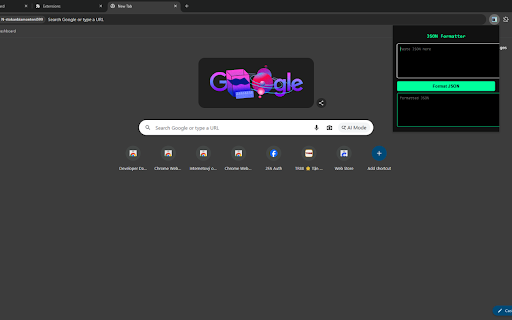
JSON Formatter Tool is a lightweight Chrome extension designed to help users quickly format and beautify JSON text directly from the browser toolbar. The extension provides a simple popup interface where users can paste raw JSON data and instantly convert it into a well structured and easy to read format.

JSON is widely used in modern web development, APIs, data exchange, and application debugging. However, JSON responses are often returned in a compact format that is difficult to read. This extension helps developers, students, and technical users quickly transform compressed JSON text into a properly formatted structure with clear indentation and spacing.

The extension is built with simplicity and efficiency in mind. Users only need to paste their JSON content into the input area and click the format button to see the formatted output immediately. The formatted JSON becomes easier to inspect, debug, and understand when working with APIs, configuration files, or data responses.

JSON Formatter Tool operates entirely within the browser popup and performs formatting locally without using external services. The extension does not request special permissions and does not collect, store, or transmit any user data. All processing happens inside the user's browser to ensure privacy and a fast experience.

This extension is useful for developers, testers, and anyone who frequently works with JSON data and needs a quick formatting tool directly accessible from Chrome.
Technical
- Version
- 1.0
- Manifest
- V3
- Size
- 26.82KiB
- Min Chrome
- 88
- Languages
- 1
- Featured
- No
Metadata
- ID
- kphfhcifkbcdmemibhhffmpobbdnpjio
- Developer ID
- u254320ff30b23074c12e50141f364a6a
- Developer Email
- [email protected]
- Created
- Mar 9, 2026
- Last Updated (Store)
- Mar 16, 2026
- Last Scraped
- Jun 7, 2026
- Website
- —
- Support URL
- https://phuongdongproperty.com/
- Privacy Policy
- —
Similar extensions
Alternatives to JSON Formatter Tool, ranked by description similarity.

Military JSON Formatter
Format (pretty-print) JSON locally with a rugged military-style interface. No permissions required.
1

JSON Formatter – Blueprint
Validate and format JSON instantly: prettify, minify, sort keys, and copy. No permissions required.
1

Neon JSON Tidy
Validate, pretty-print, and minify JSON instantly in your toolbar. Copy or download results in one click.
—

JSON Beautify
Pretty print JSON data easily.
—

JSON Helper — Pretty • Minify • Validate
Quick JSON tools: pretty print, minify, key sort, validate, copy & download. Works fully offline. No permissions.
5

Base64 Encoder Decoder
Quickly encode or decode Base64 text directly from your browser popup.
8

HTML to Clean Text
Convert HTML into clean, readable text inside a cool popup.
15

Text Cleaner & Formatter
Quickly clean and format text: trim spaces, remove blank lines, and change text case in a simple popup.
93
Data sourced from the Chrome Web Store · last verified Jun 7, 2026.